---
schema_version: "1"
id: 185e61372ed27f9c5d3b9733a0b2ff7b5d3ba39f0b15a900adb935a137431c3d
title: Control Chatter Access Through User Profiles
collection: admin
version: current
locale: en-us
portal_url: https://docs.salesforce.com/admin/current/en-us/experience/264-0-0/collab_pbr_profiles.md
canonical_url: https://help.salesforce.com/s/articleView?id=experience.collab_pbr_profiles.htm&release=264.0.0&type=5
source_site: help.salesforce.com
content_type: documentation
content_hash: 7b839097fac7b2cab109542bc68c25aeee4a72d8e79073dfecb7ce739e74e9ec
description: Modify existing custom user profiles to allow or deny access to Chatter.
products:
- Experiences
release: "264"
---
# Control Chatter Access Through User Profiles
Modify existing custom user profiles to allow or deny access to Chatter.
### Required Editions
Available in: both Salesforce Classic and Lightning Experience
Available in: Enterprise, Performance, and Unlimited Editions
User Permissions
Needed
To enable Chatter:
Customize Application
When Salesforce turns on Chatter profile-based rollout for your organization, it adds the Enable Chatter permission to your existing user profiles and permissions sets. Enable Chatter is automatically enabled for all standard profiles. It’s also automatically enabled for custom profiles when any of these user-level permissions are enabled manually or as part of a license:
- Create and Own New Chatter Groups (ChatterOwnGroups)—Users with this permission can create groups in Chatter.
- Create and Share Content Deliveries for Chatter Files (ChatterFileLink)—Users with this permission can use files with Chatter, like uploading, attaching, and sharing.
- Invite Customers To Chatter (ChatterInviteExternalUsers)—Users with this permission can invite users who don’t have a Salesforce license to Chatter.
- Manage Chatter Messages and Direct Messages (ManageChatterMessages)—Users with this permission have management access to Chatter Messages and Direct Messages (Experience Builder sites).
- Moderate Chatter (ModerateChatter)—Users with this permission can moderate Chatter feeds.
- Moderate Chatter Feeds (ModerateNetworkFeeds)—Users with this permission can moderate feeds in sites.
- Use Case Feed (ViewCaseInteraction)—Users with this permission can access Case feeds.
- View All Data (ViewAllData)—Users with this permission can view all data, regardless of their membership status in a feed or ownership of a record.
Modify your existing custom profiles with the desired permissions to manage access to Chatter, and create custom profiles, if necessary.
1. Log in as a Salesforce administrator.
2. From Setup, enter Profiles in the Quick Find box, then select **Profiles**.
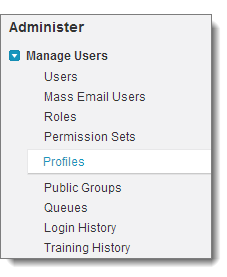
3. For each custom user profile:
1. Click **Edit**.
2. In the Administrative Permissions section, select or deselect **Enable Chatter**, depending on whether you want users with this profile to have Chatter access.
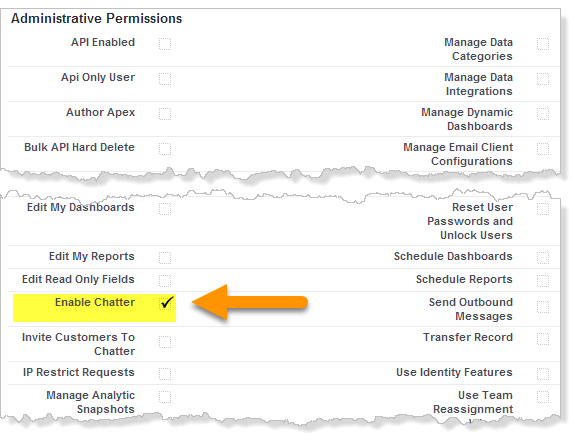

Important The Enable Chatter permission is available only if Chatter profile-based rollout is enabled for your organization. Salesforce enables profile-based rollout at your request. After profile-based rollout is enabled, selecting the Enable Chatter permission on a profile doesn't automatically enable Chatter for people with that profile. People can't use Chatter until you [turn on Chatter](https://help.salesforce.com/s/articleView?id=experience.collab_enable.htm&release=264.0.0&type=5 "Configure various Chatter features and customize the Chatter experience for your users on the Chatter Settings page in Setup.") for your organization.
3. Save your changes.
4. If applicable, create custom user profiles with the desired permissions and assign them to users.
#### See Also
- [Get Ready for Profile-Based Rollout of Chatter](https://help.salesforce.com/s/articleView?id=experience.collab_pbr_prepare.htm&release=264.0.0&type=5 "If you’re rolling out Chatter to a subset of your users, you can manage Chatter access with custom user profiles and permission sets. There’s a little up-front work that you can do to prepare.")
- [Control Chatter Access Through Permission Sets](https://help.salesforce.com/s/articleView?id=experience.collab_pbr_perm_sets.htm&release=264.0.0&type=5 "Manage Chatter access by modifying existing permission sets or setting up new ones.")
- [Chatter Settings](https://help.salesforce.com/s/articleView?id=experience.collab_enable.htm&release=264.0.0&type=5 "Configure various Chatter features and customize the Chatter experience for your users on the Chatter Settings page in Setup.")
- [Profile-Based Rollout Considerations](https://help.salesforce.com/s/articleView?id=experience.collab_pbr_limitations.htm&release=264.0.0&type=5 "In organizations that use Chatter profile-based rollout, limitations apply. There are limits with user profiles, permissions sets, and the interaction between users with and without Chatter access.")