---
schema_version: "1"
id: 51c12ea2ca2964117b9cc250468d5d0f66b94280cb5899374ba4b4f3fd7323be
title: Control Chatter Access Through Permission Sets
collection: admin
version: current
locale: en-us
portal_url: https://docs.salesforce.com/admin/current/en-us/experience/264-0-0/collab_pbr_perm_sets.md
canonical_url: https://help.salesforce.com/s/articleView?id=experience.collab_pbr_perm_sets.htm&release=264.0.0&type=5
source_site: help.salesforce.com
content_type: documentation
content_hash: 864a300c623871a16bc290012147b47ab979baacc34a9bdbc07e35556b48574a
description: Manage Chatter access by modifying existing permission sets or setting up new ones.
products:
- Experiences
release: "264"
---
# Control Chatter Access Through Permission Sets
Manage Chatter access by modifying existing permission sets or setting up new ones.
### Required Editions
Available in: both Salesforce Classic and Lightning Experience
Available in: Enterprise, Performance, and Unlimited Editions
User Permissions Needed
To enable Chatter:
Customize Application
When you enable or disable Chatter through permission sets, consider that:
- When you enable Chatter in a permission set, the permission set takes precedence over user profile settings. All users with a Chatter-enabled permission set have access to Chatter, even if Chatter isn't enabled in their user profile.
- When you disable Chatter in a permission set, the permission set doesn't take precedence over user profile settings. All users with a Chatter-enabled user profile have access to Chatter, even if Chatter is disabled in their permission set. To prevent that person from accessing Chatter, disable Chatter in both the person's user profile and permission set.
- When Chatter profile-based rollout is enabled for an org, Chatter is automatically enabled when some user-level permissions are already enabled. And some Chatter settings are disabled. For more information, see [Profile-Based Rollout Considerations](https://help.salesforce.com/s/articleView?id=experience.collab_pbr_limitations.htm&release=264.0.0&type=5 "In organizations that use Chatter profile-based rollout, limitations apply. There are limits with user profiles, permissions sets, and the interaction between users with and without Chatter access.").
Verify that existing permission sets include the correct and required Chatter permissions for the desired subset of users.
1. In Setup, navigate to Permission Sets.
2. For each existing user-level permission set:
1. In the System section, click **System Permissions**.
2. Click **Edit**, and select **Enable Chatter**. The Enable Chatter permission is available in a permission set only after Chatter profile-based rollout is enabled for your org.
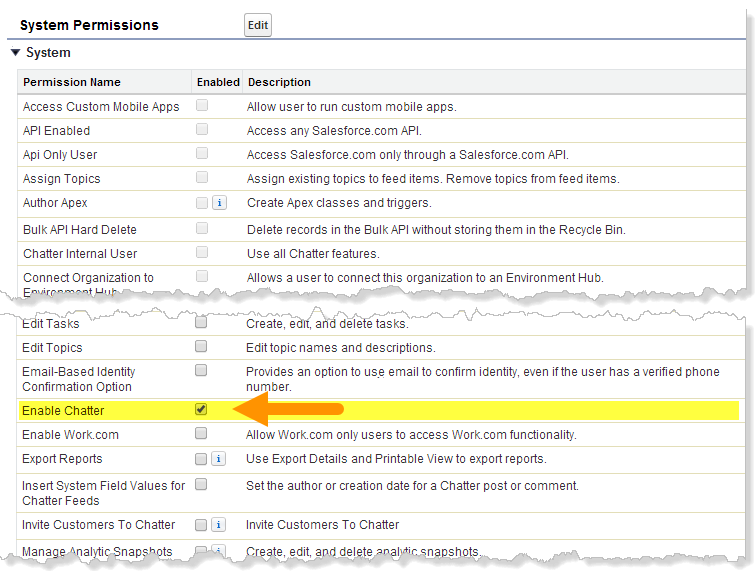
3. Save your changes.
3. If applicable, create permission sets with the desired permissions and assign them to users. By default, all permissions in a new permission set are disabled. Enable the appropriate permissions in the new permission set to give users access to Chatter plus extra levels of management authority.
- Create and Own New Chatter Groups (ChatterOwnGroups)—Users with this permission can create groups in Chatter.
- Create and Share Content Deliveries for Chatter Files (ChatterFileLink)—Users with this permission can use files with Chatter, like uploading, attaching, and sharing, and create public links.
- Invite Customers To Chatter (ChatterInviteExternalUsers)—Users with this permission can invite users who don’t have a Salesforce license to Chatter.
- Manage Chatter Messages and Direct Messages (ManageChatterMessages)—Users with this permission have management access to Chatter Messages and Direct Messages (Experience Builder sites).
- Moderate Chatter (ModerateChatter)—Users with this permission can moderate Chatter feeds.
- Moderate Chatter Feeds (ModerateNetworkFeeds)—Users with this permission can moderate feeds in sites.
- Use Case Feed (ViewCaseInteraction)—Users with this permission can access Case feeds.
- View All Data (ViewAllData)—Users with this permission can view all data, regardless of their membership status in a feed or ownership of a record.

Note Selecting the Enable Chatter permission in a person's permission set doesn't automatically turn on Chatter for that person. People can't use Chatter until you [turn on Chatter](https://help.salesforce.com/s/articleView?id=experience.collab_enable.htm&release=264.0.0&type=5 "Configure various Chatter features and customize the Chatter experience for your users on the Chatter Settings page in Setup.") for your organization.
#### See Also
- [Get Ready for Profile-Based Rollout of Chatter](https://help.salesforce.com/s/articleView?id=experience.collab_pbr_prepare.htm&release=264.0.0&type=5 "If you’re rolling out Chatter to a subset of your users, you can manage Chatter access with custom user profiles and permission sets. There’s a little up-front work that you can do to prepare.")
- [Control Chatter Access Through User Profiles](https://help.salesforce.com/s/articleView?id=experience.collab_pbr_profiles.htm&release=264.0.0&type=5 "Modify existing custom user profiles to allow or deny access to Chatter.")
- [Chatter Settings](https://help.salesforce.com/s/articleView?id=experience.collab_enable.htm&release=264.0.0&type=5 "Configure various Chatter features and customize the Chatter experience for your users on the Chatter Settings page in Setup.")
- [Profile-Based Rollout Considerations](https://help.salesforce.com/s/articleView?id=experience.collab_pbr_limitations.htm&release=264.0.0&type=5 "In organizations that use Chatter profile-based rollout, limitations apply. There are limits with user profiles, permissions sets, and the interaction between users with and without Chatter access.")