---
schema_version: "1"
id: 9efd63019aed1b3d51f95495078ea6dc4809421ac5295d0d5054cd2a71deb5c2
title: Add Actions to the Group Publisher
collection: admin
version: current
locale: en-us
portal_url: https://docs.salesforce.com/admin/current/en-us/experience/264-0-0/collab_admin_group_add_record.md
canonical_url: https://help.salesforce.com/s/articleView?id=experience.collab_admin_group_add_record.htm&release=264.0.0&type=5
source_site: help.salesforce.com
content_type: documentation
content_hash: 0a55fd27c5b76b18b37aea85bff1b486647028f599c10ce7a1b4ff814f5a34ef
description: Customize the group publisher with quick actions and Salesforce mobile app actions.
products:
- Experiences
release: "264"
---
# Add Actions to the Group Publisher
Customize the group publisher with quick actions and Salesforce mobile app actions.
### Required Editions
Available in: Essentials, Group, Professional, Enterprise, Performance, Unlimited, Contact Manager, and Developer Editions
User Permissions Needed
To customize Chatter group layouts:
Customize Application
By default, Chatter groups offer standard actions that are part of the global publisher layout, like Post, File, Link, and Poll. Override the global publisher layout with a customized group publisher layout.
1. From Setup, enter Groups in the Quick Find box, then select Group Layouts.
2. Click **Edit** next to the group layout that you want to customize, or click **New** to create a layout.
3. Click **override the global publisher layout** in the Quick Actions in the Salesforce Classic Publisher section or **override the predefined actions** in the Salesforce Mobile and Lightning Experience Actions section.
Changes to the Quick Actions in the Salesforce Classic Publisher section appear in the full Salesforce site. Changes to the Salesforce Mobile and Lightning Experience Actions section appear in the Salesforce mobile app and Lightning Experience. In groups that allow customers, the publisher shows only standard actions.
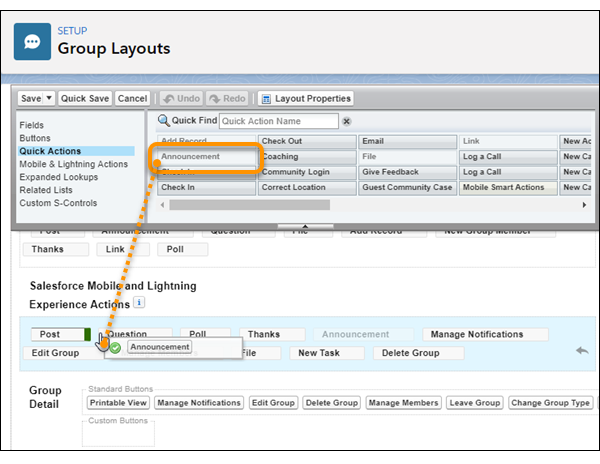
4. Drag actions between the palette and the publisher layout to add, remove, and reorder actions.
5. Click **Save**.

Example
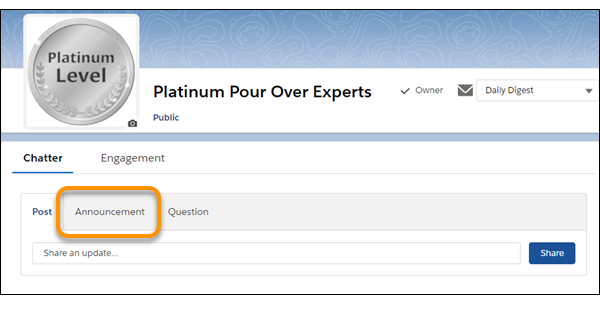
Add the Announcement and Add Record actions to the group publisher.
Now users can select this action directly in the publisher.