---
schema_version: "1"
id: 56f48ef89361f68fceb7b219c57f14c512ba232850a189ef1df170d97130e5f1
title: Add File Privacy on Records to Edit File Details Layout
collection: admin
version: current
locale: en-us
portal_url: https://docs.salesforce.com/admin/current/en-us/experience/264-0-0/collab_admin_files_priv_on_record.md
canonical_url: https://help.salesforce.com/s/articleView?id=experience.collab_admin_files_priv_on_record.htm&release=264.0.0&type=5
source_site: help.salesforce.com
content_type: documentation
content_hash: 7721f2dc8950bdcefba4f3fd13d3e1b148d20ab93c4f4fc852f589fc8d59858e
description: Add the File Privacy on Records option to the Edit File Details layout to let file owners control the visibility of files attached to records.
products:
- Experiences
release: "264"
---
# Add File Privacy on Records to Edit File Details Layout
Add the File Privacy on Records option to the Edit File Details layout to let file owners control the visibility of files attached to records.
### Required Editions
Available in: Essentials, Group, Professional, Enterprise, Performance, Unlimited, Contact Manager, and Developer Editions
User Permissions Needed
To customize Content Version layouts:
Customize Application
If you don’t see the File Privacy on Records option, you can add it by customizing the Content Version page layout.

Note In Salesforce Classic, the File Privacy on Records option also appears on the content detail page and in the content edit dialog. If a file is marked as private in Lightning Experience, it’s also private in Salesforce Classic. This feature is also available in Experience Cloud sites. Only admins and a file’s owner can change the value of File Privacy on Records.
1. From Setup, enter Object Manager in the Quick Find box, and click **Object Manager**.
2. In the Object Manager, click **Content Version**, then click **Page Layouts**.
3. Open the page layout that you use for the Edit File Details page.
4. In the layout palette, select **Fields**, drag **File Privacy on Records** to the Fields section under Content Detail Version, and click **Save**.
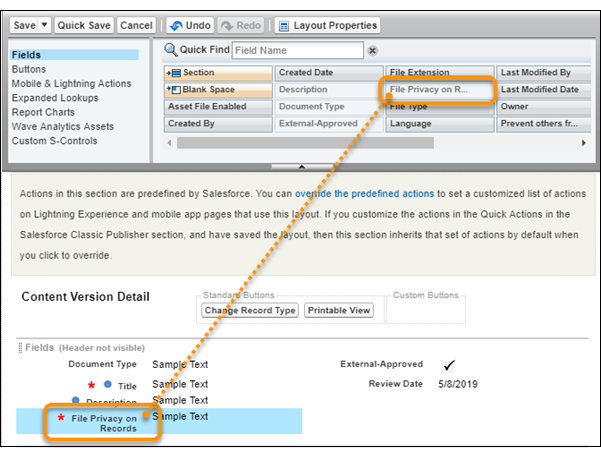

Tip Though you can place the option anywhere in the Fields section, consider placing it after **Description**.
To see your result, from the Files tab, go to the Files page and edit a file’s details.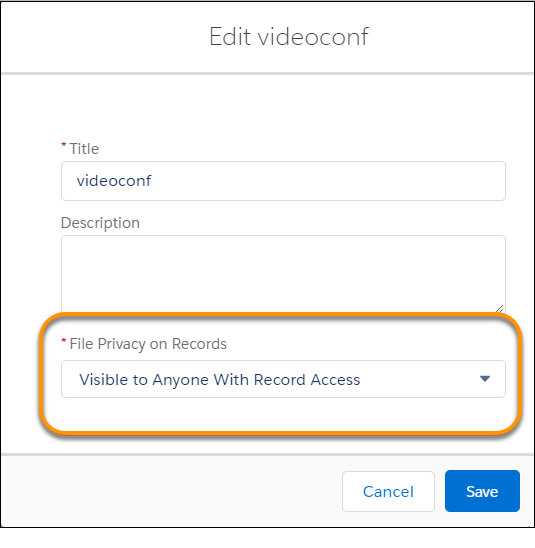

Note When you click **Edit File Details from Related Lists**, the File Privacy on Records field isn't visible.