---
schema_version: "1"
id: 307e74ee13d616709fd60380f6e04cca1a7cb087dd3c2c37d9e1088a89774166
title: Enable the Library Component
collection: admin
version: current
locale: en-us
portal_url: https://docs.salesforce.com/admin/current/en-us/experience/264-0-0/admin_files_libraries_setup.md
canonical_url: https://help.salesforce.com/s/articleView?id=experience.admin_files_libraries_setup.htm&release=264.0.0&type=5
source_site: help.salesforce.com
content_type: documentation
content_hash: 831cad65d2dd986e4270bec64ae015430912f397e26d8f4bc5e269e2181fa3d2
description: Set up libraries to upload, share, and manage files. You need Salesforce administrator permissions to enable the Libraries component.
products:
  - Experiences
release: "264"
---
# Enable the Library Component

Set up libraries to upload, share, and manage files. You need Salesforce administrator permissions to enable the Libraries component.

### Required Editions

<table class="slds-table slds-table_bordered slds-max-medium-table_stacked slds-m-bottom_small edition"><colgroup><col></colgroup><tbody><tr class=""><td class="slds-cell-wrap" style="vertical-align:top;">Available in: Salesforce Classic</td></tr></tbody></table>

<table class="slds-table slds-table_bordered slds-max-medium-table_stacked slds-m-bottom_small permission">
        <colgroup>
          <col style="width:50%">
          <col style="width:50%">
        </colgroup>
        <thead class="slds-text-title_caps ">
          <tr class="">
            <th scope="colgroup" class="slds-cell-wrap" colspan="2" style="text-align:center;vertical-align:top;" id="d38701e52">User Permissions Needed</th>
          </tr>
        </thead>
        <tbody>
          <tr class="">
            <td data-label="User Permissions Needed" class="slds-cell-wrap" style="vertical-align:top;" headers="d38701e52 ">To enable the Libraries component:</td>

            <td class="slds-cell-wrap" style="vertical-align:top;" headers="d38701e52 ">Customize Application</td>

          </tr>
        </tbody>
      </table>

Go to **Libraries**, and select **My Libraries**, and click **New**.

You can give your library a unique name and description in the New Library Wizard.
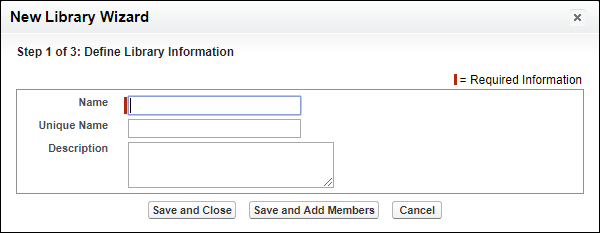
![the New Library Wizard.](https://sf-zdocs-cdn-prod.zoominsoftware.com/tdta-experience-collaboration-264-0-0-production-enus/1aab5b5e-c990-4b8c-840a-6fb18af49709/collaboration/images/admin_files_new_library.png)