---
schema_version: "1"
id: 5db721905ceea82b202efe42cb6593f995c500d6eacb2ae8fae1771f8fef1675
title: Compose the Email in Content Builder
collection: admin
version: current
locale: en-us
portal_url: https://docs.salesforce.com/admin/current/en-us/data/264-0-0/c360_a_ra_compose_email.md
canonical_url: https://help.salesforce.com/s/articleView?id=data.c360_a_ra_compose_email.htm&release=264.0.0&type=5
source_site: help.salesforce.com
content_type: documentation
content_hash: a7ec058c4b28a3fe11c0d0a0f4a07bd6094f6d81662aa7d968acafef113bddfc
description: Let’s walk through the steps to create the first welcome email in this campaign.
products:
- Data 360
release: "264"
---
# Compose the Email in Content Builder
Let’s walk through the steps to create the first welcome email in this campaign.
1. In Marketing Cloud Engagement, go to **Content Builder**.
2. To create your email message, click **\+ Create** and **Email Message**.
3. Select **Template** for the email creation method.
Emails can be created in many ways in Content Builder including from a template or HTML. In this example, we explain how to create an email from a template.
4. Choose the desired template and click **Select**.
5. Define email properties including an email name and description and click **Next**
6. To use the personalization in the Data 360 data extension, drag a **Code Snippet Block** to the email canvas. 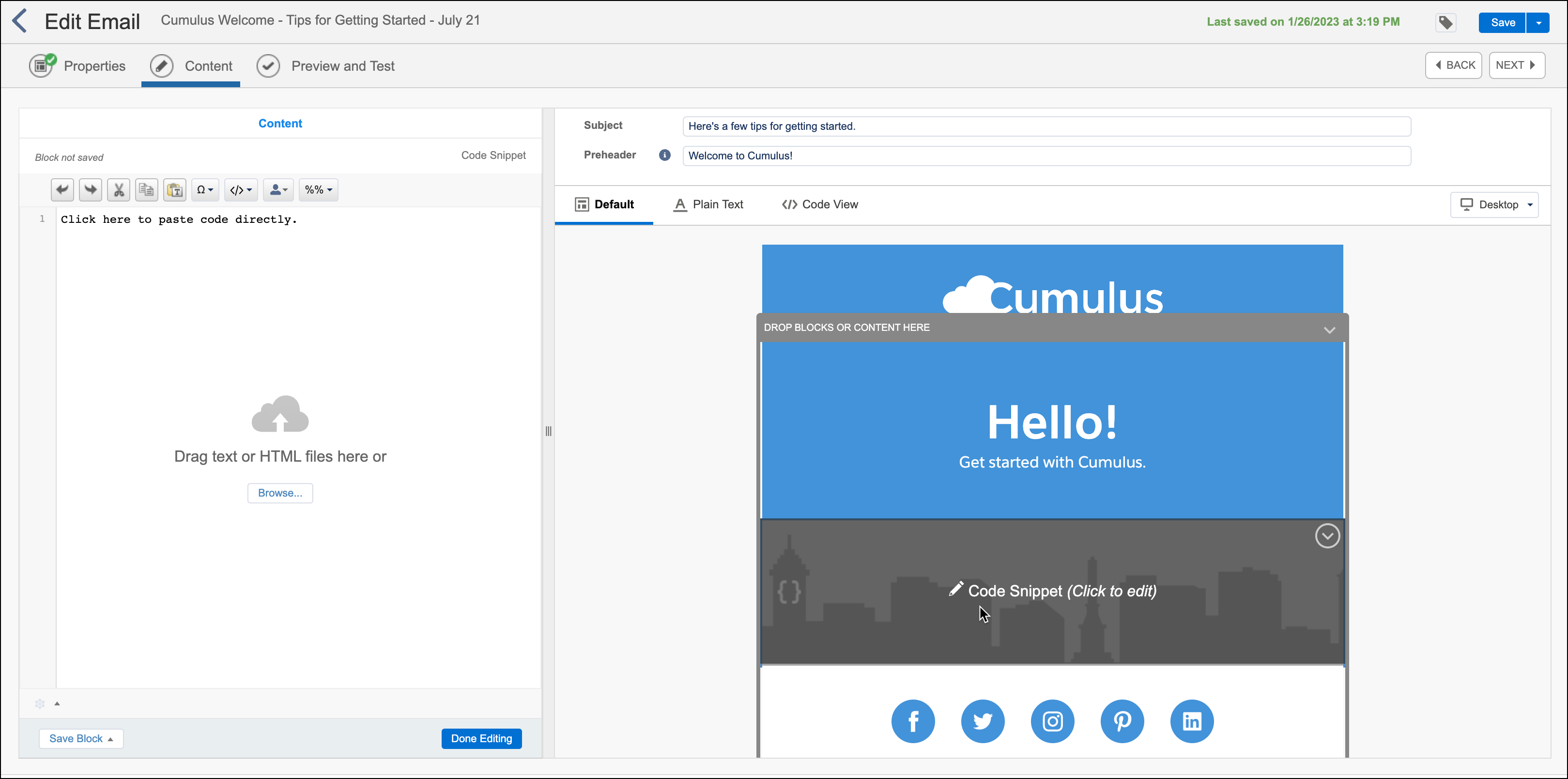
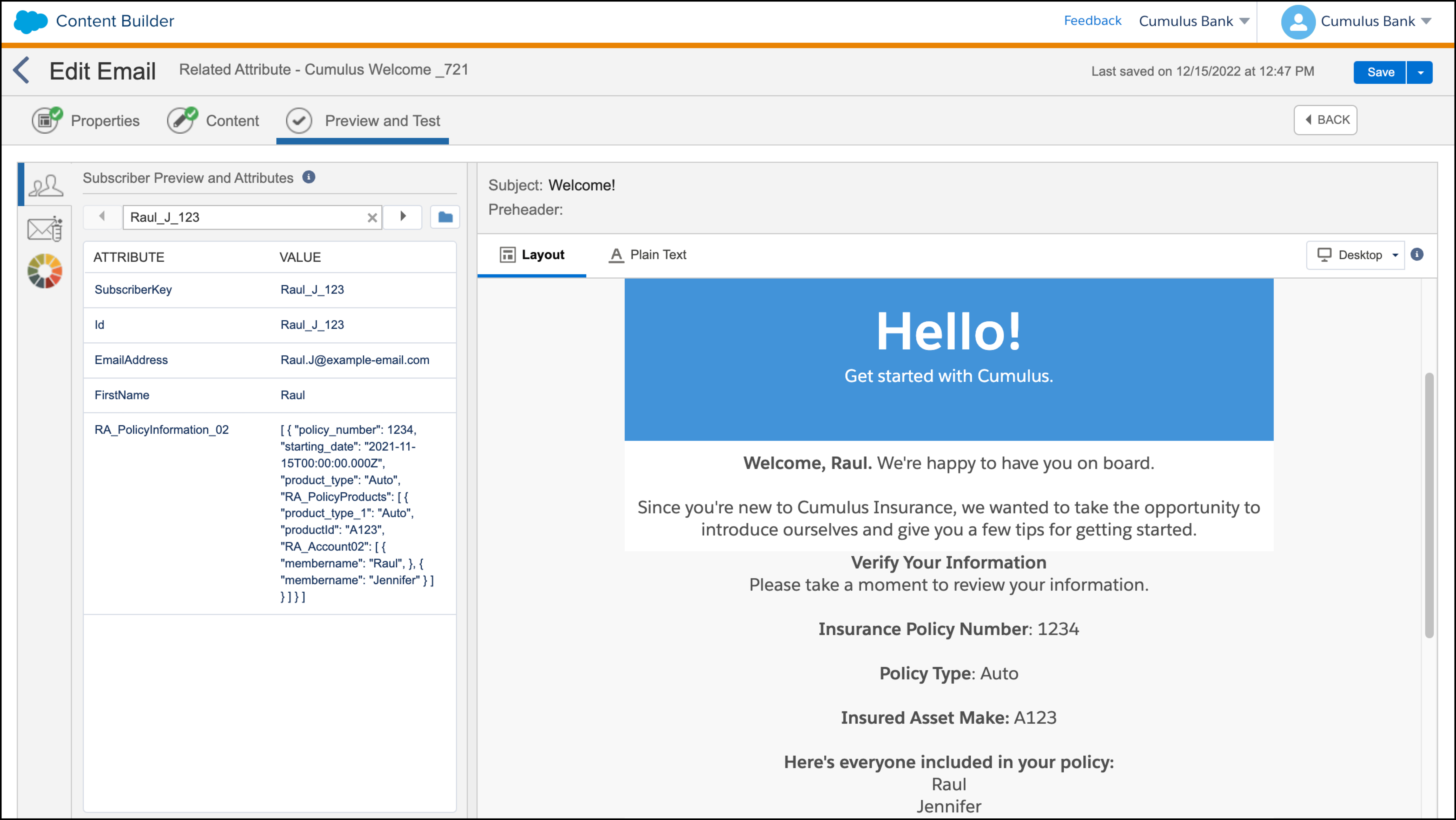
7. In this use case, the personalized elements include the customer’s first name, insurance policy number, policy type, and policy start date. Code the content using GTL, SSJS, or AMPscript to use the JSON formatted content in the data extension.
8. Click **Preview and Test** and select the data extension from Data 360.
9. After testing, click **Save and Exit**.
10. Complete these steps for the remaining two email messages.
You can parse this data with either GTL, SSJS, or AMPscript.

Example Sample GTL parsing
```html
%%[ set @JSONData = [RA_PolicyInformation_02] ]%%
{{.datasource RA_PolicyInformation_02 type=variable}}
{{.data}}
{ "target" : "@JSONData"}
{{/data}}
Verify Your Information
Please take a moment to review your information.
Insurance Policy Number: {{RA_PolicyInformation_02.policy_number}}
Policy Type: {{RA_PolicyInformation_02.product_type}}
{{.datasource RA_PolicyProducts type=nested}}
{{.data}}
{ "target" : "RA_PolicyInformation_02.RA_PolicyProducts" }
{{/data}}
Insured Asset Make: {{RA_PolicyProducts.productId}}
Here's everyone included in your policy:
{{.datasource RA_Account type=nested}}
{{.data}}
{ "target" : "RA_PolicyProducts.RA_Account02" }
{{/data}}
{{RA_Account.membername}}
{{/datasource}}
{{/datasource}}
{{/datasource}}
```
Sample SSJS parsing
```html
```
Sample AMPscript parsing
```html
%%[
var @i, @j, @k, @PolicyRowset, @PolicyCount, @PolicyRow, @PolicyNumber, @ProductType, @PolicyProductsRowset, @PolicyProductCount, @PolicyProductRow, @PolicyProductId, @MemberRowset, @MemberCount, @MemberRow, @MemberName
set @PolicyRowset=BuildRowsetFromJson(RA_PolicyInformation,"$.[*]", false)
set @PolicyCount=rowcount(@PolicyRowset)
for @i = 1 to @PolicyCount do
set @PolicyRow=row(@PolicyRowset, @i)
set @PolicyNumber=field(@PolicyRow, "policy_number")
set @ProductType=field(@PolicyRow, "product_type")
OutputLine(V("Verify Your Information
"))
OutputLine(V("Please take a moment to review your information.
"))
OutputLine(V("
"))
OutputLine(concat("Insurance Policy Number: ", @PolicyNumber, "
"));
OutputLine(V("
"));
OutputLine(concat("Policy Type: ", @ProductType, "
"));
OutputLine(V("
"));
set @PolicyProductsRowset = BuildRowsetFromJson(RA_PolicyInformation, concat("$.[", Subtract(@i, 1), "].RA_PolicyProducts[*]"), false)
set @PolicyProductCount = rowcount(@PolicyProductsRowset)
for @j = 1 to @PolicyProductCount do
set @PolicyProductRow=row(@PolicyProductsRowset, @j)
set @PolicyProductId=field(@PolicyProductRow, "productId")
OutputLine(concat("Insured Asset Make:", @PolicyProductId, "
"));
OutputLine(V("
"));
OutputLine(V("Here's everyone included in your policy:
"));
set @MemberRowset = BuildRowsetFromJson(RA_PolicyInformation, concat("$.[", Subtract(@i, 1), "].RA_PolicyProducts[", Subtract(@j, 1), "].RA_Account02[*]"), false)
set @MemberCount = rowcount(@MemberRowset)
for @k = 1 to @MemberCount do
set @MemberRow=row(@MemberRowset, @k)
set @MemberName=field(@MemberRow, "membername")
OutputLine(concat(@MemberName, "
"));
next @k
next @j
next @i
]%%
```
#### See Also
- [_Salesforce Developer_: Guide Template Language Syntax Guide](https://developer.salesforce.com/docs/marketing/marketing-cloud/guide/gtlSyntaxGuide.html)
- [_Salesforce Developer_: Content Areas Within Template and Layout](https://developer.salesforce.com/docs/marketing/marketing-cloud/guide/gtlContentAreas.html)
- [_Trailhead_: Marketing Cloud Engagement Programmatic Languages](https://trailhead.salesforce.com/content/learn/modules/marketing-cloud-programmatic-languages)
- [_Salesforce Developer_: Build Row Set From JSON](https://review-app-sdmarkdoc-pr-196.herokuapp.com/docs/marketing/marketing-cloud/guide/buildrowsetfromjson.html)