
Build summary for Modern POS version 9.9.1, including what new features and changes it contains
| Theme | Feature | Benefit |
|---|---|---|
| Omnichannel | Multiple Delivery Addresses and Dates per Order | Ability to set delivery and pickup dates at item level, where previously you only did it at the order level. Can also ship to more than one address! |
| Inventory Management | Shipping Aggregator SPI - Carry Forward Tracking Number in Generating Label for STS and RTV Flows | Update to our Shipping Aggregator SPI. The tracking number is updated automatically and shown after you create a label in a Store to Store Transfer and Return to Vendor flow. |
| Analytics/Reporting | Custom Date Filtering for Sales Attribution, Associate Log In, and Item Not on File Report | Ability to filter POS reports by the current day, the last seven days, current month, previous month, or custom range. |
| Receipts | New E-Receipt Tags | 24 new E-tags added to bring greater parity to print tags |
| Gift Cards | Gift Card Deeplink for All Layouts | You can now add a gift card deeplink to any layout whereas you previously only had it in a cart. Check gift card balance from homescreen, hamburger menu, or any layout. |
| Core Platform | Tab Navigation with Icons | Add iconography to navigation Tabs for better identification and customization unique to your brand |
| Other Feature Enhancements | Other feature enhancements | Various |
Omnichannel
Multiple Delivery Addresses, Delivery, and Pick-Up Dates per Order
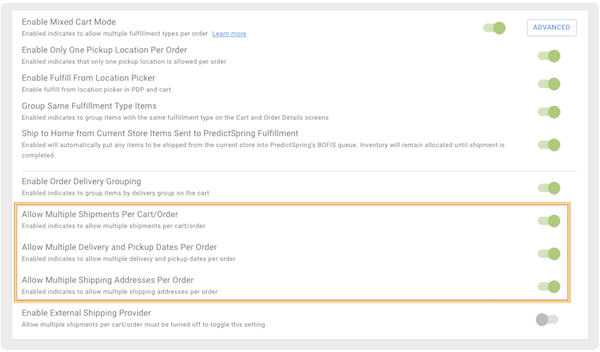
What it does: You can now add more than one delivery address and delivery date for multiple items in an order. For example, a customer can request one item to be shipped to their home and another to be sent to a friend as a gift.
How to configure:
- In CMS, go to .
- Turn on the flags for the options you want to turn on:
- Set and save your changes.
- Relaunch your POS app.
Learn more: Omnichannel: Delivery and Pickup Date Overview
Inventory Management
Carry-Forward Tracking Number in Generating Label for STS and RTV Flows
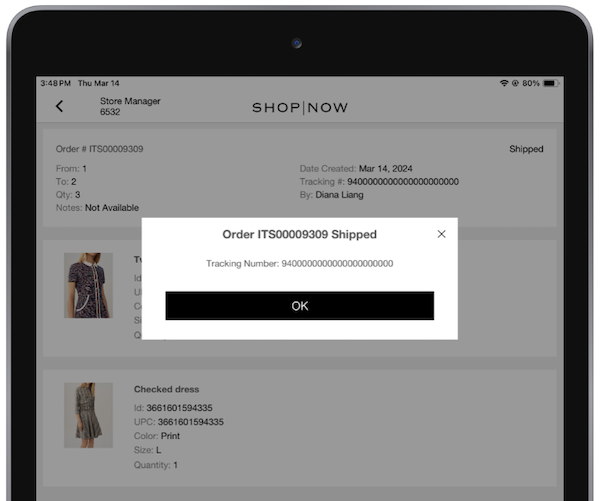
What it does: Make operations easier and less likely to make mistakes in tracking numbers with our new feature to keep the tracking number from the carrier. If you have the SPI enabled, after generating a label, the app displays a successful message along with a tracking number.
Learn more about configuring and printing shipping labels via SPI: Configuring & Printing Shipping Labels via Point of Sale SPI
Analytics/Reporting
Custom Date Filtering for Sales Attribution, Item not on File, and Associate Log In Reports
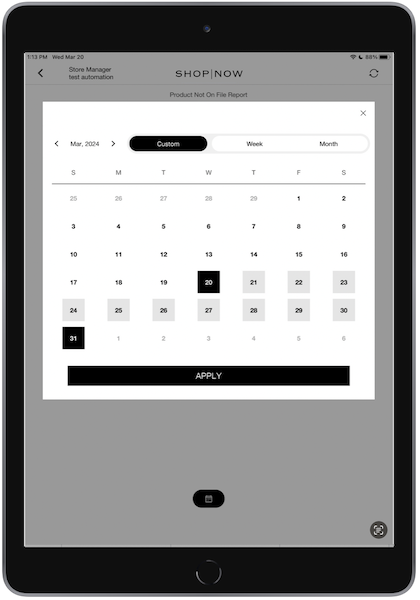
What it does: You can now filter Sales Attribution, Item Not on File, and Associate Log In reports by a custom 31-day date range.
Learn more about our POS Reports: Sales Attribution, Item Not on File, and Associate Log In
Receipts
Gift Cards
Gift Card Deep Link for All Layouts
What it does: Access gift card operations from any layout or hamburger menu. Simply add the deep link to any layout you want.
Functions Supported:
- Purchase a Gift Card
- Add to a gift card
- Cash out a gift card
- Check gift card balance
Learn more: Comprehensive List of Deep Links
Core
Tab Navigation with Icons
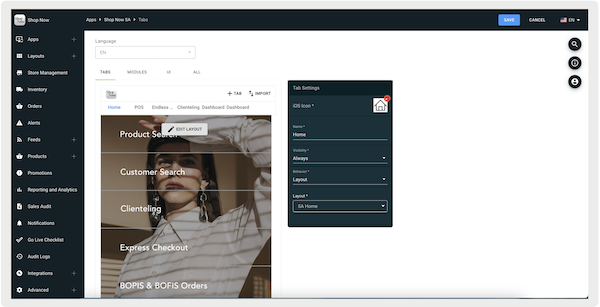
What it does: Add icons to bottom navigation for easier visual identification and custom brand experience.
How to configure:
- Select a tab to open its toolbar on the right side of the screen.
- If you want to add an icon, upload an image to show as the tab's icon under iOS Icon. Images are 65px by 65px.
- Under , enter the tab's display name for the POS app.
- Under , select one of the options:
- ": The tab is always visible.
- -in': Only signed-in users can see this tab.
- -out': Only signed-out users can see this tab.
- Under , set the tab's behavior by selecting one of the options:
- : displays a selected layout.
- '': displays a selected personalized layout. Learn More
- '': displays a selected deep link. However, if the deep link fails, a fallback layout displays.
Learn more about customizing and configuring navigational elements: Customizing Navigation Bars on Your POS App
Other Feature Enhancements
| Title | Description | Help Center Link |
|---|---|---|
| Latency improvements for NetSuite: Advanced Search (Quotes and customer) | Enhanced speed of searching for quotes and customer records within the NetSuite Platform | Learn more about NetSuite Integration |
| Optional Item Attributes in Product Cart Cell | Show whether inventory is available, how many units are backordered, or how many units are committed in a product cell in the cart. This helps you manage your inventory better and reduces the risk of overselling. Integrate with NetSuite. | Learn more about NetSuite Integration |