
Build summary for Modern POS version 9.7.1, including what new features and changes it contains.
Overview of All Features
| Theme | Feature | Benefit |
|---|---|---|
| Loyalty | Loyalty (Beta) | Merchants can use their customer creation form to add shoppers to their loyalty program. The POS can use loyalty rewards passed in the customer's SPI lookup. The Customer 360 profile has been improved to make it easier to see and track loyalty customers. It now has badges and more loyalty data. |
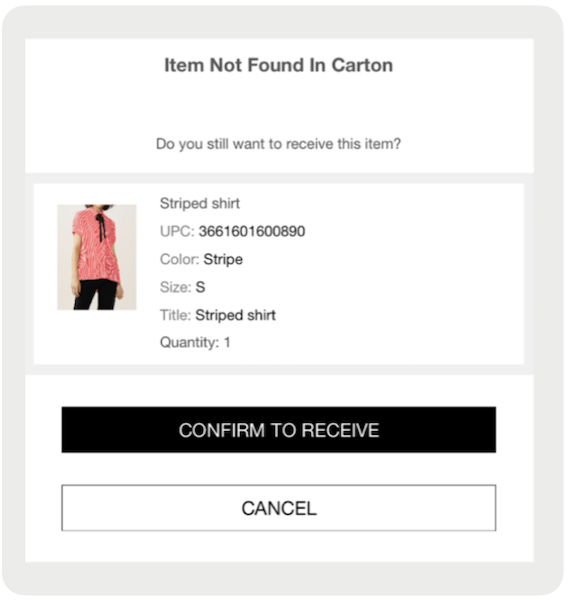
| Inventory Management | Adding items to an ASN Receiving | Ability to add an item to an Advanced Shipping Notice (ASN) if it's not in the ASN file but in the product catalog. This requires a CMS flag to turn on this capability for store associates |
| Inventory Management | Re-Scan in ASN Receiving | Ability to rescan items in an ASN receiving flow if a mistake is made |
| Inventory Management | Product Search Capability for Inventory Flows (Cycle Count, Store to Store Transfer, Return to Vendor) | For cases where products don't have a barcode, you can search the product catalog to add items to Store-to-Store (STS) transfers, Return-to-Vendor (RTV), and Cycle Counts (CYC). |
| Payments | Switching Between Tap to Pay and Payment Terminal | For Tap to Pay-enabled iPhone devices, there's now an ability to switch to a payment terminal if necessary from the device. This can be done from the Device Manager or a new deep link directly from the cart. |
| Offline | Offline Switch & Configurable Network Timeout | New offline switch permits you to switch between offline and online. It also has a new field that you can change to make offline more sensitive based on your network settings. |
| Omnichannel | Send Sale Fulfillment in POS | New Omnichannel setting allows merchants to add orders that are Ship to Home from Current Store directly to the store fulfillment (Buy Online, Fulfill In-Store [BOFIS]) queue. Inventory movements follow the fulfillment status. |
| SPI | GTIN included in Inventory SPI Spec | Request for inventory SPI enhanced to include GTIN for merchant lookup |
| SPI | Multiple Order Controller (BORIS) | Ability to support more than one order controller for BORIS if you want to maintain Point of Sale as order controller for all other fulfillment types |
| API | API gateway metrics on CMS | Monitor API quotas and usage to avoid and more quickly debug timeouts |
| Other | Other Feature Enhancements | Varies |
Loyalty
Loyalty (Beta)
What it does: Merchants can use their customer creation form to add shoppers to their loyalty program. The POS can apply loyalty rewards passed in the customer's SPI lookup. The customer 360 profile has been improved to make it easier to see and track loyalty customers. It now has badges and more loyalty data.
What you can do:
- Track customers by their unique Loyalty ID
- Display and track available rewards, point balances, and tiers, and integrate them with Customer Profile
- Easily identify loyalty members with a badge
- Apply customer rewards directly in the cart with a new deep link
- Apply rewards as coupons or transaction discounts
Learn More: Point of Sale Loyalty Overview
Coming Soon: Additional receipt tags and loyalty enrollment on edit customer flow
Inventory Management
Rescan Items in an ASN Receiving
What it does: Ability to rescan items in an ASN receiving flow if a mistake is made
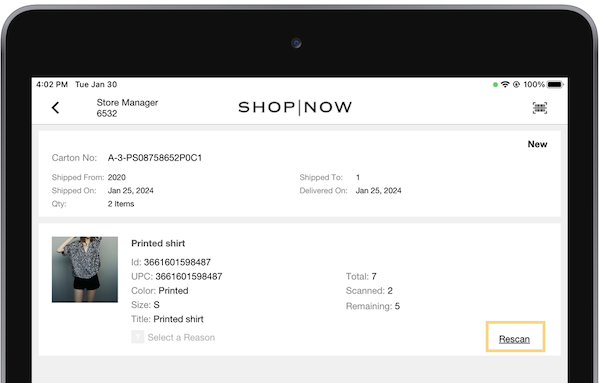
Learn More: Configure Advanced Shipping Notice (ASN) Receiving
Adding Items to an ASN Receiving
What it does: Receive items that weren't originally included in the ASN report but were included in the shipment. The POS app permits you to only get items from the ASN. You can either get more or less than the items that are in the ASN. However, to get items that weren't first listed in the ASN, you can set a flag in the CMS to turn on manual receipt of unspecified items.
How to configure:
- In CMS, go to
- Turn on
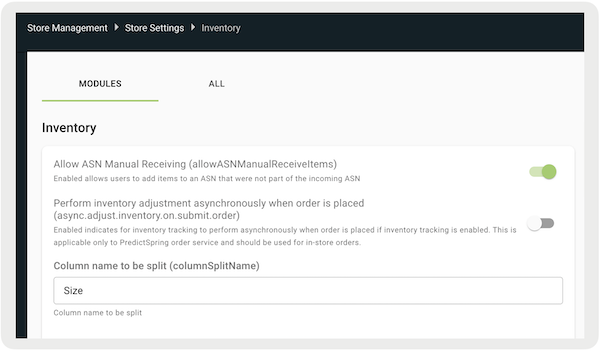
The POS app checks if the scanned item is present in the product database. If not found, the app provides the user with the option to manually receive it.
The manually received items are displayed in a dedicated section, and if necessary, you can delete them. Additionally, information about unlisted items is recorded in an event file along with their product details.
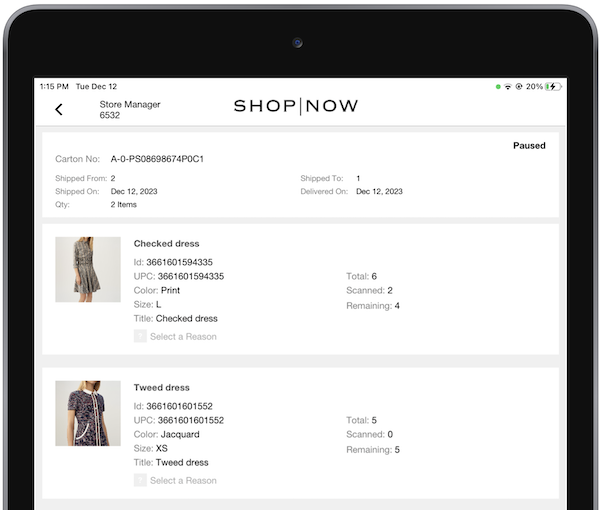
Learn More: Configure Advanced Shipping Notice (ASN) Receiving
Learn all about Advanced Shipping Notice capability: Othert in Point of Sale Webhook Summary of Point of Sale API, SPI, and Webhook Specs
Payments
Switching Between Tap to Pay and Payment Terminal
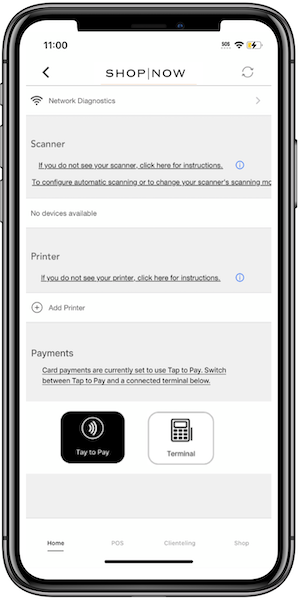
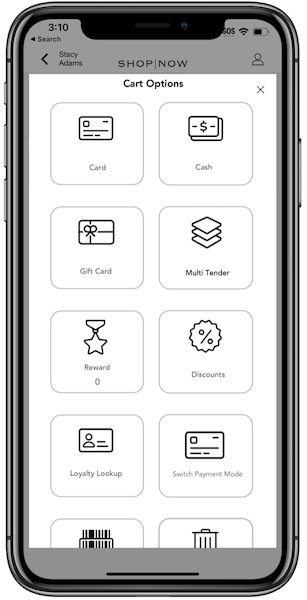
What it does: Switch between Tap to Pay and a connected terminal in two ways on a register that uses Tap to Pay: from Device Manager, and, if the deep link is set, from the Cart Options layout. This makes it easier to change, especially in a multi tender situation.
Via Dvice Manager
Via Deep Link
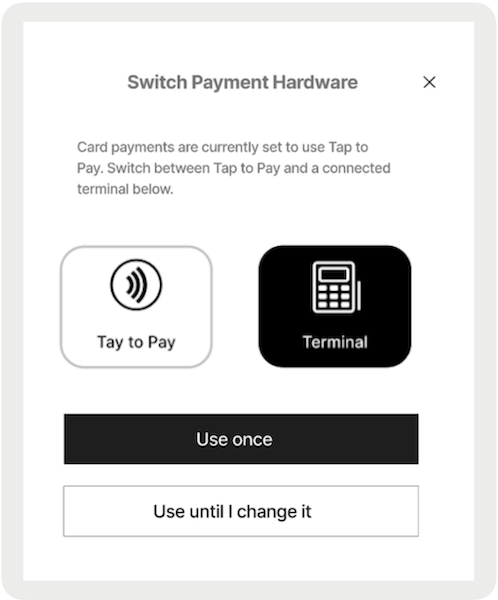
Learn how to Configure: Tap to Pay - User Experience
Enable Tap to Pay Today: Tap to Pay Overview
Offline
Offline Switch & Configurable Network Timeout
What it does: New offline settings let you switch between automatic and manual switching. You can also set a network timeout field to change how sensitive you are offline based on your network settings.
How to configure: https://labs.predictspring.com/cms/stores/configuration/offline
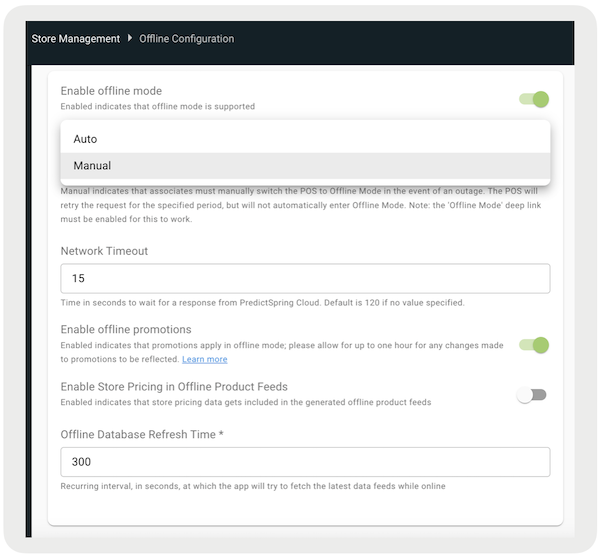
Auto: Indicates the POS automatically switches to Offline Mode in the event of an outage.
Manual: Indicates that associates manually switch the POS to Offline Mode in the event of an outage. The POS app retries the request for the specified period, but won't automatically enter Offline Mode. Turn on 'Offline Mode' deep link for this to work.
Network Timeout: Time in seconds to wait for a response from Point of Sale. The default is 120 seconds if no value is specified.
Learn more about Offline and how to turn on this setting: POS Offline Support
Omnichannel
Send Sale Fulfillment in POS
What it does: Eliminate the risk of misplacing an order if transferring a Send Sale from cash wrap to back office. Omnichannel’s Ship to Home from Current Store carries an order systematically from transaction complete to order packed and shipped via BOFIS queue and order processing.
How to configure:
If you turn on Ship to Home From Current Store fulfillment, items in carts with this fulfillment type are allocated to the BOFIS queue for review and packing.
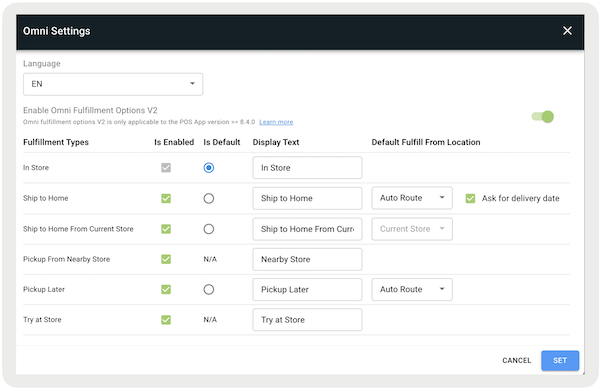
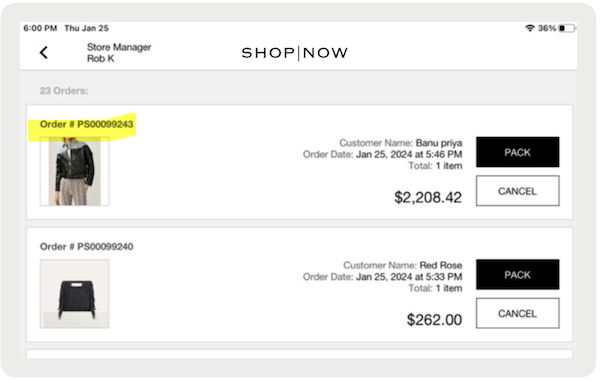
Learn more: Enabling Omni Settings in Point of Sale CMS
SPI
Multiple Order Primary SPI
What it does: Buy Online, Return In-Store (BORIS) is an order fulfillment method that allows customers to purchase products online and have them shipped to their homes. If customers are unsatisfied with their purchases, they can return them to in store.
Merchants can set up an external controller for BORIS orders. They can still use Point of Sale's order management system for all in-store orders. This allows merchants to have a separate ecommerce controller and still process BORIS returns as receipted and referenced.
How to configure:
- In CMS, go to
- Select in the upper right of the screen
- Under , select ""
- Under Endpoint Name, select ""
- Configure the rest of the fields by referring to Point of Sale API, SPI, and Webhook Specs
- Save your changes
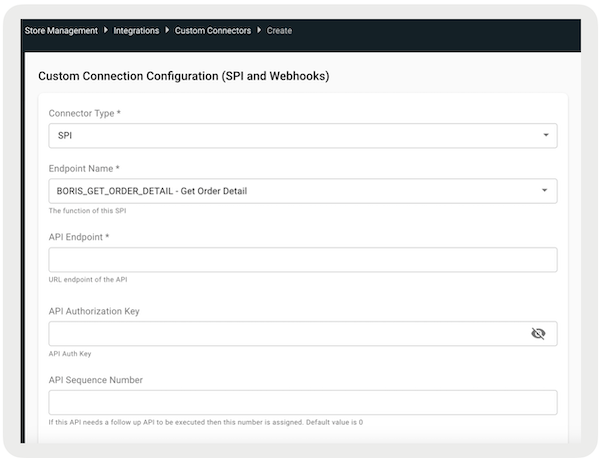
Learn more: Separate Order Controller for Buy Online Return In-Store (BORIS) Orders
If you're using Salesforce as the order controller: Enable BORIS for SFOMS Integration
Track Inventory by GTIN
What it does: If the Inventory SPI is configured, manage inventory by GTIN number by configuring the endpoint
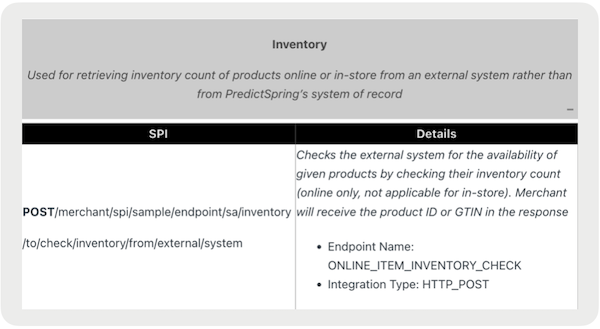
Learn how to Configure: Service Provider Interface (SPI) in Point of Sale API, SPI, and Webhook Specs
API
API Gateway Metrics Page
What it does: Monitor your API quotas and usage to avoid and more quickly debug timeouts. The table provides descriptions and use cases for the API Usage Settings fields. They aren't editable and are used for API management. They encompass the monthly request limit, usage tracking, rate regulation per second, and burst handling for unexpected surges in a merchant environment.
| Field | Field Type | Description |
|---|---|---|
| Quote | Auto-Generated | Maximum number of permitted API requests per month |
| Remaining Quota | Auto-Generated | Number of API requests remaining for current month |
| Rate Limit | Auto-Generated | Maximum number of API requests allowed per second |
| Burst Rate Limit | Auto-Generated | Maximum number of API requests allowed in a burst that exceeds API rate limit |
Learn more: Merchant Configuration and API Integration Fields
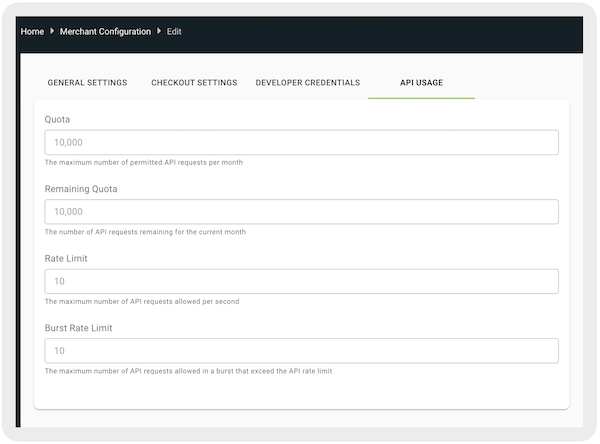
Access to CMS Page: https://labs.predictspring.com/user/login
Other Feature Enhancements
| Title | Description | Help Center Link |
|---|---|---|
| New Receipt Tags: PS Print Receipt Tags for Attributed Associate and email and print financing tender tags | New receipt tags to show number of associate attributed to a sale (that is, for commission purposes) and financing tender information. An attributed associate name is available with our next release along with the email tags for attributed associate. | Attributed Associate Tags, Finance |
| ASN reports in CMS | Now requires an input to be made before getting report back to optimize the speed. | https://labs.predictspring.com/user/login |