
Build summary for Modern POS version 9.6.1, including what new features and changes it contains.
9.5.1 was an internal-only release for work done during a code freeze. Intentionally skipped numbers for public release 9.6.1. Access all new features and enhancements listed in 9.6.1.
Overview of All Features
API
Adyen API Upgrade on Server (EOL April - 2024)
What it does: Ability to trigger an inventory adjustment if there's a sale or a return.
How to configure: https://labs.predictspring.com/cms/custom-api/create/new
SALE_INVENTORY = This event indicates that an item (or items) has been sold. If this event is triggered, the expectation is that the inventory for the specified item(s) decreases.
RETURN_INVENTORY = This event indicates that an item (or items) has been returned or exchanged. If this event is triggered, the inventory for the specific item(s) increases or adjusts in some manner if it's an exchange.
Cart/Checkout
Add-On Products
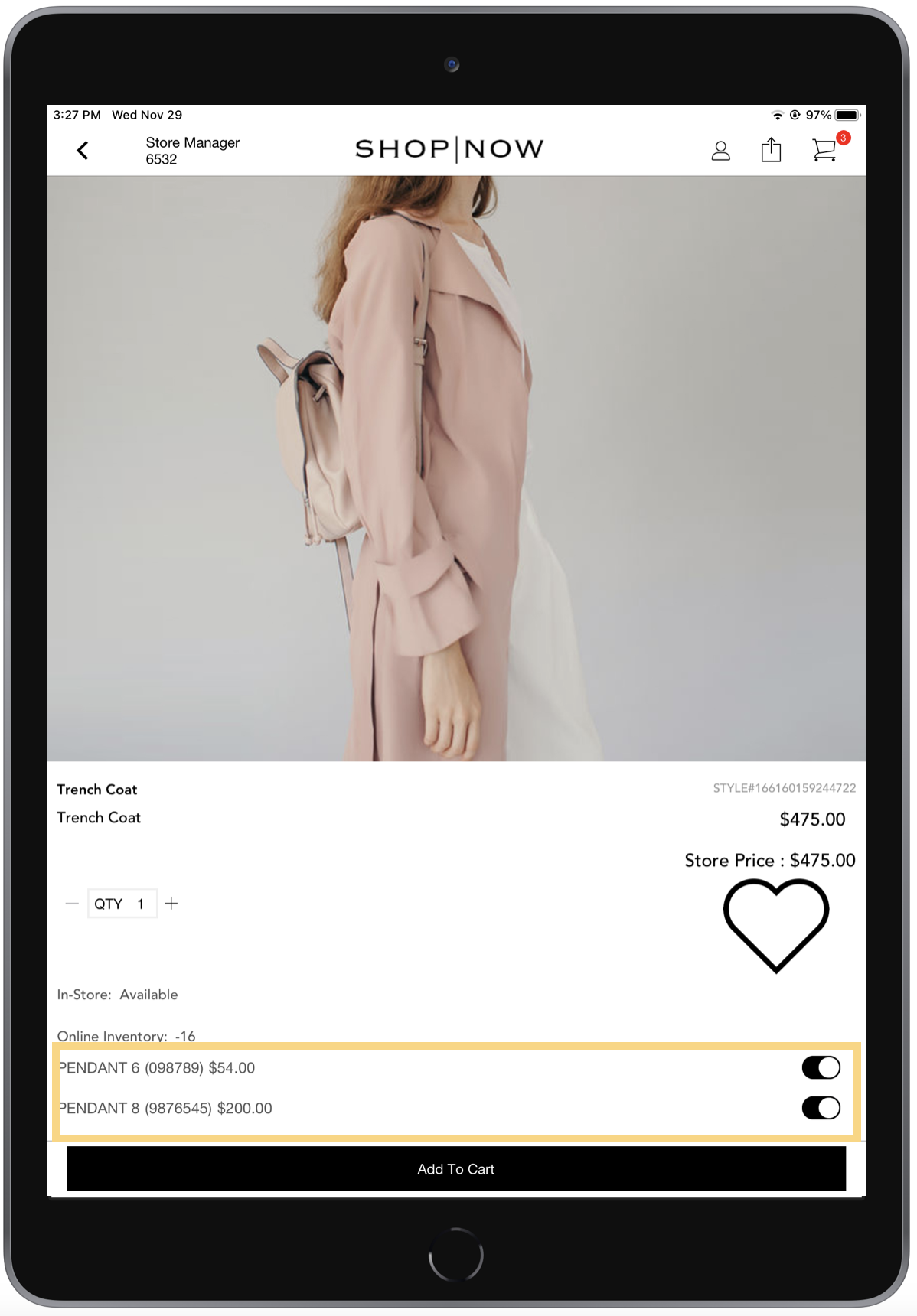
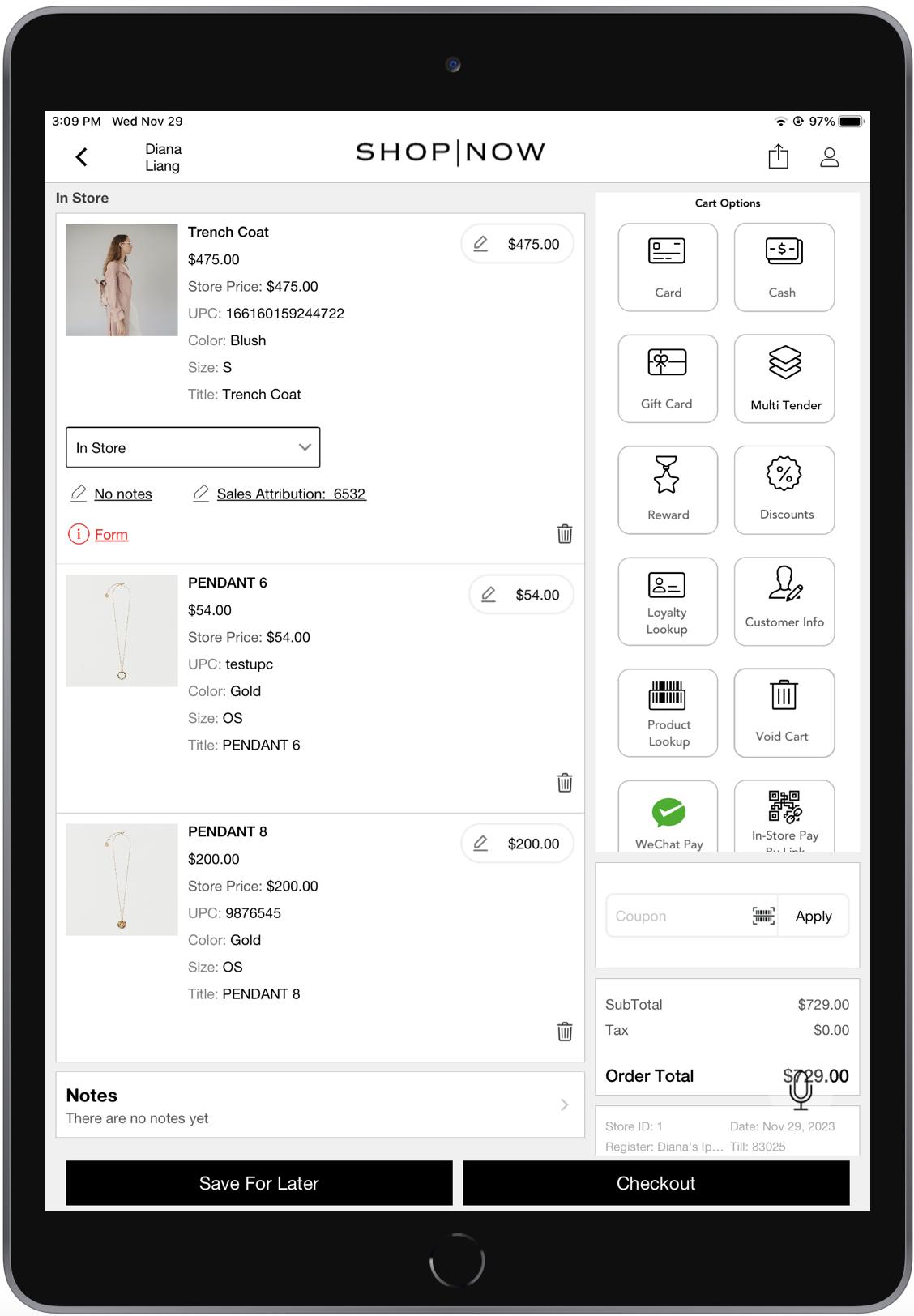
What it does: Ability to link sub-products to a parent product in the cart. Common use cases include warranty, embroidery, linked accessories like charms for jewelry, or component furniture add-ons. Available add-ons can be displayed on the Product Detail Page (PDP) with the ability to have them added to the cart. Merchants can also configure Return Policy to permit or forbid refunds for add-ons during the return.
Learn how to configure: Configure Add-On Products in the POS App
Product Forms
What it does: Product Forms permit you to link forms to specific products in the POS app, enabling you to obtain product-specific details before a sale. Additionally, these forms can be applied to add-on products like Insurance and Protection Plans.
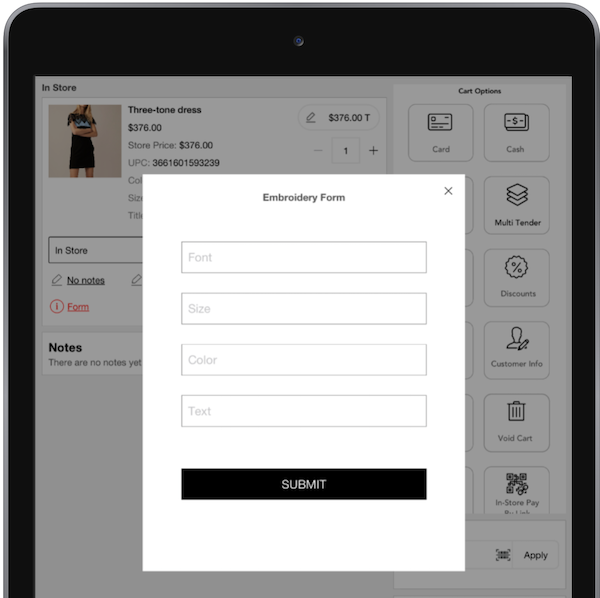
Learn More: Review Set Up Product Forms for instructions on how to create a Product Form, linking a form to a product, and how to access reporting.
EJ/TLog/JSON Export
Announcement: Deprecation of CSV / TSV / RetailNext order download formats
CSV, TSV, and RetailNext exports are limited subsets of order data and will be deprecated in 2024. For full functionality, use JSON or XML formats.

Learn More: Configure and Manage Export Jobs
Void Cart Item Export
What it does: Enhanced export of items in a cart if voided via a webhook API. This provides real-time data you can store and refer to in LP audits, for example.
How to configure the webhook: https://labs.predictspring.com/user/login
Endpoint Name: VOID_CART
Integration Type: HTTP_POST
Learn More: Orther webhooks, Void Cart
Order Status Updated in POSLog for In-Store Fulfillment
What it does: Real-time JSON/POSLog order posting for Buy Online, Pick up in Store. Ability to create a webhook for the export of a store fulfillment event for Buy Online, Pick up in Store.
Learn More: POS Offline Support
Enhanced Successful Order Report
What it does: Ability to filter through a search by FILE/API export status to help you get to a list of relevant orders, faster.
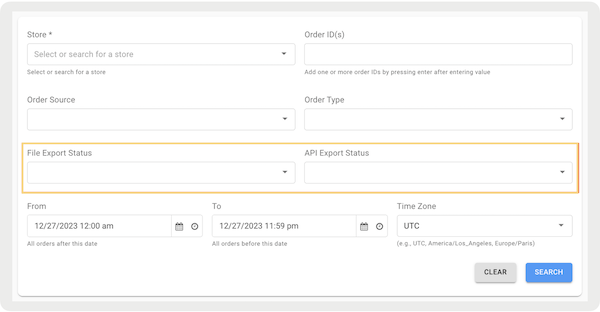
Learn More: Successful Orders in Point of Sale CMS
Feeds/Import Data
Tax Class Column + Validation
What it does: Tax Class column is now mandatory in tax feed imports. Enhanced functionality has been added to validate mandatory fields.
How to configure: In the field mappings, create a mapping that maps the tax class field onto a Point of Sale product field. Finally, configure the Product Field to read the tax class server setting so that it matches the Point of Sale product field name in the product Field Mappings.
Learn More: Tax Rates Feed & Setup
Inventory Management
Make Shipment ID Searchable and Show on ASN Report
What it does: Ability to search an ASN report by Shipment ID in CMS and POS app.
How to access in CMS: https://labs.predictspring.com/cms/asn/asns
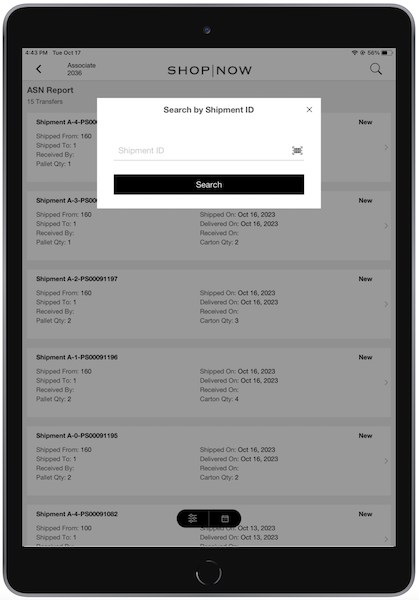
Learn More: View Advanced Shipping Notice Report in Point of Sale
Store-to-Store (STS) and Return to Vendor (RTV) Destination Store ID Lookup
What it does: Ability to search for STS Transfer and RTV lists by Store ID in POS app.
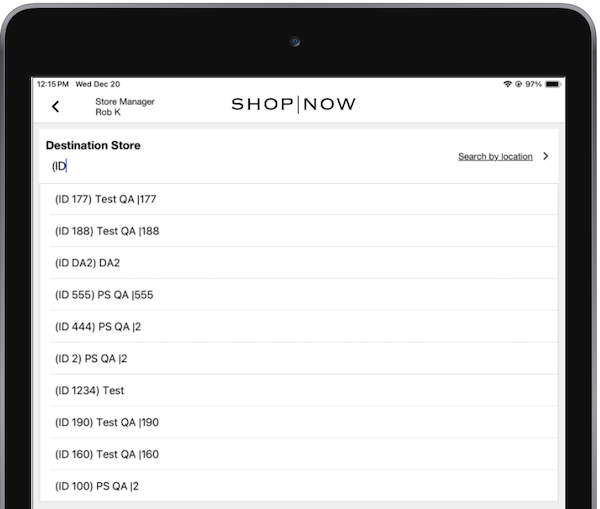
Learn More About Creating STS Transfers and RTVs: Manage Store to Store Inventory Transfers in Point of SaleManage Return to Vendor Transfers in Point of Sale
Tracking Inventory Movement in POS App
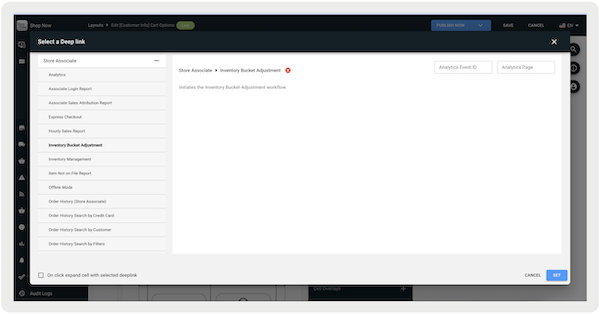
What it does: This feature provides merchants with access to a product's current availability, allowing them to adjust inventory buckets and designate them as "Not for Sale." Specifically, they can adjust the product's "Floor Demo," "Not for Sale" for Item Adjustments, and "Return" for Return to Vendor (RTV) transfers if an inventory adjustment deep link is configured. These adjustments are exclusively applied at the store level, establishing their relevance to the app's current store.
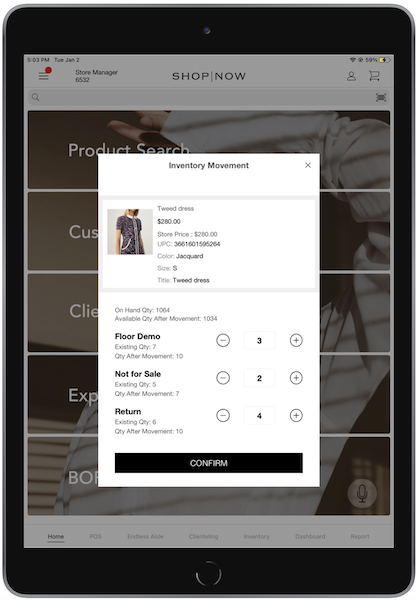
How to configure: Add a deep link to your layout
Learn More: Manage Inventory with Point of Sale
Offline
Verifone SAF
What it does: Verifone terminals support “Store and Forward” (SAF) processing for offline transactions. In this mode, the terminal provides local transaction approval and denial. This permits the POS app to still be able to perform credit card transactions while network connectivity is lost. Transactions that support this feature include Sales, Returns, and Reset Tenders (voids).
How to configure: Configure on your terminal and in CMS
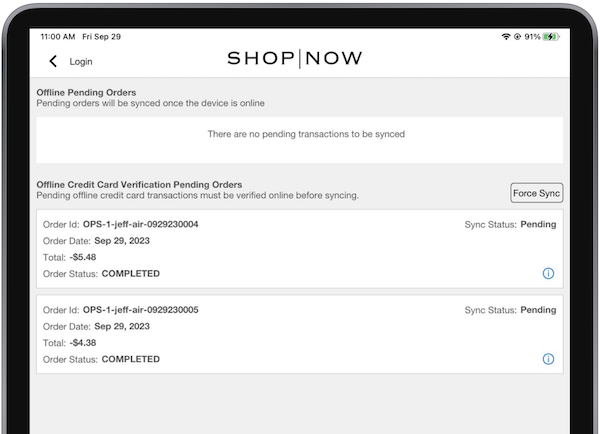
Learn How to set up: Set Up Verifone Store and Forward (SAF)
Maximum allowances
What it does: Ability to set a maximum $ amount for transactions and sessions while offline.
How to configure: https://labs.predictspring.com/cms/stores/configuration/offline
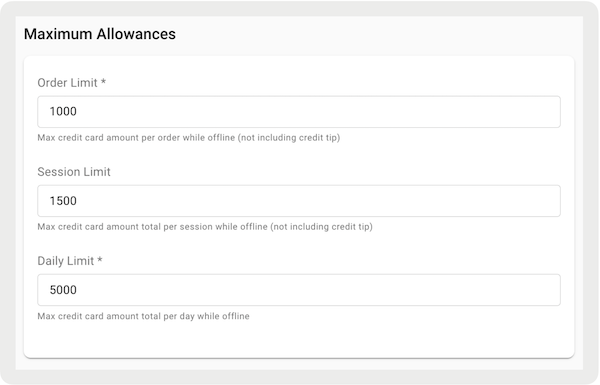
Learn More and Offline Support: POS Offline Support
Offline Network Reachability
What it does: Ability for stores with short, infrequent network outages to stay online if the system detects if there's a disconnection from the local network. In offline mode, the app switches to Offline even if connected to WiFi/Ethernet if there's a service outage. Turning on this setting can delay the switch to offline. Disabling this setting indicates your POS goes into Offline mode as expected and comes online after five successful health check calls (at 5-second intervals).
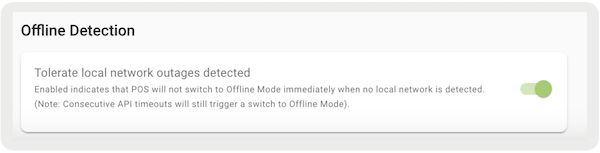
How to configure: https://labs.predictspring.com/cms/stores/configuration/offline
Learn More: POS Offline Detection
Omnichannel
Reserve Online, Pick Up in Store (ROPIS)
What it does: Allows customers to reserve items online at a nearby store for a product trial before making a purchase. This feature is initiated by ecommerce, while POS initiation is reserved for "Try at Store" orders.
After you book online, the store gets an order. The items you ordered are given to the store and ready to be delivered. This is like buying online and picking them up in store.
After the order is received by the store, the items are allocated and an associate packs the items. After the order is ready for pickup, the customer is sent a notification, and they come to the store to try the items before purchasing.
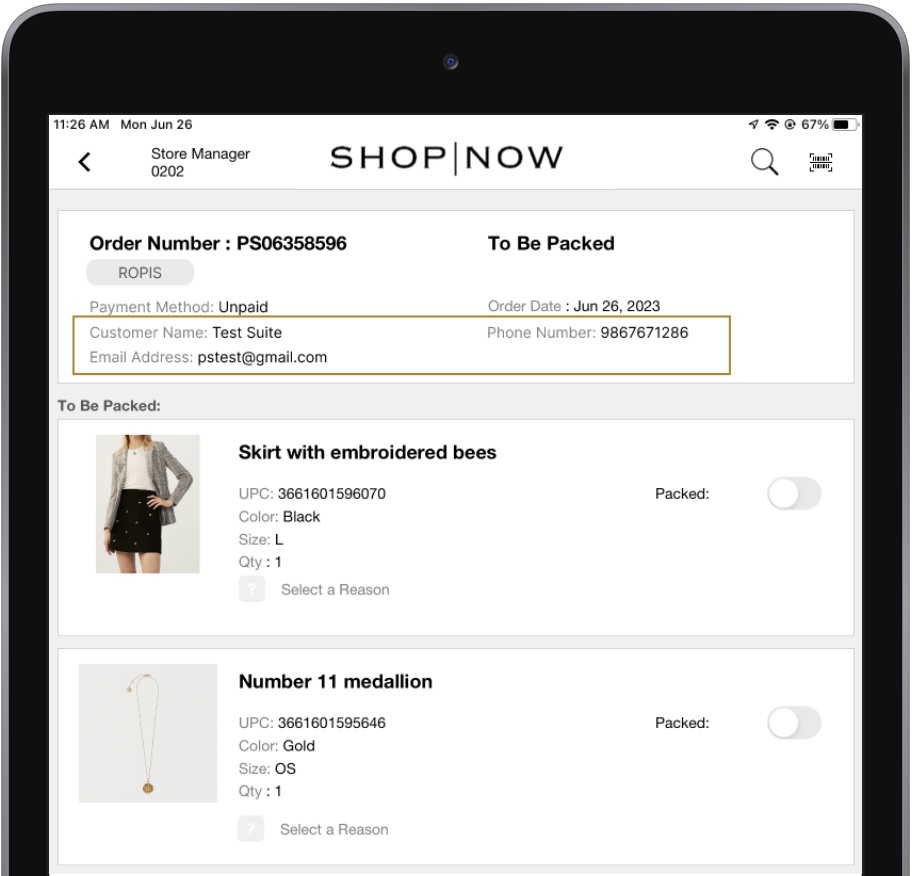
Learn More: Use Reserve Online, Pick Up In Store (ROPIS)
Receipts
New Tags for Email and Print Receipt Templates
What it does: New tags to show the data are now available in email and print receipt templates:
- Shipping Method Type
- Sub Omni Fulfillment Type
- Delivery Date
- Pickup Date
- Quote ID (email only)
How to configure: Add tags to your template via https://labs.predictspring.com/cms/layouts
Learn More about creating and updating layouts: Receipt Layouts
See full list of Tags: Configure Email Tags | Configure Print Tags
Reporting
EJ v2
What it does: Updated Electronic Journal with advanced filtering and search capabilities. EJ v1 lives in parallel with EJ v2 until April 2024. In April of 2024, EJ v1 becomes deprecated. Provide feedback to your Salesforce Customer Success representative if you have any!
How to access: https://labs.predictspring.com/cms/custom-api/create/new
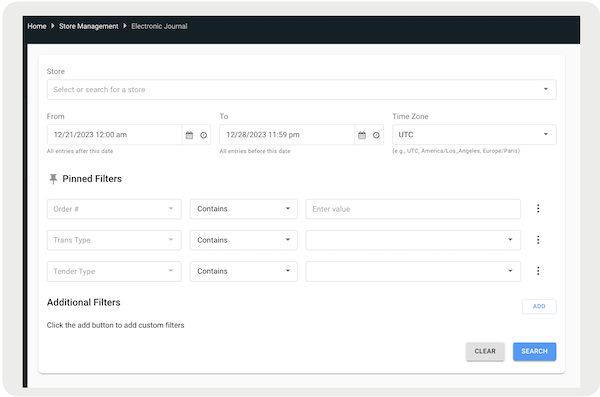
Learn More: View and Edit Electronic Journal Reports
Other Feature Enhancements
| Title | Description | Help Center Link |
|---|---|---|
| Fiscalization (Italy) - Multitender Refund | If the original payment method is multitender, the system allows for a refund to multitender in versions 9.6.1 and later. | Fiscalization Requirements for Italy |
| Only apply to Order Search Layout to Order History | Revision to have Order Search Layout only apply to Order History where previously it applied to Returns and Exchanges. | View Order History on POS App |
| iOS 17 Support | Point of Sale's application has been tested and approved for use with iOS 17. | N/A |
| Eliminate long default query on audit log page | Act to search Audit Logs before results populate where previously all load as default. | N/A |
| Italy: QR code for lottery | Ability to print QR Lottery Code on receipts for Italy's merchants. | Fiscalization Requirements for Italy |
| BOPIS + BOFIS Event Posting | Ability for merchants to post details of a BOFIS and BOPIS order through file export or webhook. | Manage Buy Online, Pickup In Store (BOPIS) Orders in Point of Sale Manage Buy Online, Fulfill In Store (BOFIS) Orders in Point of Sale |
| Firebase event tracking | Firebase is a set of Backend cloud computing services and application development platforms provided by Google. Salesforce supports this integration, allowing merchants to receive debugging and logging information. | N/A |
| New Till Nouns for Voice Command | Enhanced capability to create, reconcile, and get summary of tills with Speech Recognition beta. | Configure Speech Recognition (Beta) in Point of Sale |
| GiveX as Gift Card Provider | Expanded functionality with POS to accept GiveX gift card payments. | Integrate Givex Gift Cards |