
Build summary for Modern POS version 9.10.1, including what new features and changes it contains
| Theme | Feature | Benefit |
|---|---|---|
| Core Platform | Store Groups for Pricing | Make your pricing plan better and easier to use by setting prices at the store level, store group level (like region or outlet), or both. |
| Till and Cash Management | Tracking Canceled Cash Transactions | Our latest transaction type tracks if a cash drawer is opened during a sale that is subsequently voided. This feature verifies all cash drawer activities are meticulously recorded, bolstering security and aiding in loss prevention. |
| Till and Cash Management | Cash Audit | Enhance loss prevention operations with our new deep link. Conduct comprehensive audits at any time for the amount of cash in a till, with results directly recorded in the Electronic Journal. |
| Promotions | Single Use Promo Code Lookup | Easily troubleshoot issues with Single Use Promo codes, such as verifying whether a coupon has been redeemed in a single lookup. |
| Other Feature Enhancements | Various | Various |
Core Platform
Store Groups for Pricing
What it does: Store Groups permit merchants to define groups of stores that share prices for products. It requires a dedicated pricing feed to be sent to store groups. Store-level pricing (set through Store Inventory) supersedes these prices and any prices not set at the store or store group level defaults to the sale or list price.
How to configure: The instructions provided are high-level. For complete configuration details, refer to the corresponding Help article.
- Define your Store Group IDs (via manual input in CMS or store feed).
- Verify you have a column dedicated to Store Group in your Store Feed.
- Map your to "" in as your foundation for Store Groups.
- Upload your feed manually or via scheduled import (delta and full are available).
- Select the product pricing strategy you want to apply - , , or both.
Learn More: Configure Store Group Pricing
Till and Cash Management
Tracking Canceled Cash Transactions
What it does: Our latest transaction type tracks if a cash drawer is opened during a sale that is subsequently voided. This feature verifies all cash drawer activities are meticulously recorded, bolstering security and aiding in loss prevention.
Learn More: Auditing Tills and Managing Cancelled Cash Transactions
Cash Audit
What it does: Enhance loss prevention operations with our new deep link. Conduct comprehensive audits at any time for the amount of cash in a till, with results directly recorded in the Electronic Journal.
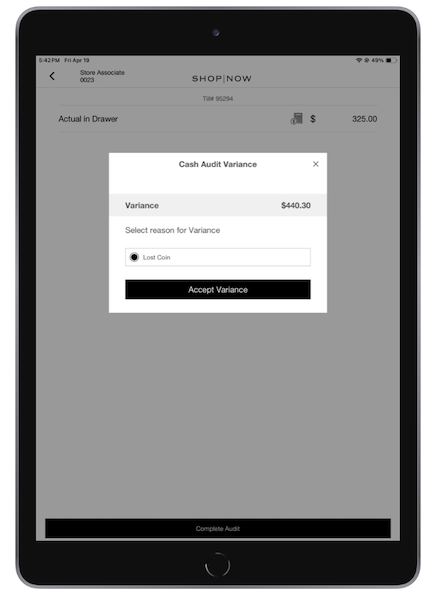
How to configure: Approval policies, reason codes, and a deep link are required to turn on this feature.
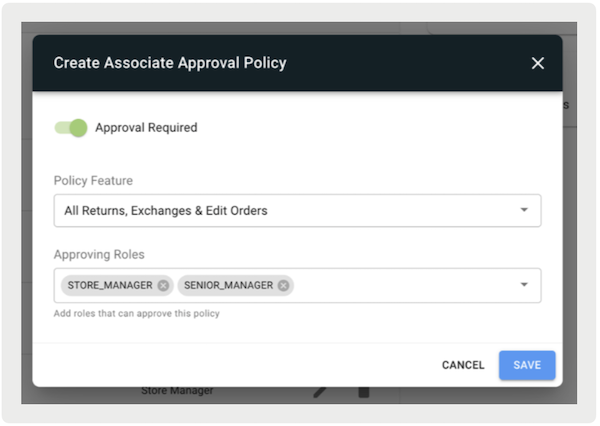
Approval Policy
- In CMS, go to .
- Select .
- Turn on .
- Under , select "".
- Under , select roles that can approve the policy.
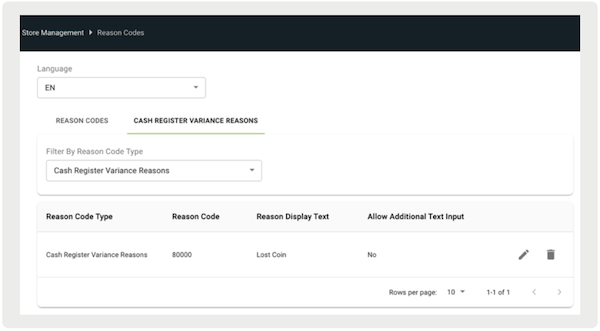
Reason Code
- In CMS, go to .
- Select.
- Create reason codes by referring to this article.
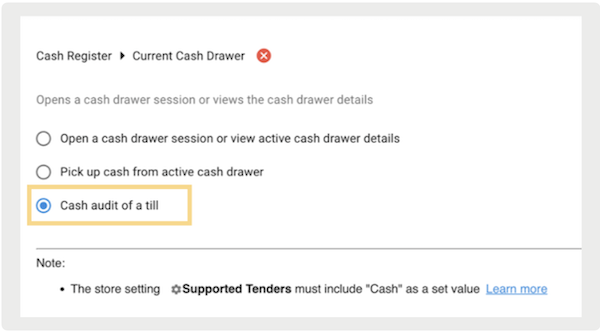
Deep Link
- Edit a layout or a hamburger menu.
- Access the deep link picker.
- Go to .
- Save your changes.
Learn More: Auditing Tills and Managing Cancelled Cash Transactions
Promotions
Single-Use Promo Codes (SUPCs) Lookup
What it does: Easily troubleshoot issues with single-use promotion codes, such as verifying whether a coupon has been redeemed in a single lookup.
How to access:
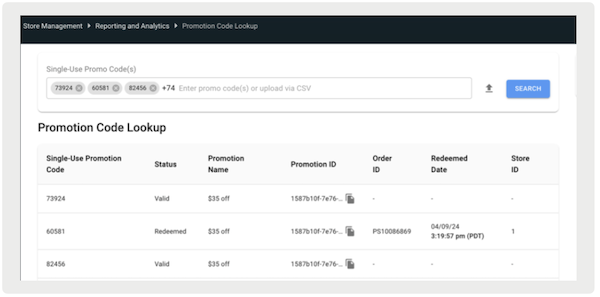
Learn More: Single-Use Promotion Code (SUPC) Report
Other Feature Enhancements
| Title | Description | Help Center Link |
|---|---|---|
| Ability to determine whether to use Wi-Fi IP or ethernet IP for Adyen ethernet connections | For app builds 9.10.1 or greater, the POS app allows users to select either Wi-Fi IP or Ethernet IP for Adyen Ethernet connections. | Learn More about Adyen Set Up |
| Deprecate ReturnsOrderLookupV2 mobile configuration flag | Return Order Search Page V2 UI flag has been deprecated | Learn more about Returns & Exchanges |
| GiveX - Ability to Purchase a Gift Card with a Gift Card | Extended functionality for purchasing a gift card with another gift card tender if you are directly integrated with GiveX | Learn more about Gift Cards |