
Build summary for Modern POS version 8.8.1, including what new features and changes it contains.
Overview of all Features and Changes
| Theme | Feature |
|---|---|
| Reporting | PBL reporting |
| Reporting | Date selector for Recon report |
| Promotions | Best Price Promotion |
| Promotions | Promo Max discount |
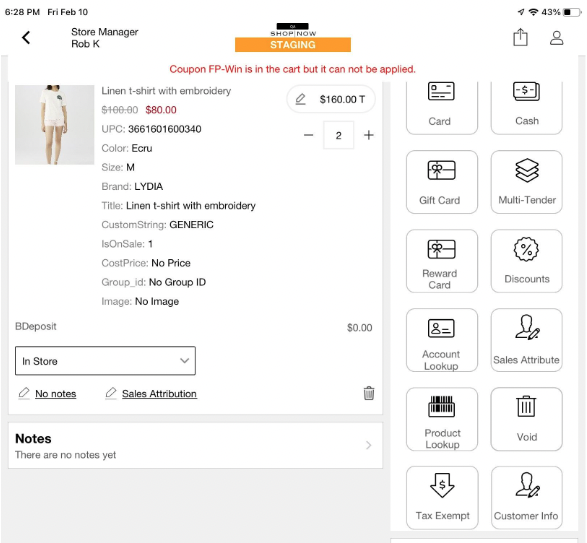
| Promotions | Coupon Warning in Cart |
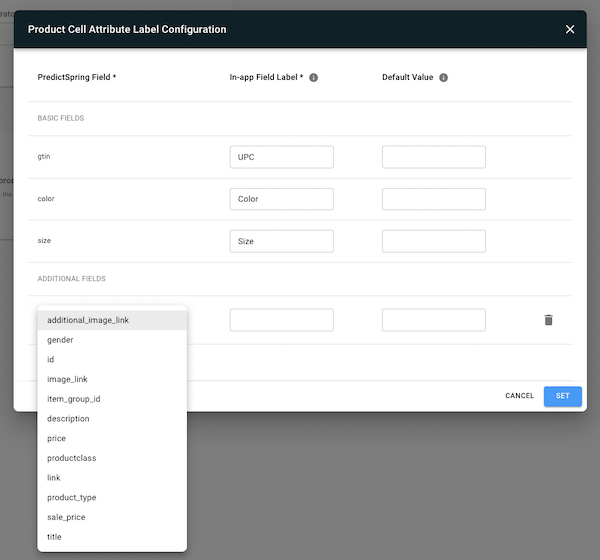
| Product Cell | Product cell configuration with customized (CMS) list of product properties (Except interstitial, Inventory, and BOPIS screens) |
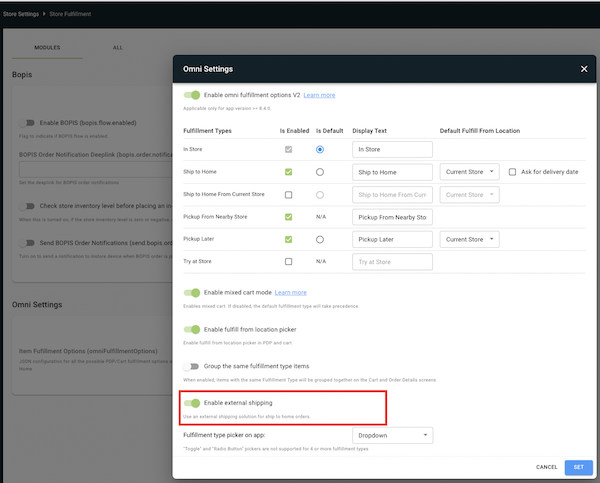
| Omni | SPI for shipping options |
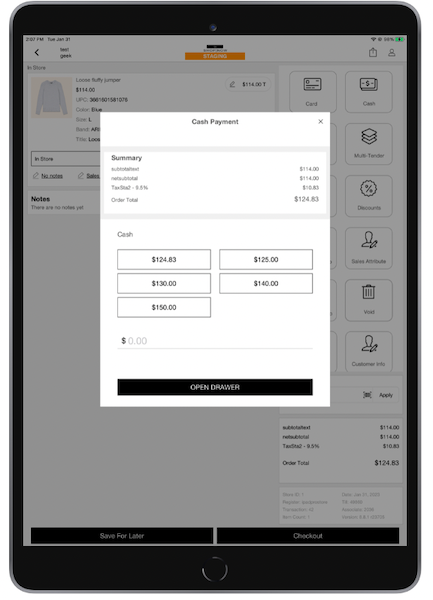
| Core POS | Predictive Cash Tendering |
| Core POS | Quote Deeplink and Search |
| Inventory | Inventory Enhancements: QTYOH adjustment and Cycle Recount Labels |
| Gift Cards | Gift card support for SVS via Adyen |
| Other Feature Enhancements | Collection of customer-impacting feature enhancements made to optimize existing functionality |
| Bugs | Collection of customer-impacting bugs addressed in the month |
Reporting
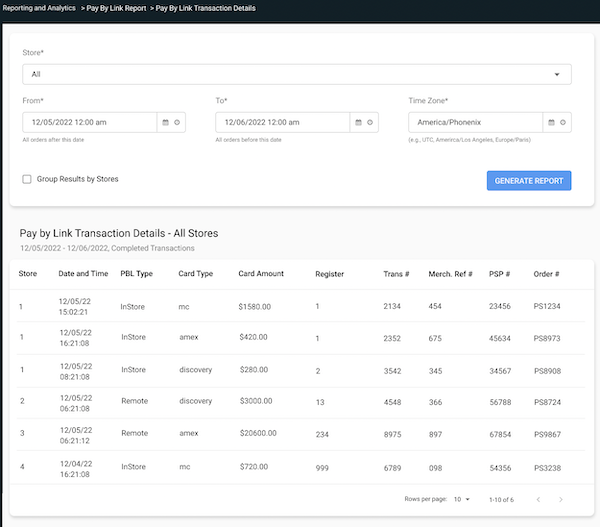
Pay By Link
: Track and reconcile Pay By Link transactions at the store level or by all stores with our dedicated report.
: https://labs.salesforce.com.com/cms/pay-by-link-report
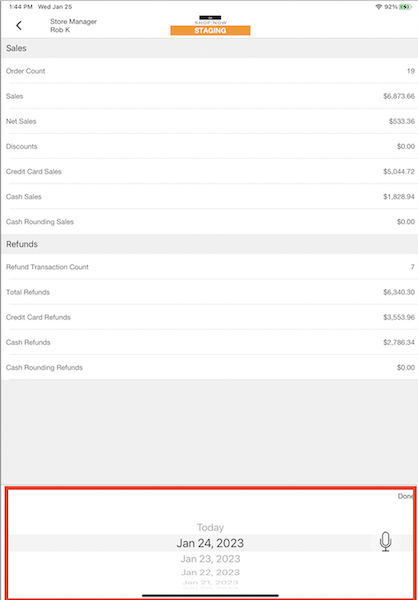
Date Selector for Recon Report
: See past 7 days for in-app sales report. This is a core update with no additional configuration required.
: POS App - Reconciliation Report
Promotions
Best Price Promotion
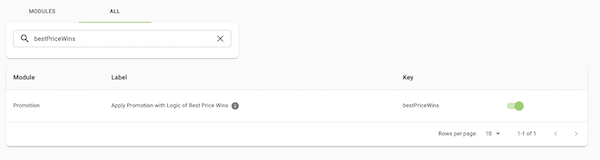
: Give your customers the best value in the cart when there are multiple promotions configured.
:
Merchant has two promotions active and applicable to the products in the cart. There is $600 of promotable products in the cart. If Best Price Wins is enabled, promotion #2 will be applied.
- Promotion #1 - Get 15% off
- Discount: $90.00
- Total: $510
- Promotion #2 - Spend $500.00, get $100 Off (Best price)
- Discount: $100.00
- Total: $500
How to Configure: https://labs.salesforce.com/cms/server-settings-all-v2?q=bestPriceWins
Learn More: Create Promotions in Point of Sale CMS
Promo Max Discount
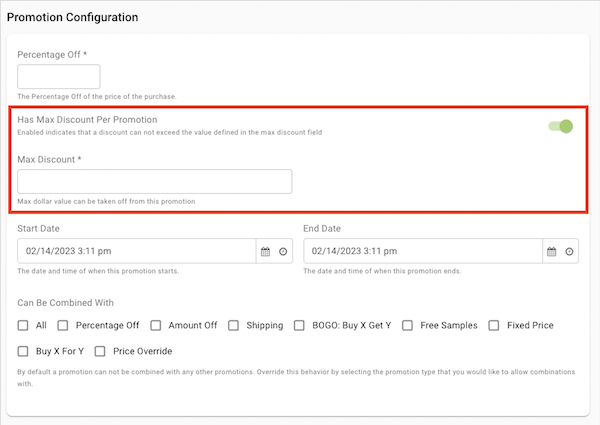
What it does: Gate the total $ amount of discount applied to an order for a percentage off or BOGO percentage off promotion.
Example:
In the following example, "Buy 3 chairs get a footstool for 50% off - up to $100 savings":
Buying three chairs and a footstool for $100 will save $50.
Buying three chairs and a footstool for $200 will save $100.
Buying three chairs and a footstool for $250 will save $100 because even though the footstool is $125 with 50% off, the max discount was set at $100.
How to Configure: https://labs.salesforce.com/cms/promotion-v2/create/ORDER_PERCENT_OFF
Learn More: Create Promotions in Point of Sale CMS
Coupon Warning in Cart
What it does: Notify the associate when a coupon is valid, applied to the cart but not applicable to the cart yet. If there is a change in the cart (e.g., adding qualifying products), and the promotion does become applicable then it will be automatically applied without having to scan or manually enter it again.
Product Cell
Customized Product Cell Configuration (Cart, Return, and Order History Only)
What it does: Select and configure the titles and fields displayed and tracked in the Product Cell. You can also add a custom string if you have custom string fields mapped. (Please note changes will only apply to Cart, Return and Order History. Inventory, interstitial and BOPIS/BOFIS screen updates will be in the next release)
How to Configure: https://labs.salesforce.com.com/cms/server-settings-v2/pos/product
Learn More: Configure Product Display Labels
Omni
SPI for Shipping Options
What it does: Improve Omni Ship to Home orders with our Shipping Options SPI. This SPI shows the shipping cost and delivery times for a third party in a Point of Sale cart summary.
How to Configure: https://labs.salesforce.com/cms/server-settings-v2/pos/store-fulfillment (requires 3rd party software for shipping data)
Learn More: Configuration & Setup in API, SPI, & Webhook Specs
Core POS
Predictive Cash Tendering
What it does: Present cash-tender options for your sales associates to select from when taking cash payments.
- The exact order amount will always be the first option.
- The next multiple of 5 after the exact order amount.
- The next multiple of 10 after the exact order amount.
- The next multiple of 20 after the exact order amount.
- The next multiple of 50 after the exact order amount.
How to Configure: In CMS go to

Learn More: Predictive Cash Tendering
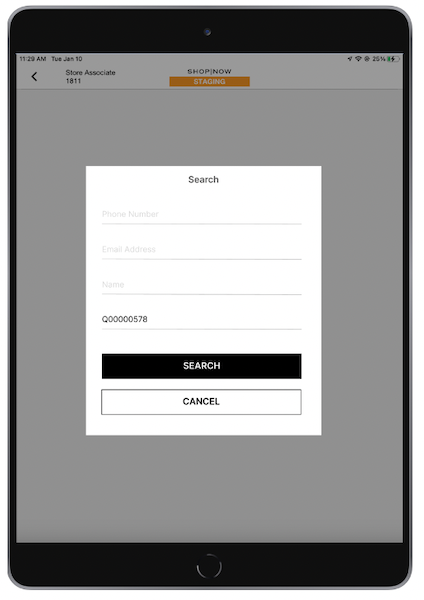
Quote Search
What it does: Search for a quote in the App by Customer information instead of scrolling through a list of saved carts. (Works for both Point of Sale and Netsuite created quotes. Only available Online.)
How to Configure: Add Quote Lookup as a Deeplink in your hamburger menu or any other layout.
Learn More: Create and Manage Customer Quotes
Inventory
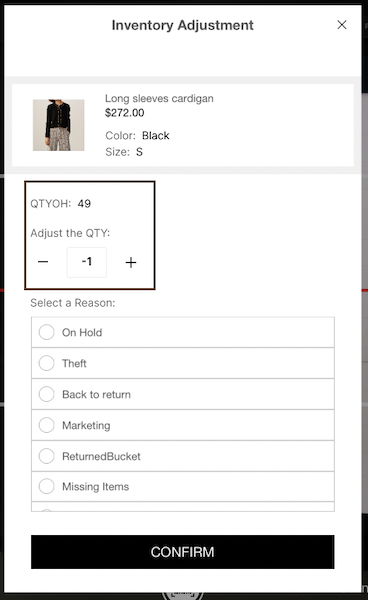
Quantity On-Hand Adjustment
What it does: Enter quantity changes in inventory management in the App instead of having to choose +/- for each item difference.
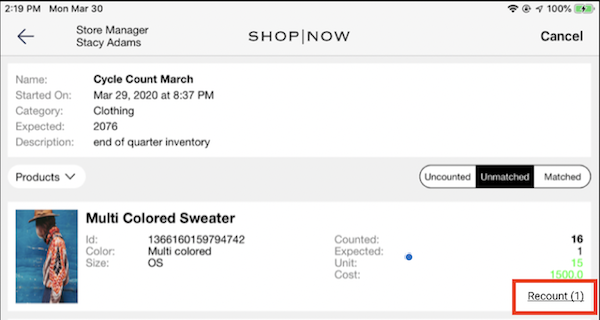
Cycle Count Recount Tracker
What it does: Cycle count recount function now shows as a label and tracks the number of recounts instead of a static icon in the app cycle count screen.
Gift Cards
SVS Support via Adyen
What it does: Allow merchants to use SVS gift cards with their Adyen terminal
Learn More: Gift Cards via Payment Terminal
Other Feature Enhancements
| Title | Description | Helpcenter link if applicable |
|---|---|---|
| Fiscalization for Spain | Further fiscalization support for sequential order tracking for Spain | Fiscalization Requirements for Spain |
| SFOMS v57 API supported - SFCC 23.1 support | Salesforce Order Management and Commerce version compatibility. |
Salesforce (SF) Order Management System (OMS) Integration Guide |
| Synchrony token pass through + cleanup | Token rotation and optimizations to support refunds with Netsuite via Synchrony. | NetSuite Integration Guide |
| Receipt Layout - Line Truncation Property | Customizable line truncation setting for grid in Receipt Layout | Receipt Layouts |
| Approval Policies - add search to listing results, improve validation, add unit tests, and refactoring | Usability enhancement to search approval policies | CMS Store Associate Approval Policies |
| Add 4 columns in download promotion csv | Added fields to Promotion CSV download Discount type+ Percent off / amount off + Can be combined with + Promotion rules | Known promotions Issues and Restrictions |
| Create Cycle Count - Update "productCategoryList" key to "partialCycleCountProductAttributeValueList" | Partial cycle counts can now also include product attributes (e.g., color) | Create Cycle Count in CMS |
| Deep Link - Add check gift card balance deep link | Deeplink for check gift card balance | Gift Cards Support in POS |
| Cycle Count - Add ability to cancel a cycle count that is in progress | Ability to cancel cycle count in CMS | Gift Cards Support in POS |
| Clienteling SPI - Update customer | Updates to Clienteling SPI | Configuration & Setup in API, SPI, & Webhook Specs |
| Field Mappings - Revert PS Field Values for Export Order | Order Export Field Mappings Updated | Export Orders Field Mappings |
| Store Settings - Add icon for the Promotion module | Promotion Module added as menu item in Store Settings | |
| ERP Config - Add custom field option: "Location" | Location as custom field in ERP configuration | |
| SFOMS Billing Address | Billing Email Address as an available field in order creation payload for SFOMS | |
| Add item promotion title for order history | Show promotion title in order history | |
| Fix purchase order start event not working | Ability to track transfer started | |
| Unique id for inv adjustment export file | Inventory Adjustment Event IDs for tracking | |
| ERP Config - add setting to enable/disable OMS as Master of Record | Can enable OMS as Master of Record for all orders |
Bugs
| Title | Description | Helpcenter link if applicable |
|---|---|---|
| Associates - Fix missing column data: "recently processed order" | Recently processed order now has data | |
| Register build report data calibration | Register Version Report Register Count Updates | |
| Unable to change fulfillment type in editorder mode | Bug fix for changing fulfillment type in edit order | |
| Check # missing | Check number is now populating data | |
| Merchant Default Enhancement for Roles | Default roles for newly created merchants | |
| Incorrect behavior when normal and GC products are in the cart | Corrected behavior to not show discount on a gift card | |
| Reprint receipt issue: SFOMS syncOrder refactor | Reprint receipt for PayByLink | |
| Receipt Print Count | Fixed receipt print count | Print Tags Configuration |
| Quiz - bug fixes |
Bug Fixes for: Answers preselected on layout load Answers automatically selected/deselected when the quiz is scrolled Selected/Deselected images mismatch with actual state of answer |