
Build summary for Modern POS version 11.2.1, including what new features and changes it contains.
| Section | Feature |
|---|---|
| Clienteling | Streamline and Track Customer Deletion |
| Core Platform | |
| Loyalty | Boost Customer Confidence with Clear Loyalty Reward Information at Checkout |
| POS Mobile | Control Multi Tender Payment Options |
| Other | Various |
Clienteling
Streamline and Track Customer Deletion
What it does: You can now delete customer records using either the customer’s ID or email address. You can also track deletion requests with real-time visibility into the status of each request. This updated flexibility helps merchants meet data privacy standards like GDPR and CCPA more efficiently by streamlining the deletion process and improving audit readiness and operational transparency.
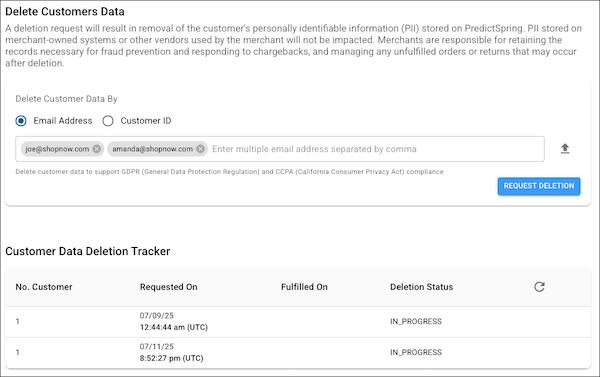
How to configure in CMS: In CMS, set the new by setting if deleting customer data. Use the to check the status of your deletion request.
Learn more: CMS User Management
Core Platform
Support Transparent and Flexible Shipping Information for POS Associates and Shoppers
What it does: Show shipping charges and discounts at the item level in the POS app and on customer receipts. Previously, the POS system showed only the delivery group level shipping fees, which created misalignment on shipping charges between merchants and customers. Retail associates can now process checkout, refunds, and exchanges with more accuracy and shoppers can see item-level breakdowns of shipping fees and discounts. By not using shipping promotions set in the CMS that target whole delivery groups, you can keep revenue accurate and prevent overdiscounting and overrefunding of shipping fees.
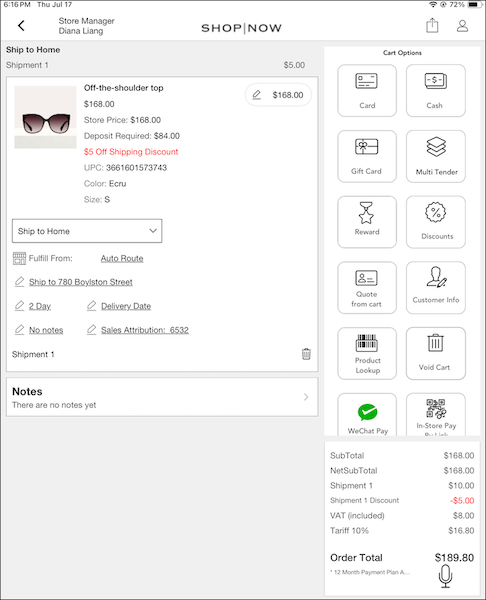
How to configure in CMS:
- Enable and configure the Delivery Groups SPI.
- Turn off any custom shipping method SPIs.
- To provide the shipping cost in the Delivery Group SPI, first delete or turn off any No-cost Shipping promotions you’ve configured in CMS.
- On your Sales print receipt template, add the print receipt tag for item-level shipping discounts: ps_p_item_shipping_discount_text.
- On email receipt templates, add these available etags: {item_shipping_charge}, {item_shipping_discount}, {item_shipping_discount_text}.
Learn more:
Streamline Region Access for CMS Users
What it does: Assign access for a CMS user to all regions or only the region, they’re created in. Previously, if you wanted a user to access all regions in your merchant account, you had to manually add them to each region. This new setting reduces setup time, minimizes manual configuration, and verifies region permissions are consistently applied during user creation. It’s especially helpful for global merchants who manage users across multiple regions.
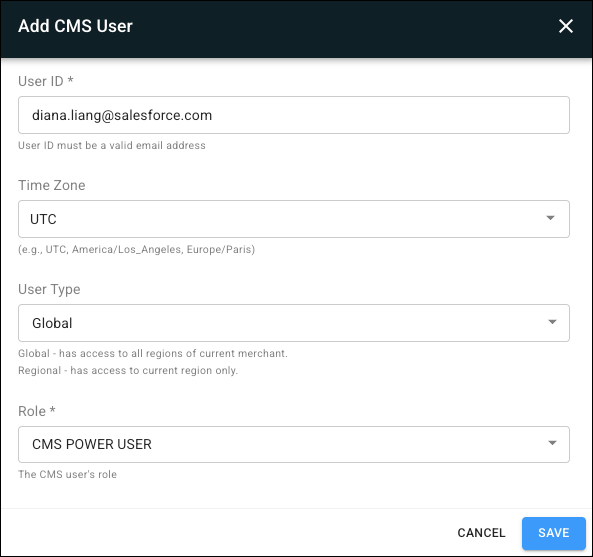
How to configure in CMS: In CMS, set the new setting if adding a new CMS user.
Learn more: CMS User Management
Loyalty
Boost Customer Confidence with Clear Loyalty Reward Information at Checkout
What it does: Clearly show customers the total reward points available and the monetary value of the points. With this information, customers and store associates can better understand the value of loyalty points and track their loyalty rewards balances. With improved tracking of reward point balances, the POS system can enforce redemption limits accurately and show clear errors.
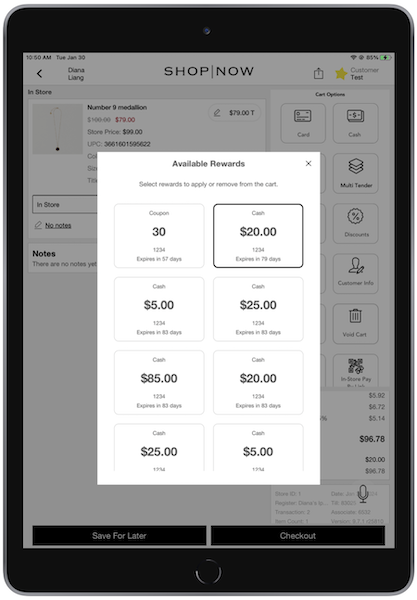
How to configure in CMS: No configuration needed as this is the new default behavior.
Learn more: Point of Sale Loyalty SPIs
POS Mobile
Control Multi Tender Payment Options
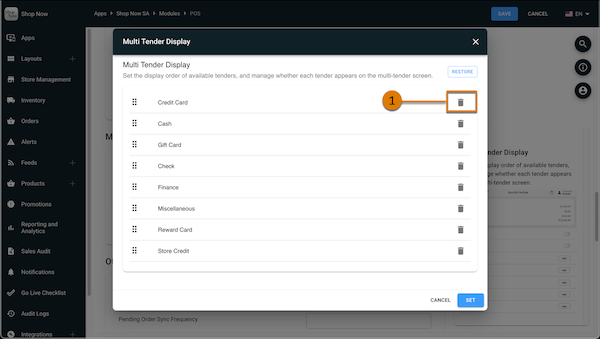
What it does: You can now easily hide payment options that you don’t want available for a split payment. Before this change, deleting a payment option from the Multi-Tender Display Order deleted the tender option completely. Now you can easily control which of your supported tender options are available to customers using a split payment.
How to configure in CMS:
- In CMS, go to and edit a selected app.
- In your app settings, go to .
- Edit the .
- To hide a tender option from the multi tender screen at checkout, select the trash can icon
(1) to delete it.
Learn more: Configure Multiple Tenders for Point of Sale
Other Feature Enhancements
| Title | Description | Help Center Link |
|---|---|---|
| Reconcile Transactions More Efficiently with Acquirer Reference Data | Acquirer Reference numbers are now available in order to export reports. Easily reconcile transactions, like gift card redemptions, with this new information. Acquirer reference numbers help you reconcile data more effectively for internal audits, enhancing compliance and risk management. | Purchase Order |
| Capture Discounts, Tariffs, and Punchout SKUs in Salesforce Order Management Integration | Native integration between POS and Salesforce Order Management (SF OMS) now supports sending additional order-level data. This includes discount codes and promotion names applied at checkout, tariff amounts collected as part of the order, and CustomSKU values used in Punchout transactions. | SF OMS CMS Configuration |