
Build summary for Modern POS version 11.1.1, including what new features and changes it contains.
| Feature | Description |
|---|---|
| API / SPI | |
| Fulfillment Type in Vertex Tax Quotations | Implemented fulfillment type determination for accurate tax quotations. |
| Clienteling | |
| Enhanced California Consumer Privacy Act (CCPA) / General Data Protection Regulation (GDPR) Customer Data Deletion | Enhanced CMS to delete customer data from Point of Sale databases and outputs. |
| Core Platform | |
| Tariff Surcharge Handling in POS | Handles tariff surcharges within the POS system, allowing merchants to transparently pass on costs to customers and improve pricing transparency. |
| Improved No-Cost Shipping Promo Visibility | Introduced clearer visual indicators for no-cost shipping promotions. |
| Fiscal | |
| Compliance with Spain Fiscal Requirements | Integrated new fiscal requirements for Spain to follow EFSTA regulations. |
| Inventory Management | |
| Serial Number Tracking in Returns Flow | Serial numbers are now recorded in order history, TLogs/JSON, and receipts. |
| Payments | |
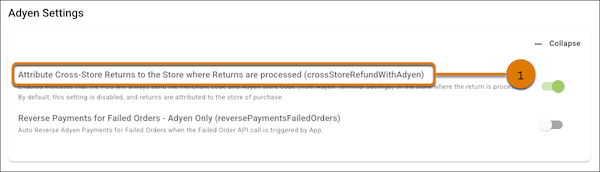
| Enhanced Adyen Cross-Store Return Processing | New setting to process returns to Adyen across multiple stores for accurate reconciliation. |
| Returns | |
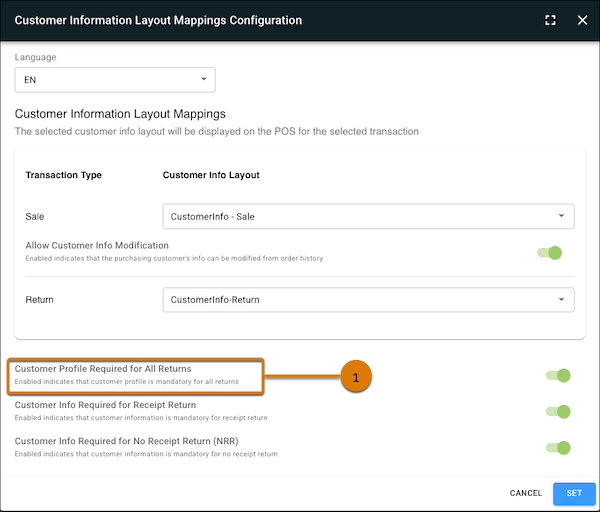
| Customer Profile Prompt for Return | New setting prompts the POS app to capture customer information for all returns, both online and offline, verifying accurate and consistent data. |
| Receipts | |
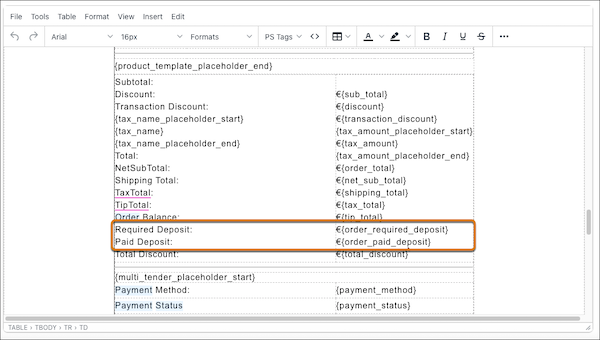
| Print Deposit Amount in Email Templates | New tags show the paid and required deposit amounts at the order level in email templates. |
API / SPI
Fulfillment Type in Vertex Tax Quotations
What it does: New settings in the Vertex configuration support accurate tax quotations based on the fulfillment type of items. This can assist with company regulations compliance and improving financial accuracy.
How to configure in CMS:
- Configure the Vertex tax engine in CMS.
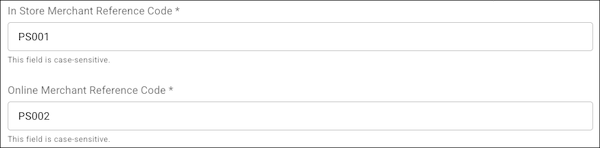
- Under , enter the Company Code you configured for your in-store taxpayer entity in Create Taxpayer Entity (for example PS001).
- Under , enter the Company Code configured for your online taxpayer entity in Create Taxpayer Entity (PS002). If a separate online entity isn't configured, you can reuse the in-store Company Code (for example PS001).
Learn more: Integrate Vertex
Clienteling
Enhanced CCPA/GDPR Customer Data Deletion
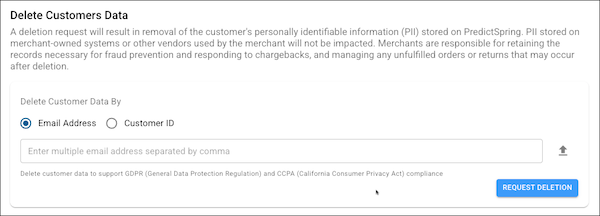
What it does: Enhancements to CMS supports deleting customer data from Retail Cloud databases and outputs. Thorough data removal from all relevant databases and outputs helps businesses be fully compliant with security regulations.
How to configure in CMS:
- In CMS, go to .
- Select either or .
- Enter the values for the option you chose.
- Select .
Core Platform
Tariff Surcharge Handling in POS
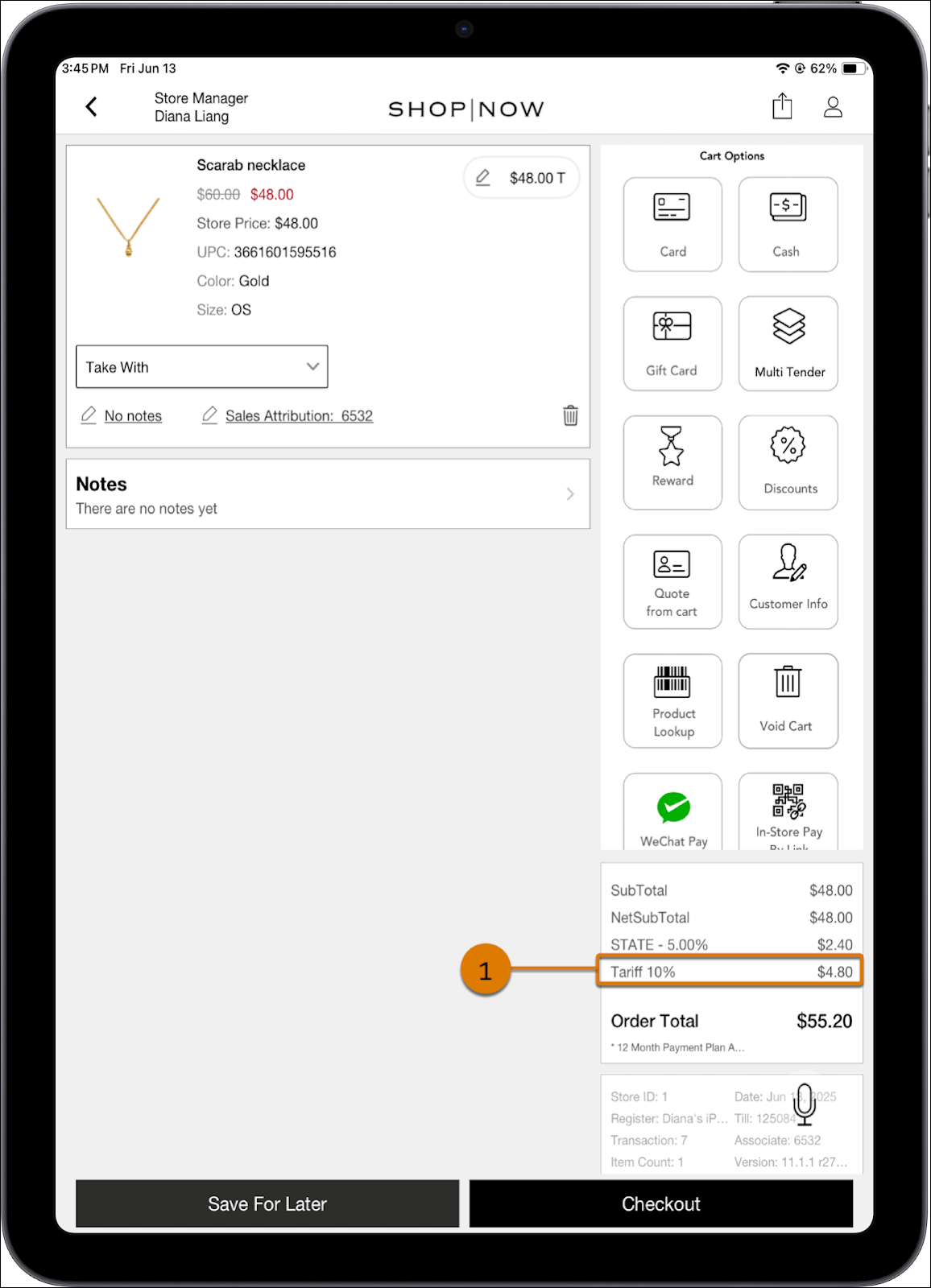
What it does: Set the tariff percentage rate with this new configuration in CMS. This new feature can help with regulatory requirement alignments, enhance customer trust, and provide a competitive advantage.
How to configure in CMS:
- In CMS, go to .
- Enter a percentage value in the field.
- Save your changes.
Learn more: Managing Tariff Surcharges in Point of Sale
Improved No-Cost Shipping Promo Visibility
What it does: Better visibility of applied no-cost shipping promotions increases user engagement and trust, making the checkout process more transparent.
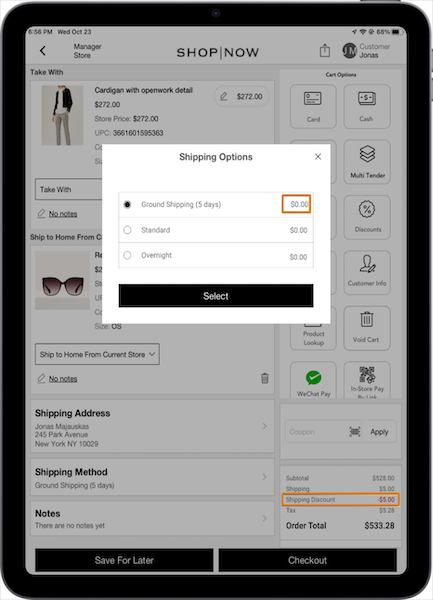
How to configure in CMS: No configuration is needed as this is the default behavior.
Learn more: No-Cost Shipping Promotion
Fiscal
Compliance with Spain Fiscal Requirements
What it does: Integrated new fiscal requirements for Spain to follow EFSTA regulations. The integration enhances data accuracy and integrity, improving regulatory reporting and audit readiness.
How to configure in CMS:
- In CMS, go to .
- and turn on these settings:
Learn more: Fiscalization Requirements for Spain
Inventory Management
Serial Number Tracking in Returns Flow
What it does: Serial numbers are now recorded in order history, TLogs/JSON, and receipts. This provides accurate tracking of serialized items, which is crucial for inventory management and customer service.
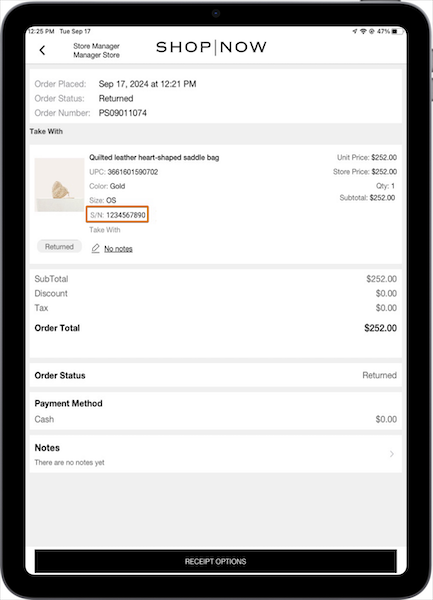
How to configure in CMS: No configuration is needed as this is the default behavior.
Payments
Enhanced Adyen Cross-Store Return Processing
What it does: New setting for processing returns to Adyen across multiple stores for accurate reconciliation. This feature reduces reconciliation discrepancies, improving financial accuracy and reporting.
How to configure in CMS:
- In CMS, go to
- Expand Adyen.
- Turn on (1).
Learn more: Adyen Payment Gateway Information
Returns
Customer Profile Prompt for Return
What it does: New setting prompts the POS app to capture customer information for all returns, both online and offline, verifying accurate and consistent data. This feature improves operational efficiency and customer service, enhancing trust through data accuracy.
How to configure in CMS:
- In CMS, go to .
- To edit , select the pencil icon.
- For the , select a layout.
- Turn on (1).
- Set and save your changes.
Learn more: Require Customer Information for Returns in the POS app
Receipts
Display Deposit Amount in Email Templates
What it does: New tags show the paid and required deposit amounts at the order level in email templates. This clear display of deposit amounts in email templates enhances order transparency and improves customer communication.
How to configure in CMS:
- In CMS, configure an .
- Add the PS Tags:
- - prints the required deposit amount at the order level
- - prints the paid deposit amount at the order level
- Set and save your changes.
Learn more: Receipt Print and Email Component Tags by Receipt Section