
Build summary for Modern POS version 10.8.1, including what new features and changes it contains.
| Feature | Benefit |
|---|---|
| Core Platform | |
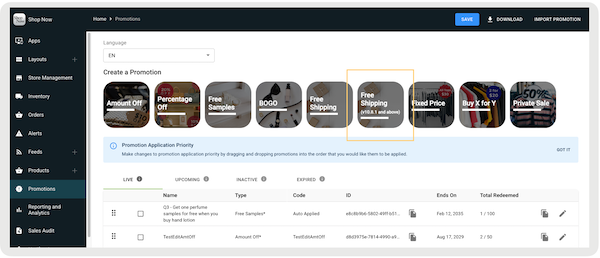
| New at no additional cost Shipping Promotion V2 | Adds support for a new version of at no additional cost shipping promotions, storing discount details in the JSON and establishing compatibility with delivery groupings |
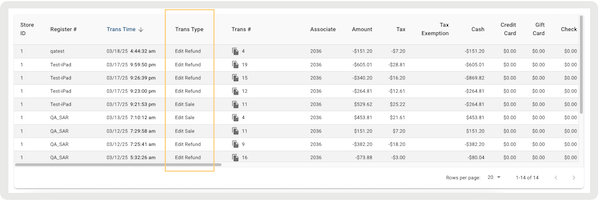
| New Transaction Type for Returns in Edit/Appeasement Scenarios | Introduces new transaction types in the Electronic Journal to track refunds processed through edits or appeasements for a specified day or date range |
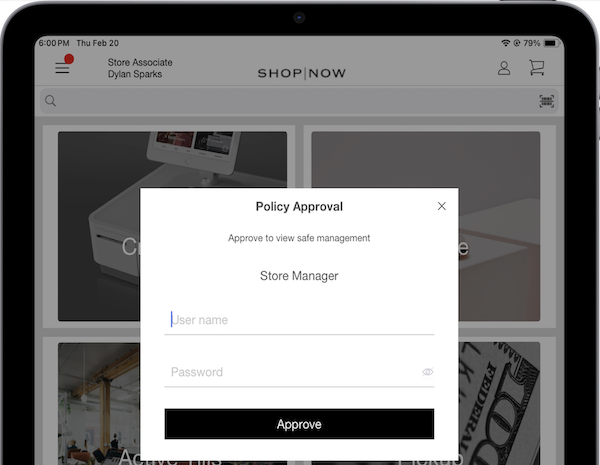
| Safe Management Override | Implements a new approval policy allowing authorized users to edit safe management settings |
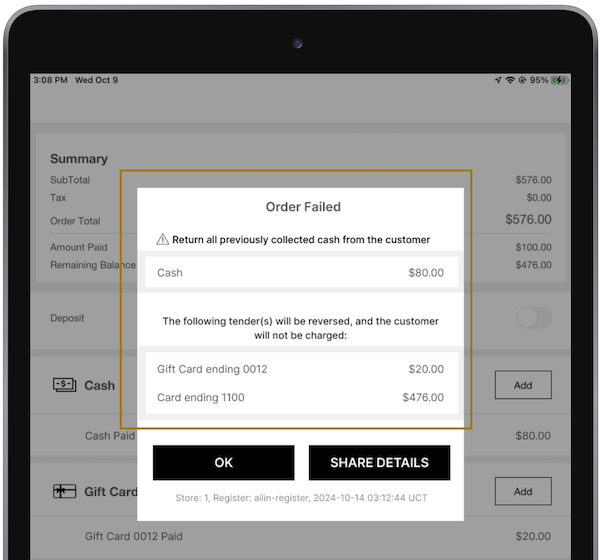
| Automated Payment Reversal for Failed Orders | Allows merchants using Adyen to automate payment reversals for failed orders due to network disruptions or API errors, reducing manual intervention |
| Discounts | |
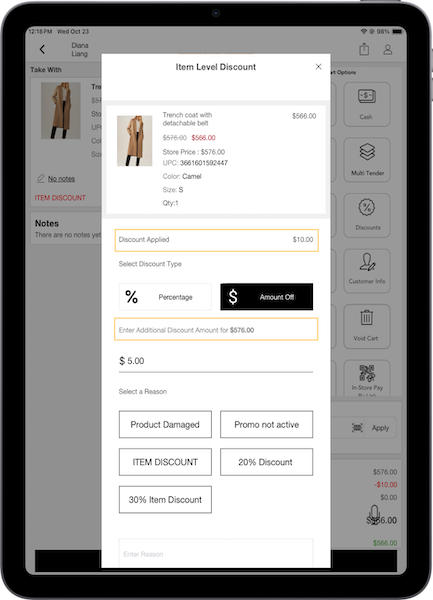
| Cumulative Discounts for Multiple Edits or Appeasements | Enhances discount handling by allowing cumulative discounts across multiple edits or appeasements |
| Inventory Management | |
| Scheduled Inventory Event Daily Export | Enhances the CMS Inventory Event Export with scheduled export capabilities |
| Fulfillment, Order Headers, and Customer Details | Improves ROPIS, BOPIS, and BOFIS flows by displaying customer email and phone number if available |
| Other | Various |
Core Platform
New at no additional cost Shipping Promotion V2
What it does: Adds support for a new version of at no additional cost shipping promotions, storing discount details in the JSON and establishing compatibility with delivery groupings.
As of March 2025, Salesforce offers two types of at no additional cost shipping (V1 and V2). Each version has different features. See the table for a comparison.
| At no additional cost Shipping V1 | At no additional cost Shipping V2 |
|---|---|
| App build prerequisite: 10.7.1 or earlier | App build prerequisite: 10.8.1 or greater |
| Apply a shipping discount for all promotions that qualify for at no additional cost shipping | Apply a shipping discount for all promotions that qualify for at no additional cost shipping |
| Record shipping charges and discounts in TLogs and JSON | Record shipping charges and discounts in TLogs and JSON |
| Print shipping charges on receipts | Compatibility with delivery groupings |
| Print shipping charges and discounts on receipts |

How to configure in CMS:
- In CMS, go to.
- Configure the promotion by referring to this article.
Learn more: No-Cost Shipping Promotion
New Transaction Type for Returns in Edit/Appeasement Scenarios
What it does: Adds new transaction types in the Electronic Journal to track refunds processed through edits or appeasements for a specified day or date range.
For refunds given to a customer after an order has been edited, the transaction will be recorded as "Edit Refund." However, any new items added to the edited order will be recorded as "Edit Sale," which can increase the total balance beyond the original amount.
How to configure in CMS: No configuration is needed as this is the default behavior.
Learn more: Configuring Appeasements on the POS App
Safe Management Override
What it does: Implements a new approval policy, allowing authorized users to edit (add or remove funds) safe management settings. Editing allows funds to be added or removed for safe management.
How to configure in CMS:
- In CMS, go to .
- Select .
- Under , select "".
- Under , select the roles allowed to edit the floats in the safe management.
- Configure the rest of the fields by referring to this article.
- Save your changes.
Learn more: Manage Safe Funds in Point of Sale
Automated Payment Reversal for Failed Orders
What it does: Permits merchants using Adyen to automate payment reversals for orders that fail because of network problems or API errors. This reduces the need for manual intervention.
How to configure in CMS: No configuration is needed as this is the default behavior.
Learn more: View Failed Orders Report
Discounts
Cumulative Discounts for Multiple Edits or Appeasements
What it does: Enhances discount handling by allowing cumulative discounts across multiple edits or appeasements. The app retains the original discount and adds any subsequent adjustments to it. In the example, an initial appeasement applied a $10 discount, which is then refunded to the customer.
How to configure in CMS: No configuration is needed as this is the default behavior.
Learn more: Configuring Appeasements on the POS App
Inventory Management
Scheduled Inventory Event Daily Export
What it does: Enhances the CMS Inventory Event Export with scheduled export capabilities
How to configure in CMS:
- In CMS, go to .
- Create or edit an Inventory Event Export by referring to this article.
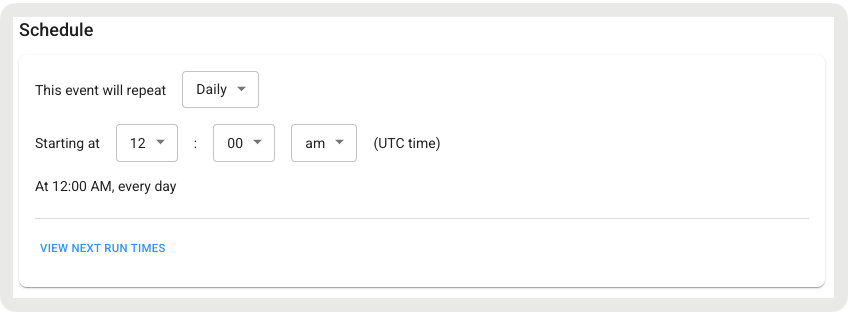
- Turn on . After it’s turned on, the scheduler appears, and you can specify how often to run the export. The only scheduling option is daily. This creates a daily file for each event you select. This file has all the data that was created for that event during the day. If no data is created for a selected event on a given day, an empty file is generated for that event.
Learn more: Exporting Inventory Events in Point of Sale CMS
Fulfillment Order Headers and Customer Details
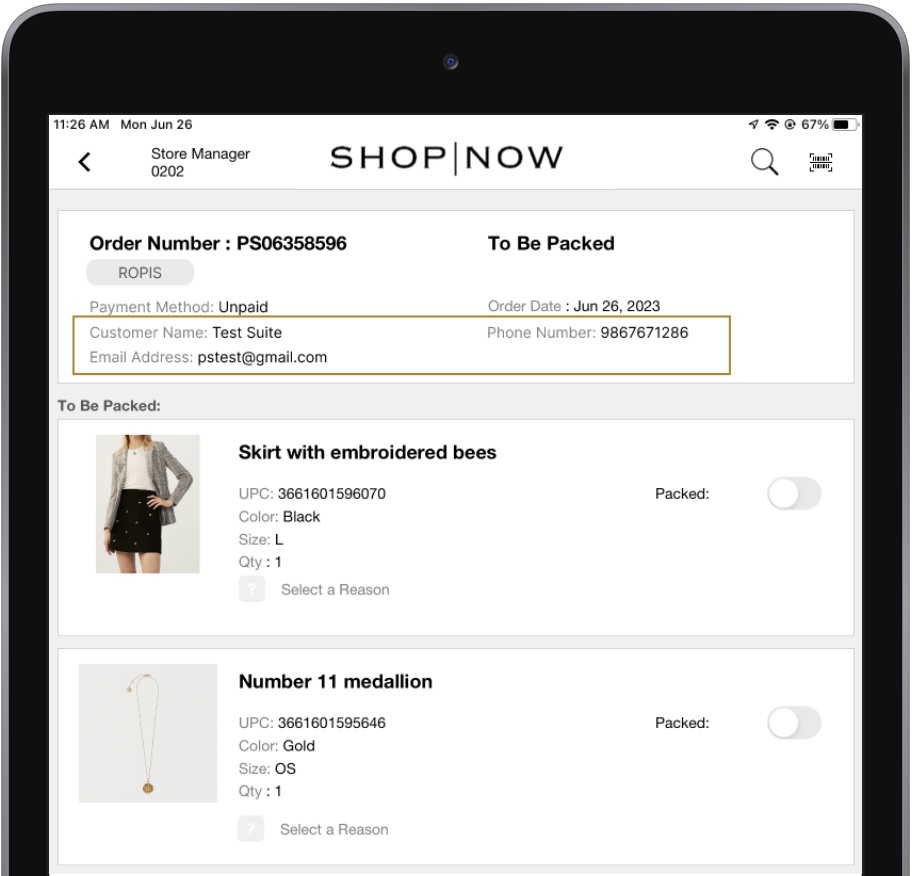
What it does: Improves Reserve Online, Pick-up In-store (ROPIS), BOPIS (Buy Online, Pickup In-Store), and BOFIS (Buy Online, Fulfill In-Store) flows by displaying customer email and phone number if available.
How to configure in CMS: No additional configuration is needed as this is the default behavior.
Learn more:Use Reserve Online, Pick Up In Store (ROPIS) Manage Buy Online, Pickup In Store (BOPIS) Orders in Point of Sale
Other Feature Enhancements
| Title | Description | Help Center Link |
|---|---|---|
| Multiple Associate API Bulk Update | Allows merchants to create and update multiple associates in a single API call, improving efficiency and helping manage API request quotas | Bulk APIs for Creating & Updating Store Associates |
| Shipping Packages Sort Order | Automatically sorts shipping package configurations alphabetically in both CMS and the POS app | Configuring & Printing Shipping Labels via Point of Sale SPI |
| Edit and Appeasement Flow with Promotions Handling | Enhances the edit and appeasement flows by retaining original promotions and discounts from the original sale. Note, only manual discounts can be applied if editing an order—promotions are not supported. | Configuring Appeasements on the POS App |