
Build summary for Modern POS version 10.7.1, including what new features and changes it contains.
| Feature | Benefit |
|---|---|
| Analytics/Reporting | |
| Omit Nonmerchandise SKUs from Sales Reports | Use the improved product class setting to exclude items like gift cards, warranties, and donations to maintain accurate sales-related metrics in reports. |
| Export Register Vitals via Webhook | You can now export your register's important data. This helps you find and fix any problems quickly to keep the system stable and reliable. |
| Integrations | |
| Apply Rewards with Synchrony Credit Cards Purchases | You can now look up available rewards and apply them during checkout for greater payment flexibility. |
| Inventory Management | |
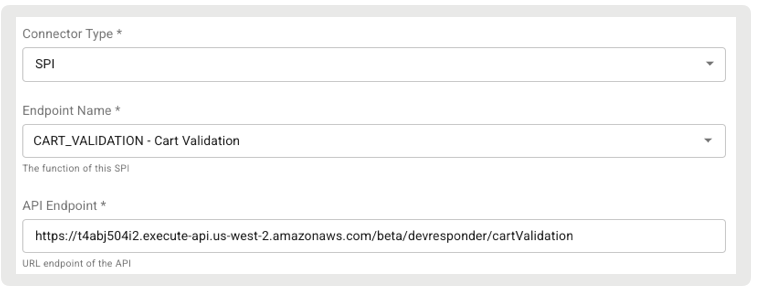
| Validate Cart via SPI | Allows the POS app to send a cart to a merchant's external system for validation before order placement. The SPI also reserves inventory, making sure that items are held for the customer until the order is confirmed. |
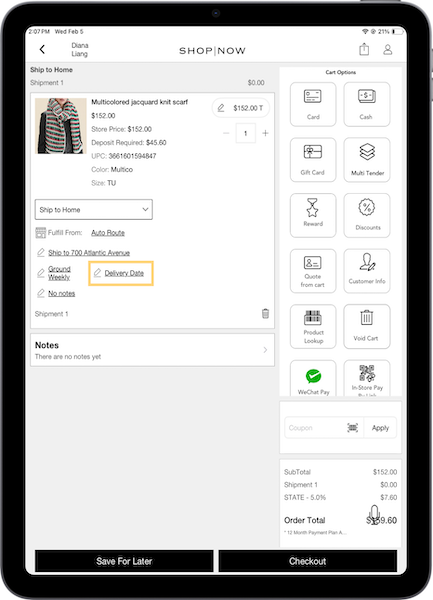
| Delivery Group Enhancements | SPI has been enhanced to support new delivery date functionality, allowing you to decide which products support a delivery date picker and which won't. |
| Simplify CMS Inventory Reporting with Enhanced Filtering and Direct Email Delivery | Download the Inventory Overview report straight to your inbox for easy access and improved inventory management. |
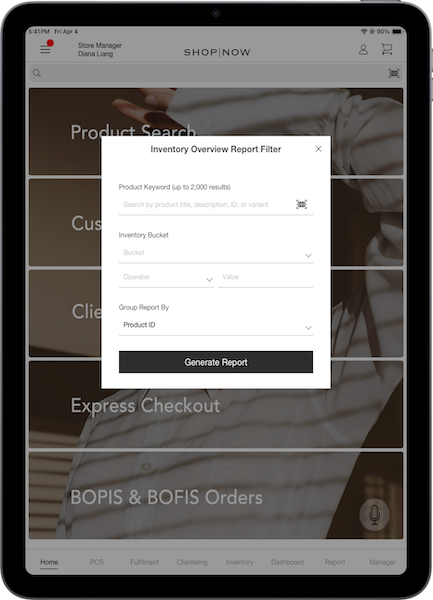
| Streamline Inventory Management with Enhanced Filtering on the POS App | Filter inventory by product keywords (title, description, ID, or variant), with results limited to 2,000 items. Additional filters by inventory bucket and condition (operation and value) permit grouping by product ID or variant group ID. |
| Other | Various |
Analytics/Reporting
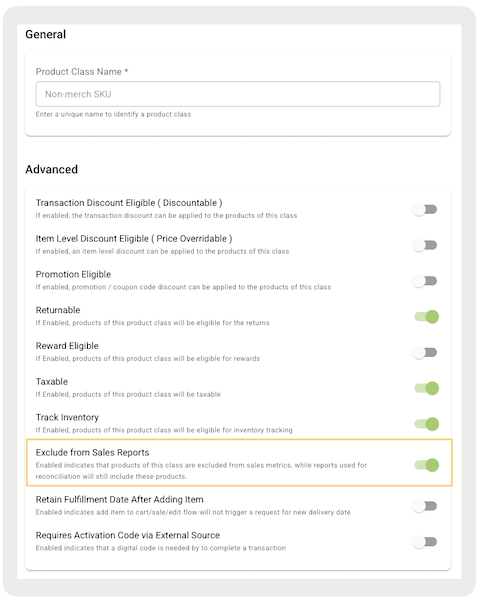
Omit Nonmerchandise SKUs from Sales Reports
What it does: The improved product class setting allows you to exclude items like gift cards, warranties, and donations from sales and refund metrics in all sale reports. This establishes more accurate sales data and can help avoid inflating sales figures with nonrevenue items.
How to configure in CMS:
- Go to .
- Create or edit an existing Product Class.
- Turn on from .
Learn more: Set Up Non-Merchandise SKUs
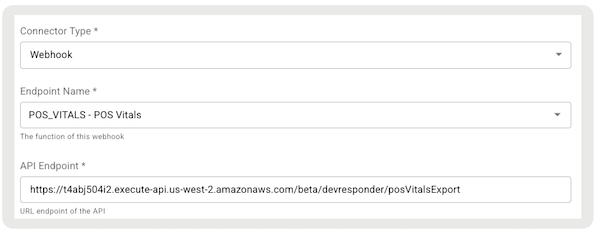
Export Register Vitals via Webhook
What it does: Vitals data can be exported through webhooks. After being received by Salesforce's backend, events are posted to the merchant-specified API endpoint. The JSON payload includes a snapshot of vitals (all captured metrics) and register metadata, such as the capture date/time, for the specific register on the current schedule for publishing vitals to Point of Sale.
How to configure in CMS:
- In CMS, go to .
- Select in the upper right.
- Under , select "".
- Under , select "".
- Configure the rest of the fields.
- Save your changes.
Learn more: POS App Register & Hardware Vitals
Integrations
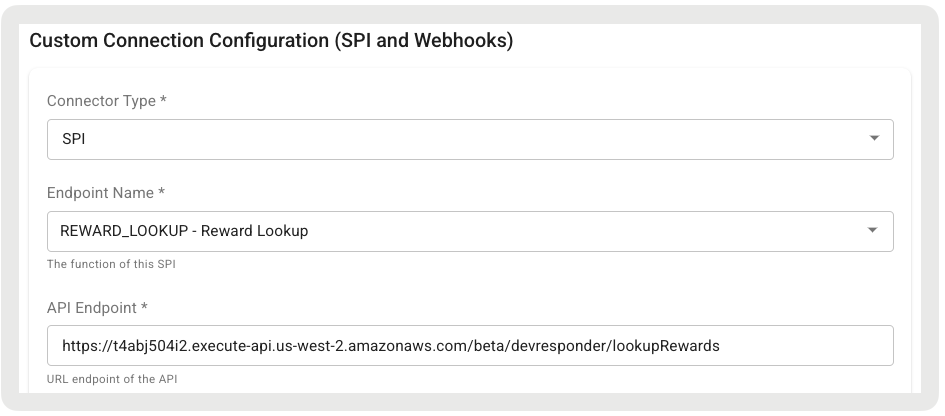
Apply Rewards with Synchrony Credit Cards Purchases
What it does: You can now look up available rewards for a customer and apply them during checkout for greater payment flexibility.
How to configure in CMS:
- In CMS, go to .
- Select .
- Under select "".
- Under , select "".
- Configure the rest of the required fields by referring to Salesforce’s API/SPI Spec.
Learn more: Set Up Processing of Synchrony Credit Card Purchases using Adyen
Inventory Management
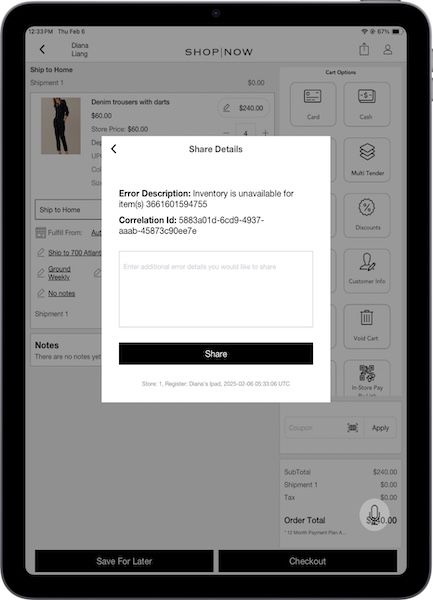
Validate Cart via SPI
What it does: This enhancement allows the POS app to send a cart to a merchant's external system for validation before the order is placed. Additionally, the SPI reserves inventory during this process, guaranteeing that items are held for the customer until the order is confirmed. This feature helps reduce the risk of selling too many items and makes customers happier by checking if items are available after the order is finished.
How to configure in CMS:
- In CMS, go to .
- Select in the upper right.
- Under , select "".
- Under , select "."
- Under , provide the external endpoint.
- Under , select "."
- Under , provide headers to be passed.
- Configure the rest of the fields as needed.
- Save your changes.
Delivery Group Enhancements
What it does: SPI now supports a delivery date picker, allowing you to select which products offer this option. This can help control customer expectations by giving them personalized delivery dates based on product availability. It also checks to make sure only eligible products have this option.
How to configure in CMS:
- In CMS, go to .
- Select in the upper right.
- Under , select "".
- Under , select "."
- Under , provide the external endpoint to retrieve delivery groups.
- Under , select "."
- Under JSON Headers, provide headers to be passed.
- Configure the rest of the fields as needed.
- Save your changes.
Simplify CMS Inventory Reporting with Enhanced Filtering and Direct Email Delivery
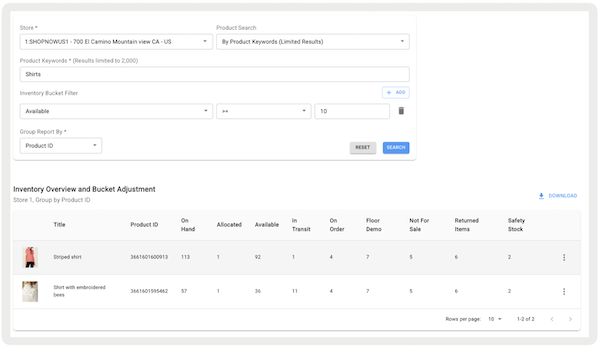
What it does: You can now filter inventory overviews in CMS by product keywords, including title, description, ID, or variant. You can only find results for 2,000 items. Additional filters by inventory bucket and condition (operation and value) turn on grouping by product ID or variant group ID, offering more precise results. The added benefit of downloading the report directly to your inbox provides easy access and enhances inventory management efficiency.
How to configure in CMS:
- Go to .
- Configure the filters.
- Select .
- To download the report, select beneath the search filters. After the report is ready, you receive an email that is used to log into CMS with a download link, which expires after seven days.
Learn more: Inventory Overview and Bucket Adjustment Report
Streamline Inventory Management with Enhanced Filtering on the POS App
What it does: You can now filter the inventory overview report on the app by product keywords, including title, description, ID, or variant. You can only find results for 2,000 items. Additional filters by inventory bucket and condition (operation and value) turn on grouping by product ID or variant group ID, offering more precise results.
How to configure in CMS:
- To set a deep link to access the report on the POS app, edit a layout, hamburger menu, or a tab.
- Using the deep link picker, go to .
- Select.
Learn more: View Product Inventory in Point of Sale
Other Feature Enhancements
| Title | Description | Help Center Link |
|---|---|---|
| Support Product Add-ons with PunchOut Webviews | You can now link add-on products directly to the cart from a web view for a smoother shopping experience. | Supporting PunchOut Webpages on POS App |
| Increase Credit Card Refund Flexibility with Customizable Processing Policies | Select your preferred refund processor based on the order type (online, in-store, mixed cart, or web orders) and order controller for credit card transactions. You can also decide if unreferenced refunds are supported. | Configure Point of Sale Refund Processing Policies for Credit Cards |
| Prevented Multiple Unreferenced Refunds with Improved Refund Process | Multiple app-initiated refunds for a single order will be blocked. This includes multiple credit card unreferenced refunds or a combination of unreferenced credit card and gift card refunds. | Refund Validation Limitations in POS |
| Duplicated Till Reconciliations Due to Network Issues | Improved till management prevents duplicate reconciliations caused by timeouts or network issues. | Managing Tills in Point of Sale |