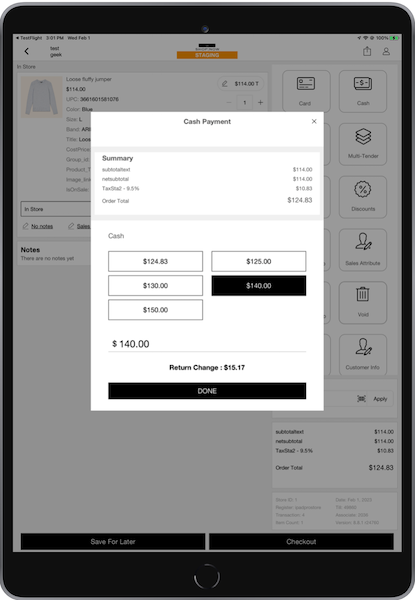
Point of Sale's Predictive Cash Tendering improves efficiency during the cash tendering process. Enable the feature to allow the POS app calculate up to five predicted cash-tender amounts. Select a predicted cash tender amount or manually enter it in the text field.
Prerequisites
- Modern POS App build: 8.8.1 and later
- Platform Support: iPad, iPhone
- Offline Support: yes
The POS app calculates up to five predicted cash-tender amounts with this logic:
- The exact order amount will always be the first option.
- The next multiple of 5 after the exact order amount.
- The next multiple of 10 after the exact order amount.
- The next multiple of 20 after the exact order amount.
- The next multiple of 50 after the exact order amount.

If any of the previous values are duplicates, only one of them is displayed.
Configure the CMS for Predictive Cash Tendering
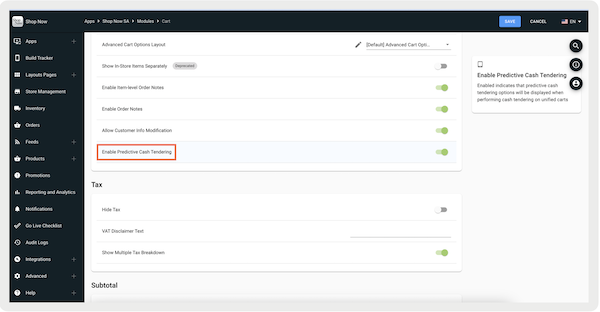
- In CMS, go to .
- Edit your selected app configuration.
- Under , go to .
- Turn on .
-
Save your changes and relaunch the POS app.
Cash Tendering App Flow
After selecting the cash-tendering deep link on the cart, you'll be prompted with this interface.
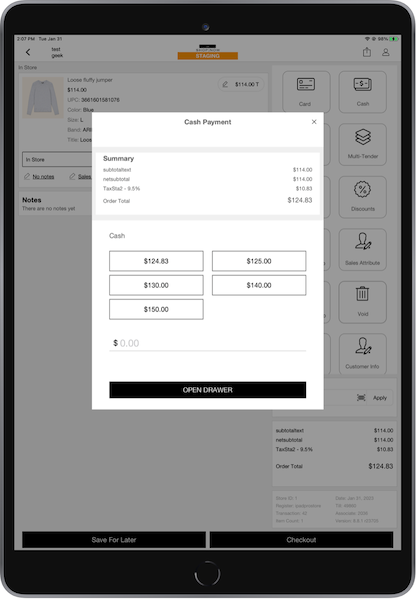
You can select one of the predicted cash tender amounts or manually enter the cash tender amount in the text field. If a predicted cash tender amount is selected, the value automatically populates in the text field as shown in the next screenshot.
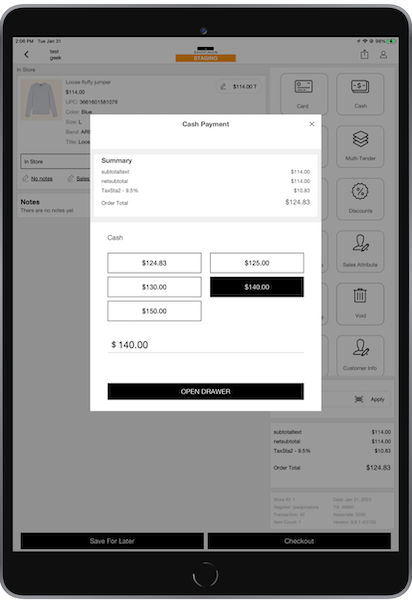
After selecting , the cash drawer opens. The selected option or amount is confirmed and becomes unavailable. After the transaction finishes, you'll be directed to the screen.