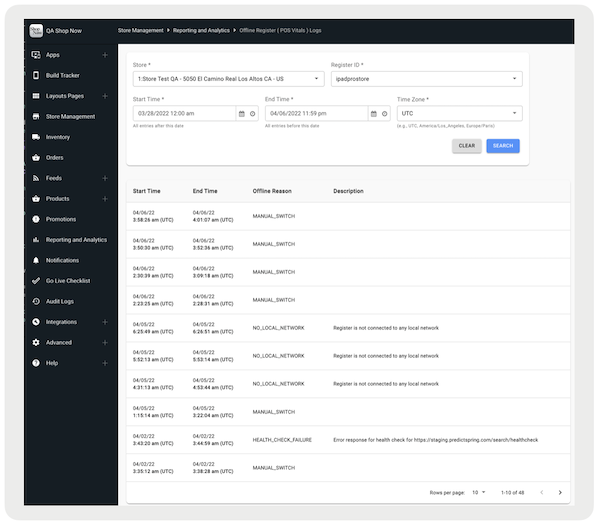
Access vital information about network connectivity mode changes in the the Point of Sale (POS) app. See the time that the offline or online switch happens, what the reason for the offline switch is, and any additional details of the offline switch.
As part of improving offline switch transparency, the POS app now logs the vitals of all network connectivity mode switches. These offline logs are saved locally and then synced to CMS after the POS app is back online.
Prerequisites
- Modern POS App Build: 7.15.5 and later
- Platform Support: iPhone & iPad
- Offline Support: yes
Offline Switches on POS App
Currently, there are three main reasons for offline switches on the POS app:
- Manual Switch
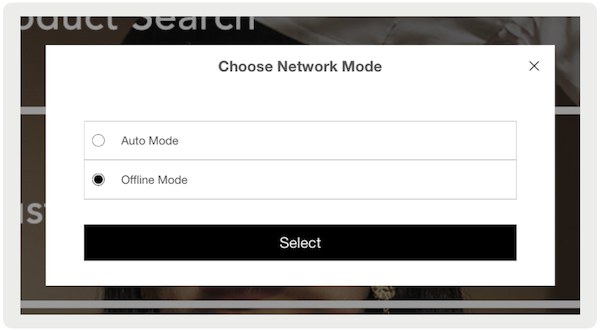
- Manual switches can be initiated if the user presses the "Offline Mode" deep link in the hamburger menu and selects the "Offline Mode" if choosing a network mode.
- No Local Network
- No local network occurs if the POS register isn't connected to any Wi-Fi or cellular network.
- Health Check Failure
- Health check failure occurs if the POS app is connected to a network but is unable to connect to the PS cloud server. If this happens, the specific backend API endpoint that resulted in this offline switch will be logged as part of the offline vitals.
Accessing Offline Register Logs in Point of Sale CMS
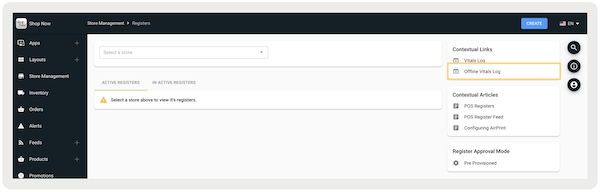
View Offline Register Logs in Point of Sale CMS on the Register List page or the Reporting and Analytics page. Use the permissions you have for this.
For Register List
- Verify you have the Register permission. Learn More
- In CMS, go to .
-
Select "" under on the right side.
For Reporting and Analytics
- Verify you have the , , and permissions. Learn More
-
In Point of Sale CMS, go to .
logs.png)