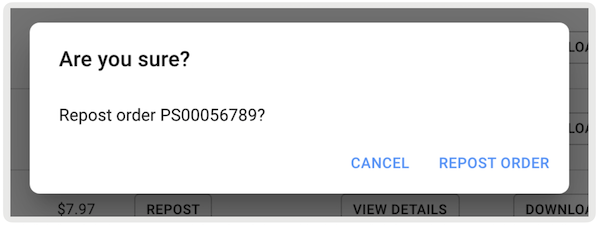
From Point of Sale CMS, resend data about invoices, payments, and refunds to NetSuite, if the original posting failed. Use the Successful Orders report to open a webhook, which posts the order to NetSuite and creates the required artifacts.
The Point of Sale (POS) app creates records for invoices, payments, return authorizations, item receipts, credit memos, customer refunds, and so on in NetSuite as part of order processing flows.
The Successful Order report in Point of Sale CMS shows the names of these external NetSuite items for reference. It also has an option to trigger the webhook, which posts the successful order to NetSuite. This in turn creates required artifacts if the external order posting to NetSuite had failed or not been triggered initially after the order was placed.
To see a report of successful orders in Point of Sale CMS:
- In Point of Sale CMS, go to .
-
Configure the search filter and select . Under the column titled "", it can show two possible CTA options:
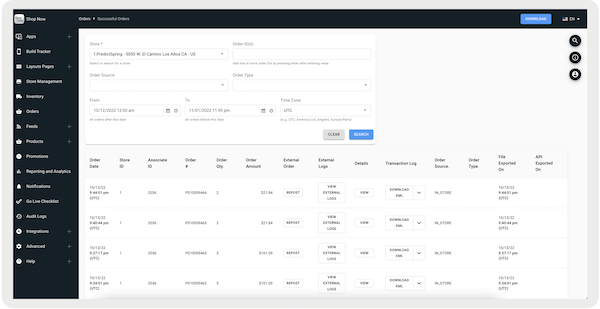
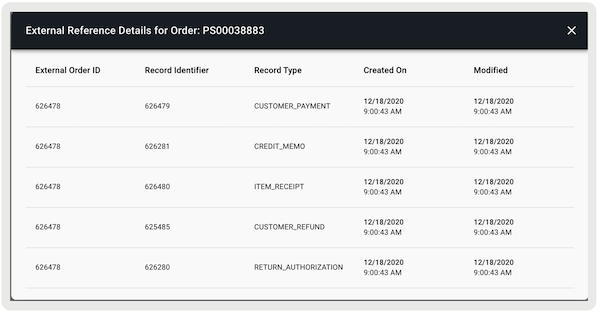
- — Displays all external or NetSuite artifacts that are created for this order. This option is only available if the order is posted to NetSuite and an External Order ID is available.
- — This refers to NetSuite's internal record identifier for or .
- — This refers to NetSuite's internal record identifiers for various documents created in relation to Sales Order or Invoice.
-
— The data under this column gives you the NetSuite's internal record
identifiers for documents like , , and so on
-
—If an External Order ID isn't available (that is, the order isn't created in the
merchant's system), a Repost CTA shows instead. If selected, it launches the webhook, which
posts the order to NetSuite. After launching, External or NetSuite artifact references are
shown in the successful order report if the report is rerun.