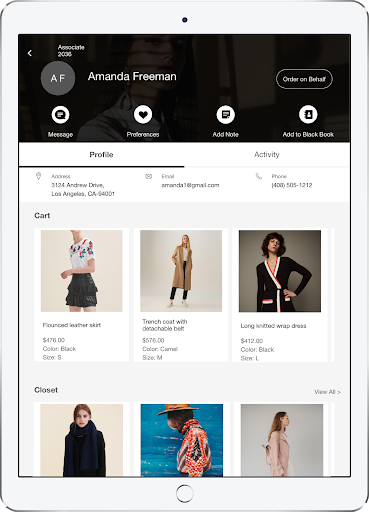
Use Customer 360° to see all the information about a customer that the merchant handles. This includes customer information and their history with your brand, past orders, items saved in the cart, loyalty details, and more.
Prerequisites
- Modern POS App Build: 5.8.2 or greater
- Platform Support: iPhone & iPad
- Offline Support: no
Creating Clienteling Layout in Point of Sale CMS
- Go to .
- Select .
-
Select a template based on the platform:
- ""
- ""
- After you make the choice and select the font, the landing page shows the default template. This default layout is editable. The various selections and the placement can change or be removed as needed. You can also add new inline deep links as well.
View Available Deep Links
The table provides a list of available deep links that can be configured within the Customer's 360° Profile layout. Deep links marked as "" under the Default column are considered defaults, indicating that they are preconfigured on the Clienteling Profile layout.
| Deep Link | Description | Default |
|---|---|---|
| Quiz |
Displays a quiz for gathering the customer's preferences While the Preference icon is a default feature on the Clienteling layout, configuring it with the Quiz deep link is necessary. This configuration enables the selection of the specific type of quiz to show. |
Yes |
| Create Note for Client | Displays a window for entering notes of the customer | Yes |
| Add Customer to Black Book | Adds the customer to the store associate's Black Book | Yes |
| Wishlist | Displays a carousel of the customer's favorite items. Items are favorited via the product catalog by tapping the heart. | Yes |
| Cart Products | Displays a carousel of the customer's cart items | Yes |
| My Closet Products | Displays a carousel of the customer's previous purchases | Yes |
| Order History | Displays a carousel of the customer's past orders | Yes |
| Client Notes | Displays a carousel of notes left by previous associates in the customer’s profile | Yes |
| Saved Carts | Displays a carousel of the customer's saved or suspended carts | Yes |
| Show Redeemable Rewards | Displays customer's redeemable rewards. Additional loyalty can be configured and displayed via Print Tags. Learn More | No |
Assigning Clienteling Layout
Assign the Clienteling layout to an app config to show it on the POS app.
- Go to .
- Edit the app configuration you want to have the layout.
- Go to
- Under , select the layout you've previously created.
View Customer 360 in the POS App
After you've configured CMS for Customer 360, relaunch the POS app. Tap on the and log in as a customer. You'll be shown the customer profile which includes this information:
- : the name of the customer.
- : Add notes and store important information about your customer.
- : The Black Book feature allows associates to track their customers easily.
- : See reviews the customer has given on a product.
- : Associates can order for the customer.