
Set sales attribution at either the order level or the item level so associates can get credit for the sales they make and you can track their performance.
View sales attribution data in Reporting and Analytics in Store Management. See Access Sales Attribution Reports in Point of Sale.
- Modern POS app Build: 5.0134 or greater
- Platform Support: iPhone & iPad (or iPad only) or (iPhone only)
- Offline Support: Partial with limitations
- Technical Prerequisites: Complete list of all store associates (via feed or API integration)
Turn on App Settings
- Go to .
- Edit the Sales Attribution setting. To attribute sales to a store associate, turn on Enable Sales Attributions.
-
(Optional) Select a default sales attribution policy:
- Logged in user: Sales are attributed to the logged-in associate on the register.
- House Account: Sales are attributed based on a specific house account value.
- None: Sales aren’t attributed.
-
Select Sales Attribution Levels:
- Order level: Attribution applies to the entire order.
- Item level: Attribution applies at the item level.
- (Optional) To attribute sales to unregistered associates at the point of sale, turn on Free Text Sales Attribution.
- (Optional) To assign custom attribution percentages at the point of sale, turn on Allow Associate to Override Sales Attribution.
- (Optional) To assign attributions to multiple associates, turn on Enable Multi Associate Attributions.
Turn on Server Settings
- Go to .
- Turn on Category Search Exact server.
- Create a layout, deep link, and so on
POS Behavior– Sales Attribution
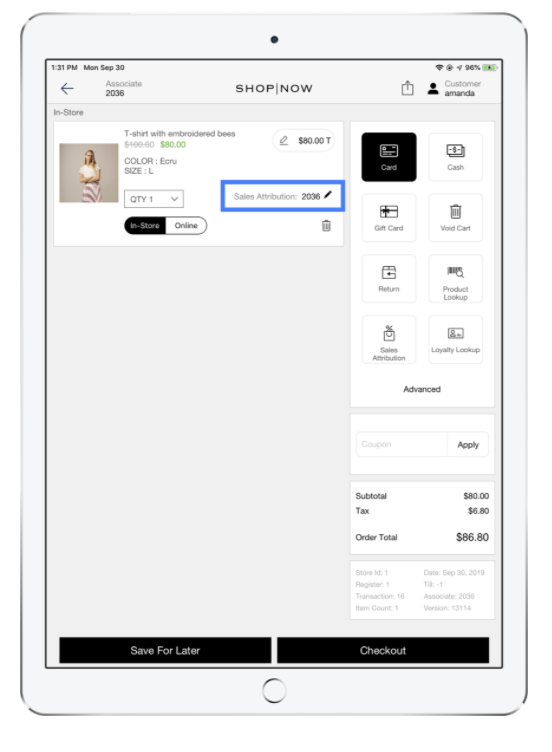
This function is used for giving the appropriate salesperson credit for a sale. If a sales associate helped a customer, scan the first item and select Sales Attribution (pencil icon). Select the sales associate that helped the customer. The sales associate is tagged for that item and items scanned after the first item.

Tip Sales associates can
switch between sales attribution at any time during the transaction.

Note
- Depending on the configuration of your POS, attribution is either set at the item or order level.
- Depending on the configuration of your POS, attribution by default may be set to the associate logged in on the register where the transaction is occurring, a house account value, or not have a default populated at all.