To process up to 10 fulfillment orders in a single picking workflow, add the Picklist Management deep link to a layout in CMS. Wave picking supports pickup orders, shipping orders, and corporate transfers.
- In CMS, go to Layouts | Layout Templates.
- Create or edit a layout.
- Add the Picklist Management deep link.
- Save your changes.
- To apply the changes in the POS app, close out the app and log back in.
-
Create a picklist on the app.
- In the POS app, tap the Picklist Management deep link.
- Select an order type and select up to 10 orders.
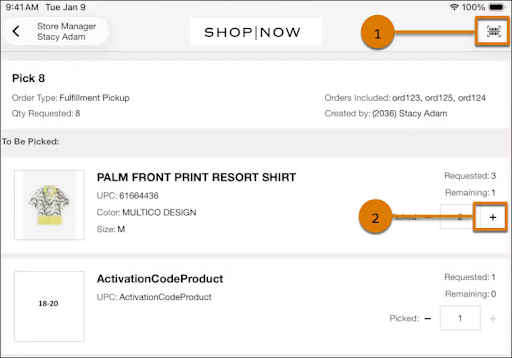
- Review the product list and pick the required quantities for all selected orders. To update picked quantities, scan items (1) or tap + (2).
- After picking is complete, print the records if needed. The system deletes picklists after 48 hours.