
Clearance items are items in a store that are sold at a discounted price. They can be enabled by flagging certain variants of a product in your store's inventory feed. IItems like display models or floor models are examples of clearance items. License plating, or unique identification, of clearance items will be performed based on their serial numbers.
In summary, this feature allows you to:
- Configure clearance items into the POS.
- Search clearance items based on their serial number.
- Show special instructions, like damaged or display models, about a clearance item during checkout.
- Show the location within the store of a selected clearance item.
- Sell the clearance items at a discounted price.
POS Build, Platform Support, and Technical Prerequisites:
- Modern POS App build: 5.8.1 or later
- Platform Support: iPhone
- Offline Support: No
- Technical Prerequisites:
- Store inventory feed with these attributes that are required for clearance item processing.
- serial_numbers - Pipe-delimited serial numbers corresponding to the variants of product to be flagged as a clearance item.
- serial_number_based_prices - Pipe-delimited prices corresponding to the variants of product to be flagged as a clearance item.
- product_locations_within_store - Pipe-delimited locations, like aisle or floor, corresponding to the variants of product to be flagged as a clearance item.
- clearance_instruction_texts - Pipe-delimited special instructions corresponding to the variants of product to be flagged as a clearance item.
- Use either the full store inventory feed or the delta store inventory feed to upload the clearance items. Use the delta feed to upload only the clearance items. This way, you can upload regular store inventory using the regular full feed, and the delta feed specific to clearance items can be uploaded later.
- Refer to Store Inventory Feed Specification for more details on the feed file.
- Feed File Snippet:
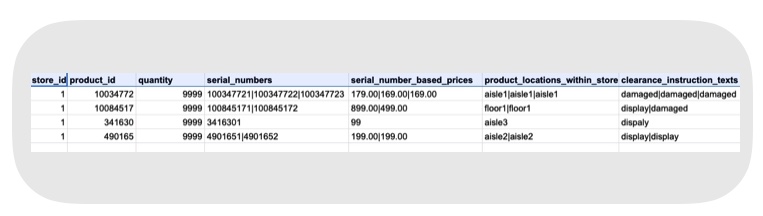
- Store inventory feed with these attributes that are required for clearance item processing.
Enable App Settings
- : provides a deeplink to scan the clearance items.
- : provides the list of clearance options if applicable for a product in PDP.
Enable Server Settings
- Go to .
- Turn on the Enable Store Inventory Tracking server setting.
- Turn on the Has Store Inventory server setting.
Clearance Items in Point of Sale Considerations
Review the different ways that you can add clearance items to your cart.
Add by Deeplink
Clearance items are searchable using the Deeplink, which will invoke a barcode scanner popup. You can scan items by serial number or by product ID.
Add by PDP
Clearance options corresponding to a product can also be obtained from the PDP page using the PDP V2 component. From your PDP V2 layout, add a cell and add the component before saving your layout. The layout cell will result in a cell that you can tap on in your PDP page that will invoke the clearance item popup.
Checkout
Clearance options for a product can be added to a cart from either a Deeplink or from the PDP page. Both methods will launch a dialog popup that contains a list of clearance items and options corresponding to the product. You can add an item to the cart by tapping Add To Cart.
Checkout Lock
A clearance item can't be added to a cart if it's been added to a cart by another store associate. This restriction is in place to avoid the scenario of the same item being sold by two different store associates.
The restriction can be removed if any of these conditions are met:
- The item is deleted from the cart.
- The cart with the clearance item has remained idle for more than 30 minutes.
- Completion of the sale.
- If for any reason the sale transaction failed.
Known Issues & Restrictions
A clearance item can't be added to a cart if it's been added to a cart by another store associate. See Checkout Lock for more information on these restrictions.