
The POS app provides an option to purchase reward cards and redeem them as tender when placing an order. Configure reward card support in CMS setup.
- Version 5.7.2 or higher is required for this feature.
- This feature requires integration with your Reward Card Provider using Point of Sale APIs.
- The purchase flow can be added to the POS app by adding the following deep link:
- .
- Merchants should have the multi-tender feature enabled to redeem a reward card as a tender for an order.
- Reward cards can be added as tender in the multi-tender flow by going to:
- .
| Offline Capability | No |
| iPad UX | Yes |
| iPhone UX | No |
- Go to .
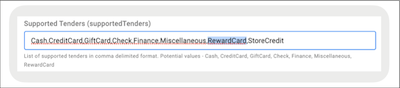
- Go to Supported Tenders and see if it’s already configured.
-
Enter RewardCard in the field if it isn’t already.
- Save your changes.