
Point of Sale inventory management provides a lightweight inventory management system that will allow customers to manage inventory across stores, online, and digital warehouses.
Inventory Life Cycle
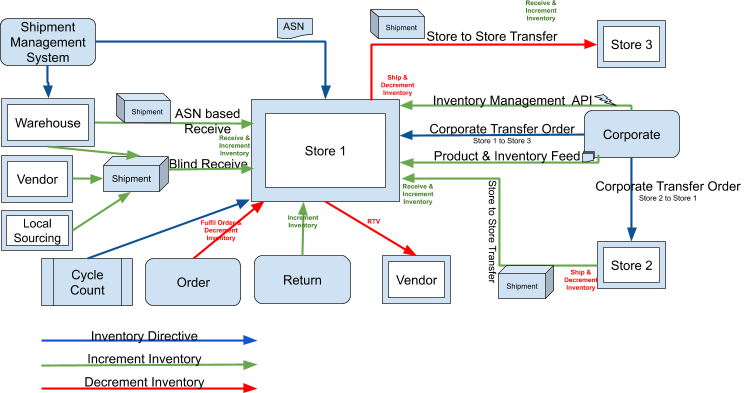
- Set Up Inventory Management
Enable Point of Sale inventory management and store-level inventory tracking in CMS to streamline inventory processes and improve stock accuracy. Follow the steps to configure and schedule store inventory feeds for automated updates. - Inventory Receiving
Inventory receiving methods enable stores to track and manage incoming merchandise efficiently. Blind receiving allows the addition of items to store inventory without an ASN, while store-to-store transfers optimize inventory levels based on demand. Corporate-initiated transfers and advanced shipping notices (ASN) provide centralized control and streamline the receiving process from warehouses or suppliers. - Inventory Transfer Out
Inventory Transfer Out enables stores to initiate transfers directly from the Retail Cloud POS. Corporate can also create transfer orders through CMS or file uploads, adjusting inventory based on demand and supply. By facilitating efficient inventory management, stores can promptly address surges in demand. - Store Operations
Cycle count lets stores perform regular inventory audits, and then make any needed changes. With full cycle count, you can audit all of a store's products, and with partial cycle count, you can audit only select merchandise. - Inventory Buckets
Point of Sale supports the following inventory buckets - Sellable Quantity, Allocated Quantity, Safety Stock, Quantity On Hand, Quantity In Transit, Quantity On Order, Not for sale, Returned items, and Floor/Demo items. - Sample Data Movement
This table walks you through a Point of Sale Store Lifecycle and how inventory buckets are impacted as different transactions are happening in-store. - Inventory Adjustments
Store inventory management lets merchants view and adjust product counts through the CMS. Full and delta inventory feeds allow for comprehensive or incremental updates from external systems. Merchants can also integrate with the Point of Sale platform to update store inventory via API calls. The system tracks inventory based on order details, decrementing counts for in-store purchases and allocating stock for online orders. - Inventory Types
Point of Sale supports both online and in-store inventory. Online inventory can be managed via Feed, CMS, and API.