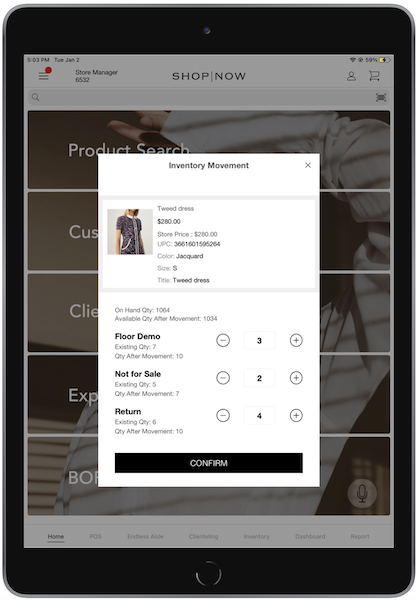
Use the Inventory Movement feature to access a product's current availability and adjust inventory buckets.
Point of Sale's Inventory Movement feature is designed to facilitate Inventory Management tasks on the POS app. This feature provides merchants with access to a product's current availability, allowing them to adjust inventory buckets and designate them as "Not for Sale." Specifically, they can adjust the product's "Floor Demo," "Not for Sale" for Item Adjustments, and "Return" for Return to Vendor (RTV) transfers. These adjustments are exclusively applied at the store level, verifying their relevance to the app's current store.
Prerequisites
- App Build: 9.6.1 or later
- Supported POS Device
- Offline Support: no
Configure Inventory Management in Point of Sale CMS
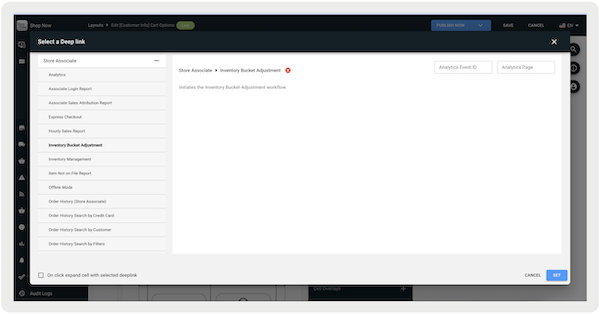
Configure the deep link in Point of Sale CMS needed to access this feature in the Retail Cloud Point of Sale (POS) app.
- Create a layout or use the existing one.
- Select a cell and select in the toolbar menu on the right.
- Go to .
- Select .
-
Set and save your changes.
View Inventory Management in Point of Sale
See how Inventory Management works in the Point of Sale (POS) app.
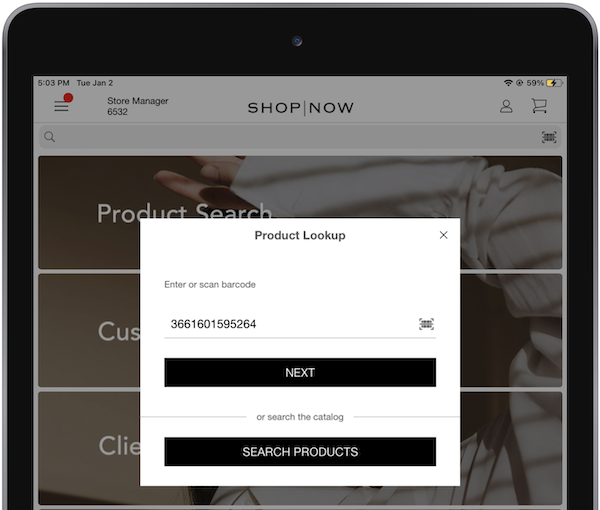
On the app, tap the deep link. A window appears, allowing you to search for the product. You can do this by either entering or scanning the product's bar code or by using the product catalog.
After the product is found, the product's information is shown. This information includes the current amount of product on hand and the expected amount of product available after the change.
Adjusting these buckets recalculates the product's available bucket. After confirming, it can take a few minutes for the product inventory to update.