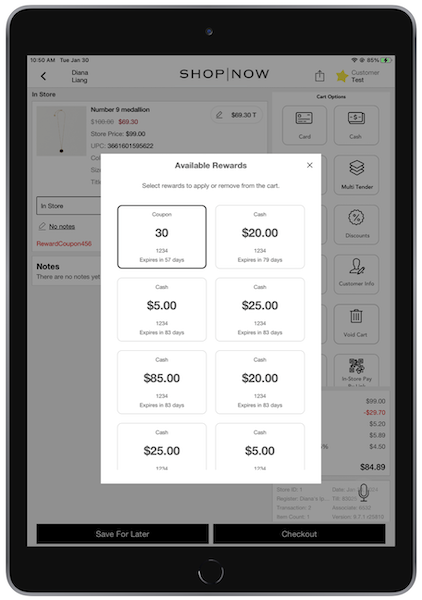
Use Point of Sale's SPI to connect your loyalty program to the POS app. Make it easier to find loyalty customers and show rewards.
For an overview of the Point of Sale loyalty feature capability, read this article.
Prerequisites
- Modern POS App Build: 9.7.1 or greater
- Platform Support: iPhone & iPad
- Offline Support: no
Leveraging Loyalty Information via Point of Sale SPIs
Configure Clienteling Service Provider Interfaces (SPIs) in Point of Sale to get customer loyalty information.
Clienteling SPIs for Retrieving Loyalty Customer Information
There are four Clienteling SPIs you'll need to configure for retrieving customer loyalty information. After being configured, this information is passed and displayed on the POS app:
- Available rewards and their point values
- Point balances
- Tiers
- Loyalty visual badge
- Total rewards monetary value
For a complete list of fields available in the Clienteling SPI, refer to the Backend SPI Field under the CMS Grouping "User Loyalty Profile" in this article.
To configure the Clienteling SPIs:
- In CMS, go to .
- Select .
- Under , select "".
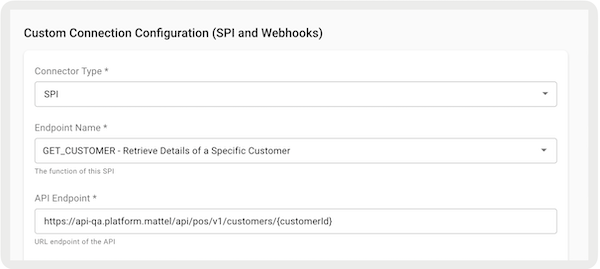
- Under , select a Clienteling SPI to configure. Refer to the table for the four SPIs required. Create a configuration for each of the four SPIs.
- Configure the rest of the required fields.
-
Save your changes.
| Endpoint Name | Endpoint | Description |
|---|---|---|
| SEARCH_CUSTOMERS | GET/merchant/spi/sample/endpoint/sa/customers | Get a list of customers enrolled in the loyalty program, allowing for search and filtering based on specific criteria. |
| UPDATE_CUSTOMER | PUT/merchant/spi/sample/endpoint/sa/customers | Update a customer's loyalty program profile, including personal details. |
| CREATE_CUSTOMER | POST/merchant/spi/sample/endpoint/sa/customers | Enroll a new customer into the loyalty program, create a customer profile and initiate loyalty point tracking. |
| GET_CUSTOMER | GET/merchant/spi/sample/endpoint/sa/customers/{customerId} | Find detailed information about a customer's loyalty program account. This information includes the customer’s points, tier level, rewards they can use, monetary value of their rewards, and the points each reward is worth. |
For more information on Point of Sale SPIs, refer to Point of Sale API, SPI, and Webhook Specs.
Loyalty Points SPI for Retrieving Redeemed Points
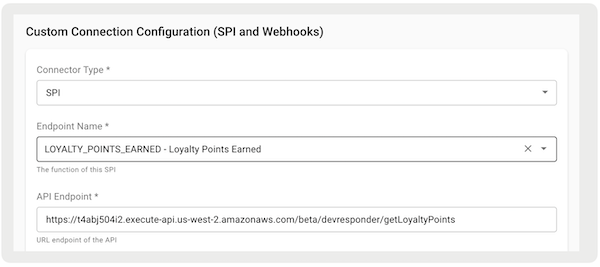
For app builds 9.8.1 or greater, with Point of Sale's Loyalty SPI, the points redeemed during a transaction are retrieved from a third-party provider if starting tendering. This data is retained until the transaction is ready for receipt printing. The initial request, submitted during Phase 1 order submission, includes the order or cart payload. The response includes earned loyalty points that are available for printing. Note, if the call fails or takes more than 1,000 milliseconds, the transaction isn't rolled back and the points won't be available to print on the receipt.
| Endpoint Name | Endpoint | Description |
|---|---|---|
| LOYALTY_POINTS_EARNED | POST/merchant/spi/sample/endpoint/sa /getLoyaltyPoints | The POS app doesn't count loyalty points that are redeemed. This SPI gets the number of loyalty points that are redeemed in a transaction from a different system. |
Understanding Loyalty Reward Types
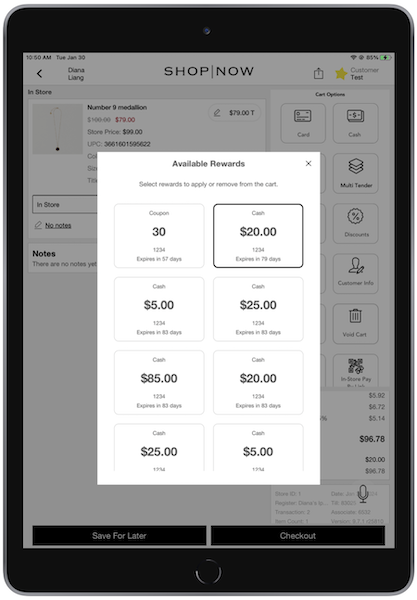
Apply coupons and transaction discounts to orders in the Point of Sale (POS) app.
Transaction Discounts
Transaction discounts are applied to the order subtotal, calculated before taxes. In the "Get Customer" reward object under loyaltyProfile, these discounts are identified by setting the "rewardType" as "Discount." These rewards are specified as currency values. They can be marked as combinable with other loyalty rewards or not by setting "combinable" as "true" (combines this reward with others) or "false" (doesn't add if another is chosen). Rewards can't be added to the cart if they reduce the cart subtotal to under $0. Additionally, there are no restrictions on combining a loyalty transaction discount with other promotions.
A sample payload for a transaction discount looks like this:
{
     "profile": {
     "address": {
     "addressLine1": "12500 street",
     "addressLine2": "New York",
     "city": "New York",
     "countryCode": "US",
     "emailAddress": "tom@email.com",
     "firstName": "Tom",
     "lastName": "Cruise",
     "phone": "789-111-1111",
     "postalCode": "12345",
     "state": "NY",
     "storeId": "string"
     },
     "customerId": "789",
     "customerGroup": "string",
     "email": "tom@email.com",
     "firstName": "Tom",
     "lastName": "Cruise",
     "postalCode": "string",
     "phoneMobile": "1234567890"
     },
     "loyaltyProfile":{
     "rewards": [
     {
     "amount": "5.0",
     "code": "123",
     "codetype": "HONORM",
     //"expiryDate": 1706659200000,
     "labelText": "AG",
     //"redeemedDate": 1643587200000,
     "rewardId": "123",
     "statusDesc": "string",
     "rewardType": "Discount"
     },
     ]
     },
     "sessionId": "",
     "statusCode": "SUCCESS",
     "statusMessage": "OK"
     }
Coupons
Coupons are linked to a promotion code, which already exist within the Point of Sale promotion engine. In the "Get Customer" reward object under loyaltyProfile, these coupons are identified by setting the "rewardType" as "Coupon." To successfully apply a coupon reward to the cart, the reward code provided must match a valid single-use or multi-use promotional code associated with an active promotion. When a coupon reward is applied to the cart, the POS app will treat the reward code as a coupon code. The POS will also adhere to all the combinability and applicability rules set within the promotion engine for that specific code.
A sample payload for a coupon would look like the following:
{
     "profile": {
     "address": {
     "addressLine1": "12500 street",
     "addressLine2": "New York",
     "city": "New York",
     "countryCode": "US",
     "emailAddress": "tom@email.com",
     "firstName": "Tom",
     "lastName": "Cruise",
     "phone": "789-111-1111",
     "postalCode": "12345",
     "state": "NY",
     "storeId": "string"
     },
     "customerId": "789",
     "customerGroup": "string",
     "email": "tom@email.com",
     "firstName": "Tom",
     "lastName": "Cruise",
     "postalCode": "string",
     "phoneMobile": "1234567890"
     },
     "loyaltyProfile":{
     "rewards": [
     {
     "amount": "5.0",
     "code": "123",
     "codetype": "HONORM",
     //"expiryDate": 1706659200000,
     "labelText": "AG",
     //"redeemedDate": 1643587200000,
     "rewardId": "123",
     "statusDesc": "string",
     "rewardType": "Coupon"
     },
     ]
     },
     "sessionId": "",
     "statusCode": "SUCCESS",
     "statusMessage": "OK"
     }