
The Point of Sale app requires data to operate offline, including product feeds, store logins, and tax rates. After the app is back online, it syncs offline tills and orders placed offline.
The Point of Sale app needs to download data to work offline. This data includes product feeds, store logins, and tax rates.
The POS app must run in online mode at least once and download this data needed for offline functionality:
- Product Feed
- As part of the 8.1.0.1 app build, the offline product feed now supports store-level product price/inventory changes.
- We recommend that merchants generate delta feeds for product updates if the full product list is more than 50k records.
- Store Credentials
- Tax Rates
- Product Deltas
If offline mode is turned on (CMS configuration), use the Offline Logs deep link to check if the offline feed data was downloaded. This is usually set in or . This deep link is useful for determining whether a register is ready to function offline. It tells you how many records are in the register's offline database for each feed type. It also tells you if the register last checked for, downloaded, and finished storing new offline feeds.

Depending on the type of data, checks for new offline feeds occur at regular intervals, on certain triggers, or both. For Products, Taxes, Associates, and Promotions, a check for new feeds happens at the refresh interval configured in CMS (“”). The POS app consolidates all daily delta files into a single offline feed file. For example, if delta feeds are sent to Salesforce hourly, they are combined into one consolidated offline feed generated daily at the time specified by “”. New associate credentials are retrieved on login as well. Lastly, on this page forces a refresh of all offline feed data.
Some less common scenarios can also trigger a refresh of the register’s offline database on
the next login. These are a change to the register’s language or associated Store ID.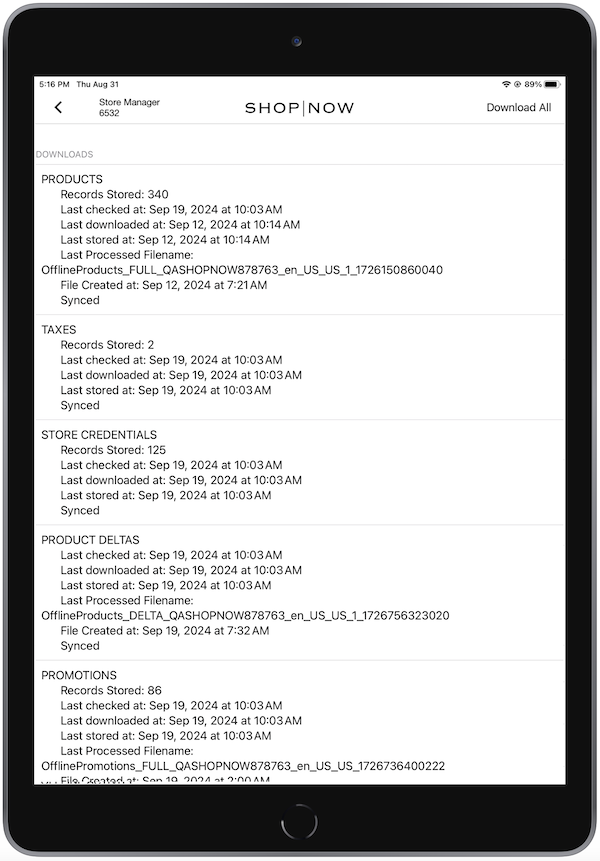
Online Syncing
After the app is back online, it syncs all the offline tills, followed by the orders placed offline.
