
Point of Sale's order reexport feature allows merchants to resend failed order exports to their ERP systems via webhook integration.
Point of Sale's supports multiple-order export mediums. One of the ways to export the orders to the merchant's ERP (or backend) system is through a webhook integration. As part of this webhook integration, the merchant's ERP endpoint is set up in the Point of Sale CMS. The Point of Sale system exports the orders to the merchant's ERP using this endpoint. Any failure during this export is recorded in the CMS and the order corresponding to the failed exports is allowed to reexport from the CMS. This document describes this reexport mechanism in detail.
Prerequisites
- Modern POS App build: 6. x.x and later.
- Platform Support: iPhone & iPad
- Integration Prerequisites: The order export medium is a webhook. If the next two
attributes are configured in the CMS, then the orders are exported using webhook
integration. Both of these attributes are available in the CMS under Store Management >
Store Settings > Modules > OMS > Order Export:
- Real Time Order Export Endpoint
- Real Time Returns Export Endpoint
Order Export Flow
-
Webhook: As an order is placed, it'll be exported in real time if the webhook endpoint is configured. Failed webhooks can be reposted in CMS by going to Reporting and Analytics > Repost Failed Webhook Events.
-
Postprocess: Point of Sale has a postprocess module that handles the real-time order export to the external system based on the endpoint configuration.
-
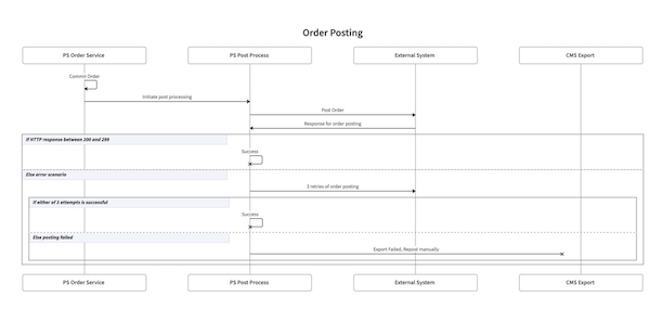
Successful Export: After the order is posted to the configured endpoint, the postprocess module awaits a successful response. If the response (HTTP response code) provided by the configured endpoint is between 200 and 299, the export is considered successful.
-
Failed Export: The order export can encounter failure due to any of these reasons:
- Point of Sale's postprocess module itself encounters an error while processing the export.
- Merchant's endpoints fail to process the received order and hence provide a response with HTTP code 3xx, 4xx & 5xx.
- Network failure.
-
Automatic Retry: The postprocess module supports automatic retry where the order that encounters failure gets reexported. There are max 3 automatic retry attempts on failure, after every 1 minute.
-
Manual Retry (CMS):
-
If the order doesn't get reexported even after the automatic retry attempts, it is then listed in the CMS, where the user can start the manual reexport. This is the same process as explained previously. If the reexport fails again, the automatic retry is started and any failure after that brings the order back to the CMS.
-
All such failed exports that need manual intervention are available in CMS under Alerts ()
-
The sequence diagram for this export process:
-
CMS - Configuration and Setup
-
The orders that need manual reexport are listed in CMS under Alerts ()
-
The same screen also allows users to reexport all or a few of the selected orders.
Known Issues & Restrictions
- It supports the reexports of orders for which the initial export failed. It doesn't have the capability to reexport an order which got successfully exported.
- It supports reexports for orders that are exported to the merchant's endpoint using webhook integration.
- The export process also supports the automatic retry if the webhook endpoint gives back a response with HTTP status codes 3xx,4xx & 5xx. Merchant's webhook endpoint must handle duplicate posting due to auto-retry mainly because of 5xx. For example HTTP status code 504.
- The max automatic retry attempts are three, and it isn't configurable.