
Provide digital records of Point of Sale sales transactions and order details to help merchants track sales and manage inventory. Generate reports by configuring stores, date, time, and time zone to view the data.
Viewing and Generating Reports
- Go to .
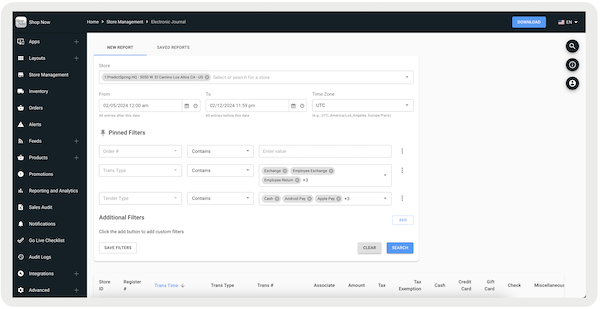
- Under , multiselect the stores you want to view data from.
- Configure the date, time, and time zone. The maximum range is 31 days.
- Under , you can narrow your search by filtering by X additional criteria in the report. , , and are shown by default, but users can add parameters under .
- To remove a field or add another pin, select the ellipses (three vertical dots) to the right. After specifying a column, you can also specify a rule along with a corresponding value. For example, if you configure "," only transactions with a total discount less than or equal to 200 appear.
- If you configure "," only transactions that were completed by the specified associate will show.
- Select to generate a report with your configured fields.
Supported Transaction Types
- User Activity: Login, Logout
- Till Management: Create Till, Reconcile Till
- Cart/Order Management: Appeasement, No Sale, Sale, Order, Mixed Cart, Return, Exchange, Suspend Sale, Void, Pickup, Offline, Sale Initiated, Sale Failed, Resume Sale, Price Correction, Reward Card, Employee Sale, Employee Return, Employee Exchange, Line Item Voids Learn More
- Cash Activity: Paid In, Paid Out
- Safe Management: Safe Float, Till Float, Expense, Miscellaneous 1, Miscellaneous 2, Bank Deposit
- Store: Store Close
Available Report Filters
| Field Name | Allowed Rules | Description |
|---|---|---|
| Amount | <= / >= | Filters records of a specified amount |
| Associate | Contains/Does Not Contain | Filters records corresponding to a specified associate ID |
| Bank Deposit Variance | <= / >= | Filters records of a specified bank deposit variance |
| Cash | <= / >= | Filters records of a specified cash amount |
| Check | <= / >= | Filters records of a specified check amount |
| Credit Card | <= / >= | Filters records of a specified credit card amount |
| Credit Tip Amount | <= / >= | Filters records of a specified credit tip amount |
| E-Comm | <= / >= | Filters records of a specified ecommerce amount |
| Finance | <= / >= | Filters records of a specified finance amount |
| Gift Card | <= / >= | Filters records of a specified gift card amount |
| Miscellaneous | <= / >= | Filters records of a specified miscellaneous amount (charges that aren't easily categorized or classified under specific predefined categories or accounts) |
| No Receipt Return | True/False | Filters records for a completed returned order that had the original receipt or not |
| Notes | Contains/Does Not Contain | Filters records for transactions of specified keywords |
| This is a catchall field depending on the event type. It stores the following based on an event: | Bank Deposit—date of store closure the deposit is associated with (vs. Transaction Time that will record when the deposit happened, which could be a later date than the store closure) | |
| Offline | True/False | Filters records for transactions made either online or offline |
| Online Order ID | Contains/Does Not Contain | Filters records for transactions associated with the specified online order ID(s) |
| Order # | Contains/Does Not Contain | Filters records for transactions associated with the specified order ID(s) |
| Original Price | <= / >= | Filters records of a specified original price |
| Original Tender | <= / >= | Filters records of a specified other tender amount |
| PRT Receipt | N/A | Filters records for orders that have completed checkout with a receipt |
| Penny Rounding | <= / >= | Filters records of a specified penny rounding amount |
| Product ID | Contains/Does Not Contain | Filters product-specific events (for example price correction) by product ID mapped in Product - Field Mappings |
| Reason Code | Contains/Does Not Contain | Filters records for transactions of a specified Reason Code (for example "Price Correction") |
| Reason Text | Contains/Does Not Contain | Filters records for transactions of a specified Reason Code text (for example "Not for Sale") |
| Register # | Contains/Does Not Contain | Filters records for transactions associated with the specified register ID(s) |
| Return Order ID | contains/does not contain | Filters records for transactions associated with the specified return order ID(s) |
| Store Type | contains/does not contain | Filters records of a specified store type. Supported types are Regular and Outlet |
| Tax | <= / >= | Filters records of a specified tax amount |
| Tax Exempt | True/False | Filters records of a specified tax exemption status |
| Tax Exemption | <= / >= | Filters records of a specified tax exemption amount |
| Tender Type | Contains/Does Not Contain | Filters records of specified tender types; supported types are: Cash, CreditCard, GiftCard, Check, Miscellaneous, Finance, RewardCard, Others, or All |
| Total Discount | <= / >= | Filters records of a specified discount amount |
| Trans # | Contains/Does Not Contain | Filters records for transactions with the given transaction ID(s). This is different from Order ID because the transaction ID is a specific financial transaction or event, while the order ID is the customer's order. |
| Trans-Type | Contains/Does Not Contain | Filters records for specific transaction types, refer to Supported Transaction Types for more information |
| Variance | <= / >= | Filters records of a specified variance amount |
Saving & Sharing Reports
To learn how to save and share Electronic Journal search queries, allowing quicker access, see Saving and Sharing Electronic Journal Reports.