
The Modern POS app supports Mexico's requirements when printing a receipt of a credit card transaction.
- Modern POS App build: 7.11.5 or above
- Platform Support: iPhone & iPad
- Offline Support: No
These are the mandatory requirements for Mexico receipts.
- POS app will print the merchant receipt copy along with original order receipt for all credit card transactions. (partial paid by credit card, sale, return).
- Merchant copy will be printed only the first time when the order receipt/gift receipt is printed.
- POS app will print the declined credit card receipt copy whenever there is a credit card declined.
- Merchant copy should have an option for customer signature field based on credit card response returned by payment provider.
- In CMS go to , scroll down to the receipt section.
- Click Receipt Configuration and scroll down to “Setting section”.
- Enable “Enable merchant copy Receipt” and “Enable declined card Receipt copy”.
- Scroll up to the Text Fields section and enable “Show Merchant Copy” and "Show Card Holder copy text".
- Enter the “card holder copy” text and “merchant copy” text which needs to be printed on the receipts.
- Save the settings.
POS App Behavior
The POS app behaves as follows for receipts configured to comply with Mexican requirements.
Print Merchant Copy
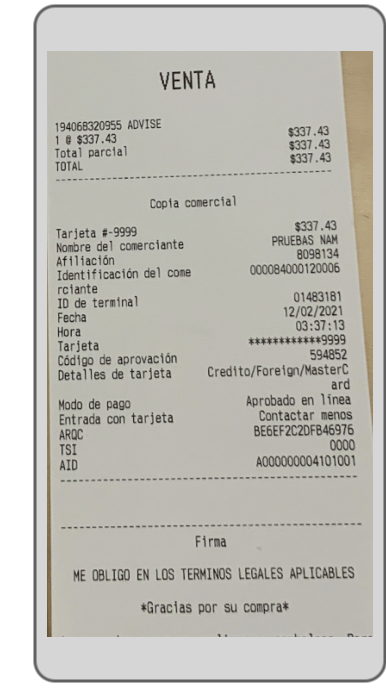
After an order is placed, the POS app shows the thank you screen with options to print the receipt for the order. If the order was placed or returned with a credit card, on printing any type of receipt the app will first print the merchant copy and the order receipt.
This is a sample of a merchant copy.
Print Declined Card Copy
When a credit card is declined, the POS app will show the message that the credit card has been declined and print the receipt copy of the declined transaction.
This is a sample of a declined credit card receipt copy.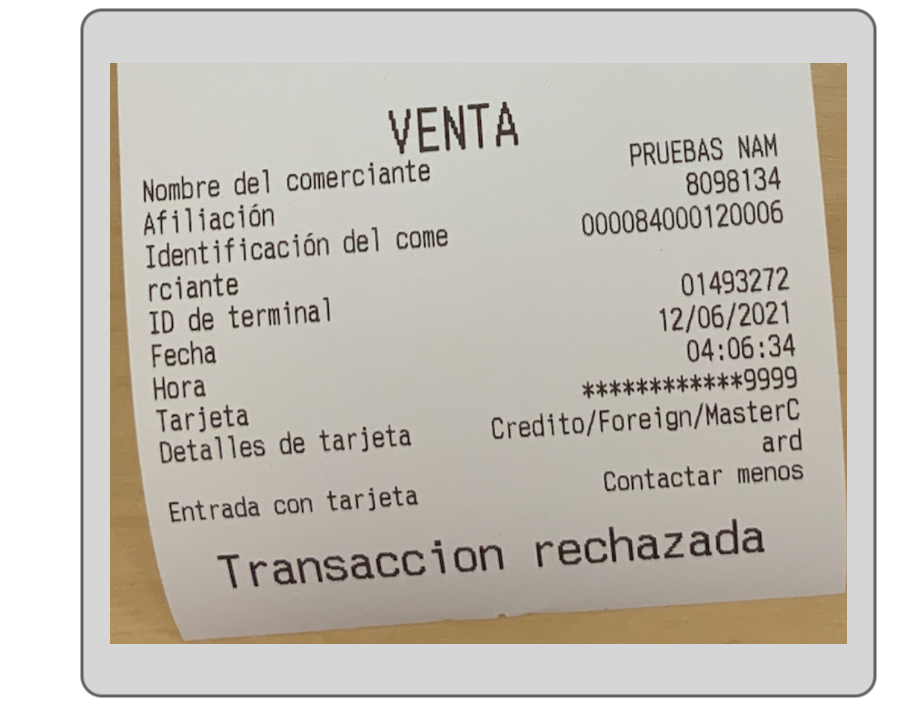
Limitations
These limit apply to order receipts configured to comply with Mexican requirements.
- There's no way to print the merchant copy again from the order history screen.
- POS app will not prompt for any error or retry option if no printer is connected while printing the declined credit card receipt.
- 1:N printer topology is supported to print the declined credit card receipt.
- Merchant copy will only be printed for credit card orders (no other tender has support for merchant copy).