
Show your Point of Sale customers an overview of their purchase on Verifone payment terminals before they pay. The cart summary displays the number of items, taxes, and the order total on the terminal.
This functionality is available for these terminal models:
- M400
Prerequisites
- Modern POS App Build: 9.3.1 or above
- Platform Support: iPhone & iPad
- Integration Prerequisites: Verifone terminal must be connected via the Device Manager screen in POS with 1:1 topology while online
CMS - Configuration & Setup
- Go to.
- Create or select an existing payment gateway that you've set up earlier.
- Under , turn on the setting.
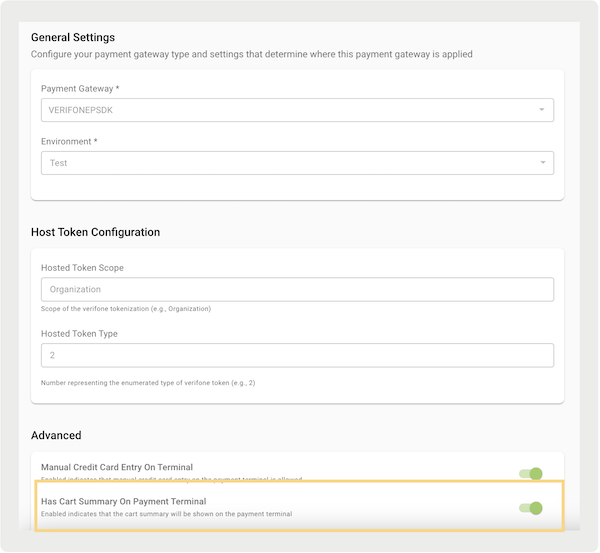
Terminal Configuration
By default, all terminals have been configured to show the line item screen before proceeding with payment. To turn off this functionality, follow the steps in this article to access sysMode on the terminal and show the line item display. If the line item display is turned off at the terminal configuration level, the app won't show the line items even though the CMS flag is enabled.
POS App Flow
After the settings are turned on and the payment terminal is linked via the Device Manager screen, the terminal is ready to show the cart summary.
The cart summary will start appearing on the terminal as soon as you populate the cart. The summary shows the exact state of the current cart, including how many items are in it, how much tax is added, and so on. The terminal refreshes to show the empty screen after the cart is canceled or the transaction is finished.
Example screenshots for the
M400 terminal. 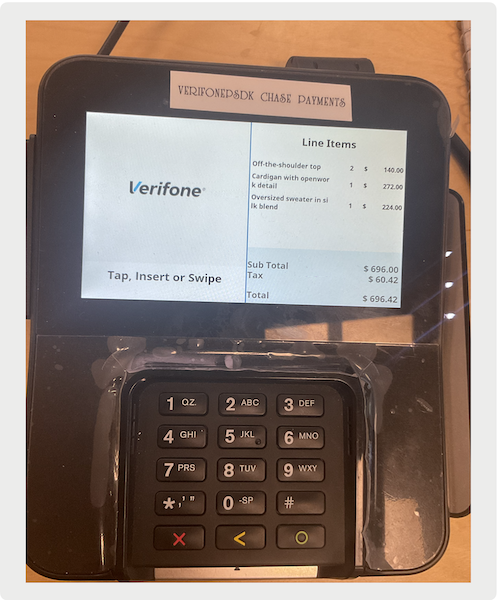
Known Issues & Issues
Verifone line item display only shows the information of the items and cart totals.
| Supported | Not Supported | |
|---|---|---|
| Items |
|
|
| Cart Summary |
|
|
The terminal's display refresh don’t always match the speed of the POS display. A slight delay of one to two seconds can occur due to network connectivity and stability between the terminal and POS.
If the app crashes while the receipt is being displayed, there's no way to reset the screen manually on the terminal (tapping "X" on the terminal won't work).
- App restart automatically pairs with the previously connected terminal. When we establish the connection automatically and start the new cart, the POS resets the terminal screen.
If the Verifone terminal screen is stuck due to network issues or other issues, the fallback solution is to reboot the terminal. This can occur if the line item display doesn't get cleared or if the screen shows "payment successfully captured" but remains stuck. Follow the Troubleshooting > Terminal Reboot section of this article to know how to reboot the terminal.