Integrate Point of Sale with supported peripherals by understanding the necessary network calls and communication protocols. Ensures communication among your iPad, iPhone, and devices like card readers, printers, scanners, and cash drawers.
Network Protocol Table
| Vendor | Protocol | Port | Notes |
|---|---|---|---|
| Card Reader | |||
| Adyen | TCP | 8443 | Terminals and iPads should be in the same subnet |
| Elavon | TCP | 6000 | |
| Verifone | TCP | 5015, 5016, 5020 | For the Payment SDK, the default primary port number is 5015, and the secondary port number is 5016. 5020 is used for "unsolicited" notifications from Payment SDK. |
| Printer | |||
| Epson | UDP | 3289 |
Discovery by ENPC Broadcast Service
|
| Epson Fiscal | TCP | 9100 | |
| Star | TCP | 9100 | |
| Scanner | |||
| Star Accessory | TCP | 9100 | Uses the established network channel between the POS and Printer. No new communication channel is needed. |
| Cash Drawer | |||
| APG Net Pro - Discovery | UDP | 10004 | |
| APG Net Pro - Commands | TCP | 30998 |
Example
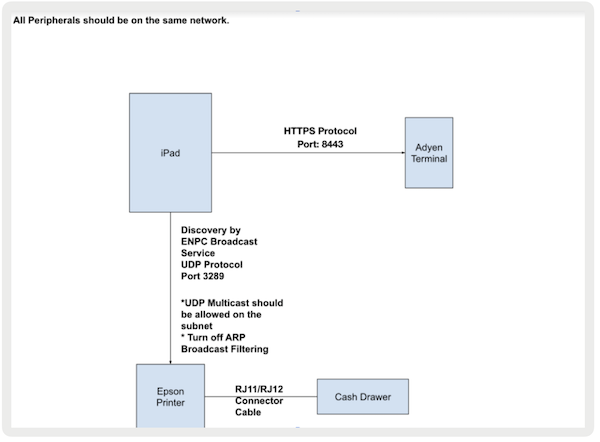
This example diagram shows the protocols and ports used among an iPad, card reader, printer,
and cash drawer. That this diagram is specific to Adyen terminals and Epson printers.