The Point of Sale (POS) app provides error handling for failed gift card transactions, so store associates know what actions to take.
It's possible that order failures or gift card transaction failures can occur. This section addresses how the POS app handled such failure scenarios and what actions are needed from the store associate.
POS App
If an associate goes to the Pending Orders page, they can see two more sections: and .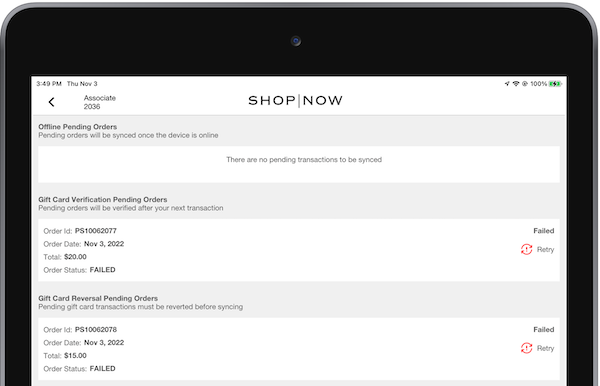
Gift Card Verification Pending Orders
Orders appear here if the status of the gift card transaction is unknown. This occurs if the app didn't receive the transaction response from the terminal due to the app closing or the terminal connection being lost.
The gift card transaction status is automatically verified after the completion of a credit card payment. The store associate can also manually trigger the verification call on the pending orders page.
If the status of the gift card transaction is successful, it will move to the 'Gift Card Reversal Pending Orders' section to be reverted.
Gift Card Reversal Pending Orders
Orders will appear here if the order has a successful gift card transaction but the final order submission was unsuccessful. These successful gift card transactions shall be manually reverted by the store associate before the orders can be synced. Ideally, the gift card reversion can occur within 24 hours of the original transaction.
After the gift card transaction has been reverted, the order will become a pending order and be synced after the next order submission.


CMS Failed Order Report
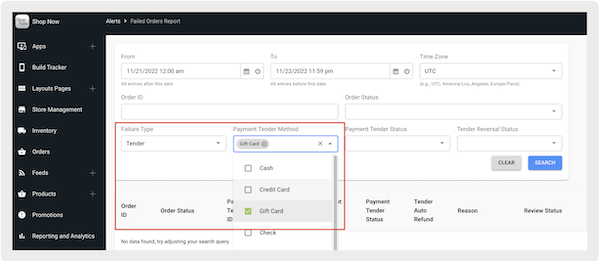
All failed orders with gift card transactions will be reported in the CMS Failed Order Report. These orders fall into two categories: orders with gift cards as products and orders with gift cards as tenders.
Gift Card as Product
Purchasing a new gift card, loading a balance onto
an existing gift card, and cashing out a gift card are considered 'Gift Card as Product'
transactions. These transactions can be viewed in the Failed Order Report by filtering by 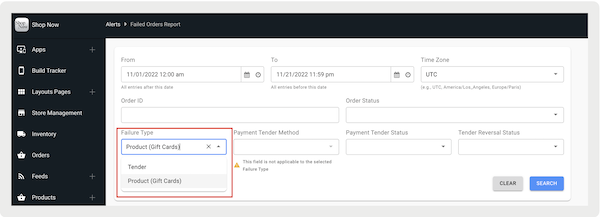
Each line item in the table represents one gift card transaction. Each transaction includes the Adyen PSP Reference ID of the original transaction and the revert status. For transactions where the revert transaction failed, it'll be labeled with "" and requires manual review. Next are examples of the gift card as product transaction with a successful revert and an unsuccessful revert.

Gift Card as Tender
Paying with a gift card and refunding to a gift card are considered 'Gift Card as Tender' transactions. These transactions can be viewed in the Failed Order Report by filtering by . The line item entries are the same as Gift Card as Product with PSP Reference and revert status.