
Use the Point of Sale (POS) app to authorize payments for Endless Aisle or Online transactions and collect money whenever items are sent to customers.
Prerequisites:
- Modern POS App Build: 6.4.2 and later
- Platform Support: iPhone & iPad
- Offline Support: yes
- Payment Terminal: Adyen or Verifone
- Payment Gateway: integration with Adyen or Verifone to accept a payment. Payment capture is done by the merchant after the item(s) are shipped.
Merchants can use this feature if they prefer not to capture funds immediately upon placing orders for Endless Aisle transactions. Store associates can place orders seamlessly through the POS app without needing additional details during checkout.
Configure Point of Sale CMS Payment Gateway Settings
- In CMS, go to .
- Select a previously created Adyen or Verifone payment gateway or create one.
-
Under , turn on the switch.
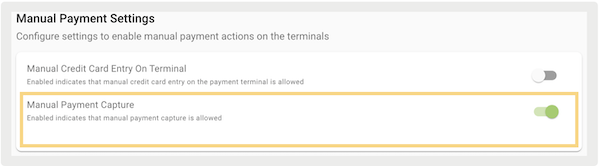
- Save your changes.

Configure Adyen Account
If you have a Verifone terminal, skip this section and go to the Configure Verifone section below.
- Log in to your Customer Area with your merchant-level account.
- Go to .
-
Under , select "".
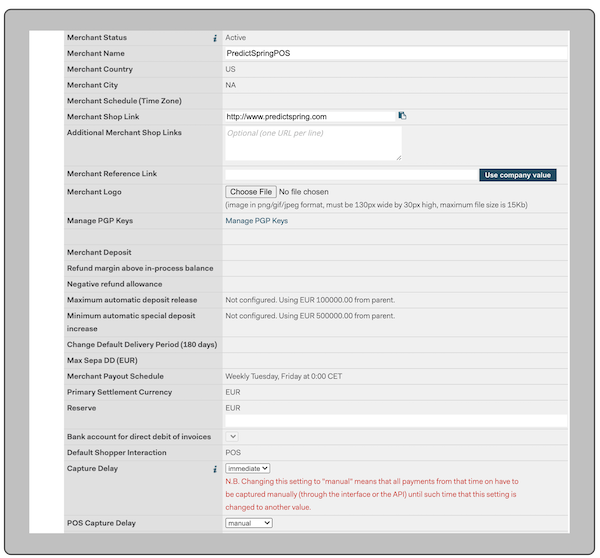
- Select .
- Turn on Multiple Partial Capture to support mixed cart mode and online orders where items are shipped separately. This setting can be enabled by contacting your Adyen support team.
Configure Verifone
For a detailed guide on how to set up your Verifone account and terminal, see Verifone Payments Onboarding.
As Verifone doesn't support partial capture, the terminals will execute either AUTH or capture based on this criteria:
-
If all items in the cart have "In Store" fulfillment, the amount will be fully captured.
-
For online or mixed carts:
-
If the Verifone Payment Gateway: “” flag is turned on in Point of Sale CMS, the terminal writes an AUTH.
-
If the Verifone Payment Gateway: “” is turned off in Point of Sale CMS, the terminal fully CAPTURES the funds.
-
AUTH is not supported if using a Debit Card. In such cases, the terminal shows an error, stating "," and the POS shows "."