
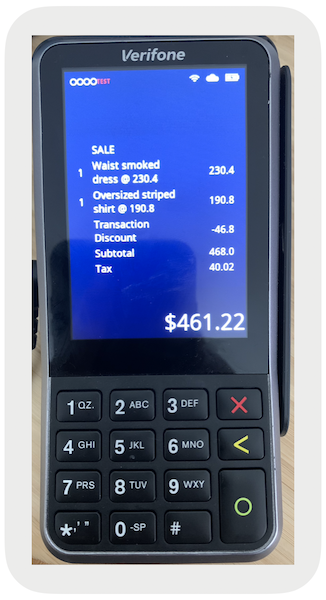
Display purchase details on the Adyen terminal before payment. Showing the cart summary on the payment terminal gives shoppers an overview of their purchase, including quantity, discounts, and taxes.
Prerequisites:
- Modern POS App Build: 5.10.3 or later
- Platform Support: iPhone & iPad
- Integration Prerequisites: Adyen terminal must be connected via the Device Manager screen in POS with 1:1 topology while online
This functionality is available for these terminal models: AMS1*, M400, M450*, P400 Plus, SFO1* and V400m.
* POS supports M450, AMS1, and SFO1 from version 10.6.1 onwards

Configure Point of Sale CMS for Ayden Line Items
- Go to .
- Edit an existing configuration.
- Turn on the setting.
- Save your changes.
POS App Flow
After you've configured the settings and the payment terminal is linked via the Device Manager screen, the terminal is ready to show the cart summary.
The cart summary will start appearing on the terminal as soon as you populate the cart. The
summary will reflect the exact state of the current cart, including line item quantity updates,
discounts, taxes, and so on The terminal will refresh to show the empty screen after the cart
is voided or the transaction is complete.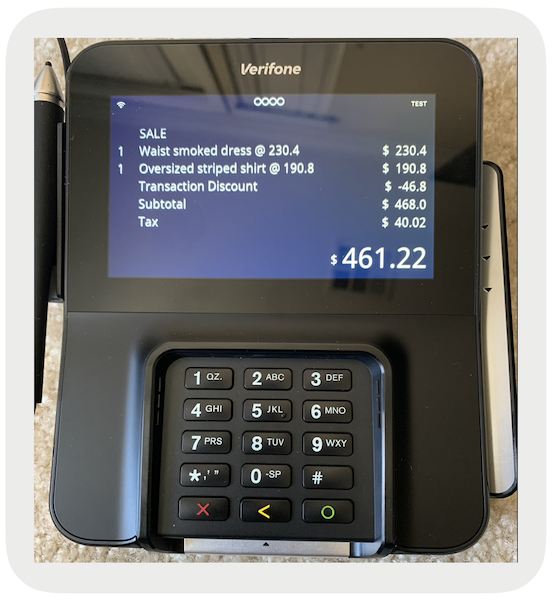
Known Issues and Restrictions
- The terminal display refresh can lag behind the POS display by a second or two due to network connectivity and stability.
-
If the app crashes while the receipt is showing, you can't reset the screen on the
terminal by yourself (pressing X on the terminal won't work).
- Restarting the app automatically pairs it with the previously connected terminal. Upon establishing the connection automatically, the POS will request to reset the terminal screen.
- If automatic reconnection doesn't occur, the fallback is to reset the terminal by pulling out the battery.
-
If the line item is enabled and subsequent payment requests aren't showing up on the
terminal (the app shows "," but the terminal continues to show the line items), confirm with your Adyen
representative that
device.thirdPartyInteractionDelaysisn't configured. This property needs to be removed if it is configured. It can only be configured by the Adyen team.