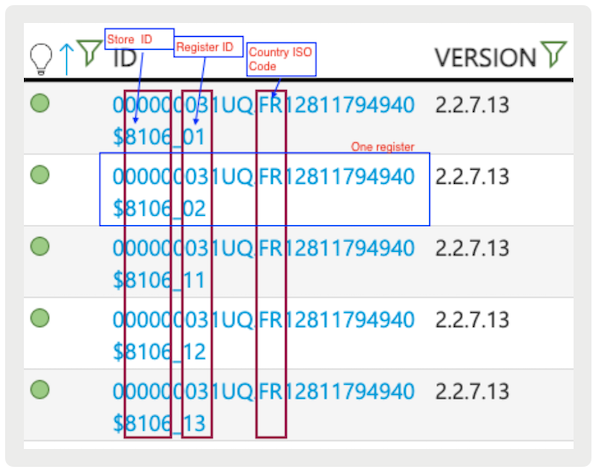
Retrieve required fiscal reports, like FR Journal Archive and FR Fiscal, from the EFSTA portal in Point of Sale CMS for audits in France.
In the event of an audit in France, auditors may request specific reports to be made available:
- FR Journal Archive
- FR Fiscal
- FR Grand Totals
These reports can be accessed via the EFSTA portal, and each register in the store should have its reports downloaded. Here are the steps for downloading and verifying the reports:
Downloading Reports
To download reports:
- Log in to EFSTA using Google Auth.
- After logging in, you'll see the dashboard screen.
- Select EFR from the left-hand menu.
- Select your store and register, then select the three dots at the end.
- Select a date range and select "Share Data."
- Note the provided password and copy it. You'll need it for the next step.
- Select the provided LINK.
-
Download the following three files from the dropdown option on the EFSTA portal:
- FR Journal Archive (.jou file)
- Proof.js utility (can verify FR Fiscal)
- Proof.js utility (can verify FR Grand Totals)
Verifying Reports
To verify reports:
- Download the proof.js file provided on the portal.
- Place all these downloaded files in one folder named "EFR" under the Downloads section of your Mac.
- Install Node.js on your local machine (download from https://nodejs.org/en/download/).
- Open a terminal window and go to the correct folder by typing "cd ~/Downloads/EFR."
- To verify the files' presence, type "ls -l," and you should see the files listed.
Running Verification Commands
To run verification commands:
-
Execute the following two commands in the terminal:
- node proof.js *total.xml
- node proof.js *export.xml If you're using a MacBook, you can right-click on the folder containing EFR files and proof.js, then select "New Terminal at Folder." This will take you directly to the correct folder in the terminal.
-
In the terminal window, type the following commands:
- node proof.js *total.xml
- node proof.js *export.xml
You should see "Summary OK" for each command, indicating that the files meet the fiscal requirements.