Connect Point of Sale to your identity provider (Azure AD or OneLogin) through Salesforce Identity.

Important This feature is available for Hyperforce only. For the legacy
platform, configure POS app SSO through OneLogin instead. See Establish OneLogin with POS
App.
Prerequisites
- User accounts configured in Salesforce or linked to third-party identity provider. See Integrate B2C Commerce with Single Sign-On.
- Store Associate Feed containing store associate IDs, names, store IDs, and roles.
- In CMS, go to .
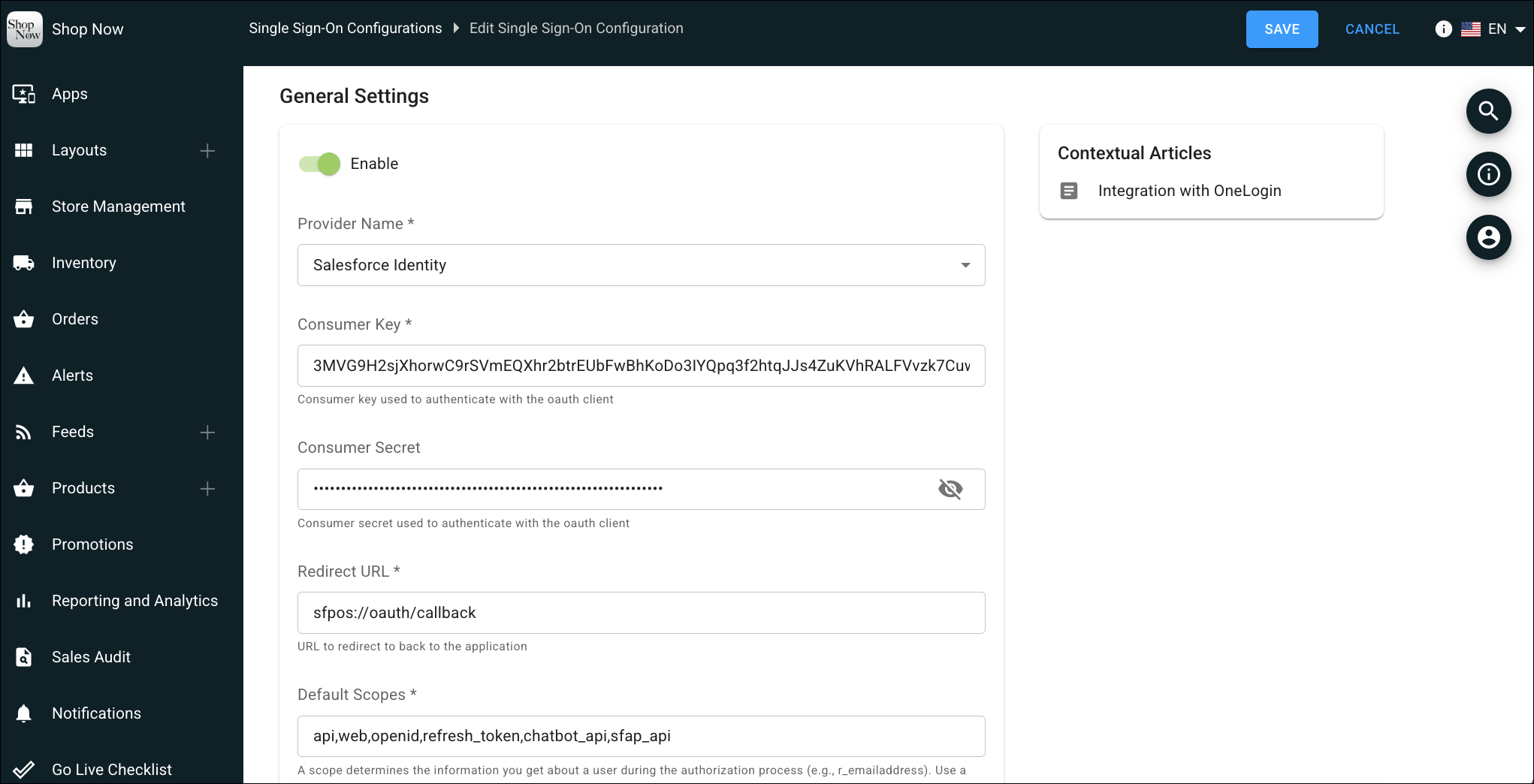
- Toggle Enable to turn on SSO.
- For Provider Name, select Salesforce Identity.
-
Enter your OAuth credentials:
- Consumer Key: Enter the consumer key from your external client app.
- Consumer Secret: Enter the consumer secret from your external client app.
-
For Redirect URL, enter the callback URL (for example,
sfpos://oauth/callback). -
For Default Scopes, enter the required OAuth scopes (for example,
api, web, openid, refresh_token). -
Configure the endpoint URLs:
- Token Endpoint URL: Enter your Salesforce org token endpoint.
- Authorize Endpoint URL: Enter your Salesforce org authorization endpoint.
- User Info Endpoint URL: Enter your Salesforce org user info endpoint.
- Save the configuration.