
Create app roles in Microsoft Entra ID and map them to Point of Sale CMS user roles. App roles grant employees access to the CMS based on their assigned role.
- Log in to the Microsoft Entra Admin Center.
- Go to App registration > App roles.
-
Create a corresponding app role for each CMS user role. The app role's Value has to
match the CMS user role label. For example, for a CMS user role of Associate, the app role’s
value is also “Associate” (1).
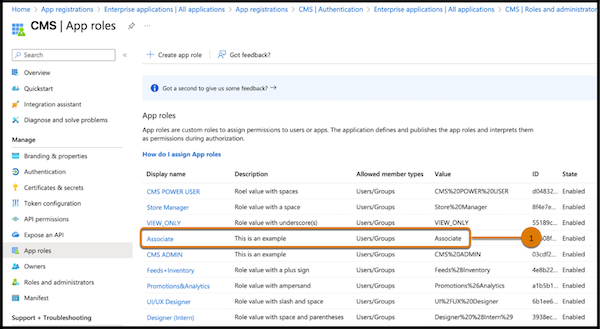
You can label the app role however you prefer, but using a name similar to the CMS user role makes mapping management easier. For example, use the label “Associate” for the Associate CMS user role.
- If the app role’s Value includes special characters, you must percent-encode the characters. For example, “UI/UX Designer” becomes “UI%2FUX%20Designer.” Refer to the table to find the percent-encoded values for special characters.
| Character | Percent-encoding |
|---|---|
| ':' | %3A |
| '/' | %2F |
| '?' | %3F |
| '#' | %23 |
| '[' | %5B |
| ']' | %5D |
| '@' | %40 |
| '!' | %21 |
| '$' | %24 |
| '&' | %26 |
| "'" | %27 |
| '(' | %28 |
| ')' | %29 |
| '*' | %2A |
| '+' | %2B |
| ',' | %2C |
| ';' | %3B |
| '=' | %3D |
| '%' | %25 |
| ' ' | %20 |