
Use REST APIs to integrate POS with the Salesforce Core CRM Connector for clienteling purposes. Create a Salesforce Connected App in Salesforce for Point of Sale to access the requisite APIs. The primary objects of interaction are Accounts and Notes. POS provides capabilities like search, create, and update for customer accounts that are maintained in Salesforce Core CRM.
Customer must have a Salesforce Core product that has access to Person Account objects. This object is available with core products, including but not limited to Service, Sales, Field Service, Order Management, and other industry clouds. Work with your Salesforce Account Executive to confirm your access to the right supporting Salesforce Product to use as your POS CRM source.
Refer to POS Access List - URLs and IP Addresses for a list of URLs and IP addresses to be allowlisted. This is to turn on the necessary communication. Turn on the Person Accounts feature in your Salesforce environment. Point of Sale's API connectors use queries for "Person Account" account types. It won't function if not turned on.
- In CMS, go to .
-
Fill out the fields .
Field Section Field Type Required Description Example URL base General Settings Text Yes The URL base of your Salesforce Core CRM. https://urlbase.com API Version General Settings Text Yes The API version of your Salesforce Core CRM. v51.0 Username User Text Yes The username of your Salesforce Core CRM account. username123 Password User Text Yes The password of your Salesforce Core CRM account. password123 Client ID Client Text Yes The client ID of your Salesforce Core CRM. myClientId Client Secret Client Text Yes The client secret of your Salesforce Core CRM. myClientSecret Alternate Customer Identifier General Settings Text No The Custom Field name in Salesforce Core CRM that identifies the corresponding customer. -
Click SAVE in the upper right-hand of the screen.
 Note Custom Account and Custom Account Data configurations are automatically updated to Salesforce Core CRM Connector specific Account classes in the Merchant Configuration () when the Salesforce Core CRM Configuration is created for the first time.
POS Flows
- Search Customer/Account
- Fetch Customer Profile
- Sign up new Customers
- Update Customer Profile
- Fetch Notes
- Create New Notes
- Update Notes
- Delete Note
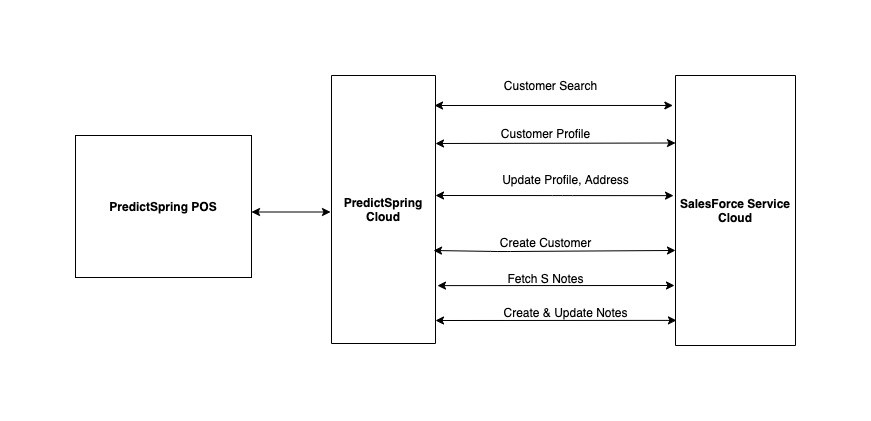
Reference Architecture
Understand the architecture of the integration between the Point of Sale Cloud, Salesforce Core CRM Connector, and app.
POS UI - Salesforce Core CRM Mapping
Get details of the mapping between Point of Sale and Salesforce Core CRM objects.
| POS Screens | Point of Sale Object | Salesforce Core CRM Objects |
|---|---|---|
|
Customer | Account |
|
CustomerNote | ContentDocument, ContentDocumentLink, ContentNote |
Salesforce Core CRM Connector APIs
Get details of the Salesforce Core CRM Connector APIs.
Authorization: Session ID based Authorization
API: /services/oauth2/token
grant_type:password
https://developer.salesforce.com/docs/atlas.en-us.api_rest.meta/api_rest/quickstart_oauth.htm
Customer Search
API:
Parameterized Search: /services/data/v<>/parameterizedSearch
SOQL Base Search: /services/data/v<>/query?q=
| SObject: Account |
When using Person Accounts, an account of the Person Account record type represents an individual shopper. When not using Person Accounts, a standard account and contact together represent an individual shopper. A business account shopper always has a standard account and contact. https://developer.salesforce.com/docs/atlas.en-us.api.meta/api/sforce_api_objects_account.htm |
| HTTP Method | GET |
| API Reference |
https://developer.salesforce.com/docs/atlas.en-us.api_rest.meta/api_rest/dome_query.htm |
Fetch Customer Profile
API:
Get Account By ID: /services/data/v<>/sobjects/Account/<AccountID>
| HTTP Method | GET |
| Reference | https://developer.salesforce.com/docs/atlas.en-us.api_rest.meta/api_rest/resources_sobject_retrieve.htm |
Update Customer Profile
API:
Update Account: /services/data/v<>/sobjects/Account/<AccountID>
| HTTP Method | PATCH |
| Reference | https://developer.salesforce.com/docs/atlas.en-us.api_rest.meta/api_rest/dome_update_fields.htm |
Get Notes List
API:
SOQL based retrieve notes: /services/data/v<>/query?q=
| HTTP Method | GET |
| SOQL |
SELECT contentDocument.Id, contentDocument.Title, contentDocument.CreatedDate, contentDocument.LastModifiedDate, contentDocument.latestPublishedVersion.versionData from ContentDocumentLink where linkedEntityId = \'<AccountID>\' and contentDocument.fileType=\'SNOTE\' order by contentDocument.LastModifiedDate desc"; |
| Reference | https://developer.salesforce.com/docs/atlas.en-us.api.meta/api/sforce_api_objects_contentdocumentlink.htm |
Get Notes Test
API: /services/data/v<>/sobjects/sObject/id/<latest published versionData>
| HTTP Method | GET |
Update Note
API: /services/data/v<>/sobjects/ContentNote/<contentNoteId, i.e. contentDocument.id>
| HTTP Method | PATCH |
Object-Attribute Mapping
Get details of the object to attribute mapping.
| Point of Sale Customer Object | Salesforce Core CRM Account Object |
|---|---|
| customerData.profile.firstName | Account.FirstName |
| customerData.profile.lastName | Account.LastName |
| customerData.profile.customerId | Account.ID |
| customerData.profile.salutation | Account.Salutation |
| customerData.profile.phoneMobile | Account.Phone |
| customerData.profile.email | Account.PersonEmail |
| customerData.profile.address | Account.BillingAddress |
| customerData.profile.addressList[1] | Account.ShippingAddress |
| customerData.consents.newsLetterSignUp | Account.PersonHasOptedOutOfEmail |
|
Available POS Clienteling Fields can be mapped to and from custom fields on Salesforce Core CRM side if required. Example:
|
If POS Clienteling or User Profile field needs to be mapped to or from Merchant defined custom field in SFSC, then that shall be called out and configured. Merchant should provide exact custom field which they have already defined in SFSC Person Account object. Example:
|
| Point of Sale CustomerNote Object | Salesforce Core CRM Objects |
|---|---|
| customerNote.noteId | ContentDocument.Id |
| customerNote.title | ContentDocument.Title |
| NA | ContentDocument.CreatedDate |
| customerNote.updateTimeStamp | ContentDocument.LastModifiedDate |
| NA | ContentDocument.LatestPublishedVersion |
| customerNote.title | ContentNote.title |
| customerNote.noteText | ContentNote.Content |
| customerData.profile.customerId | ContentDocumentLink.LinkedEntityId |
| From SFSC - ContentNote.Id | ContentDocumentLink.ContentDocumentId |
| “V” | contentDocumentLink.ShareType |