
Discover the steps to configure the Salesforce Order Management System (OMS) in CMS. Point of Sale platform has an inbuilt Salesforce OMS connector. The connector is built on the best practices and collaboration with the Salesforce team.
Before reading this article, refer to Salesforce (SF) Order Management System (OMS) Integration Guide to learn the integration portion.
Based on various OMS features and declarative integration paradigms we have the following sections:
- Connectivity and Authentication
- Order Search Configuration
- BOPIS Setup
- Custom Field Mappings
- Return Field Mappings
- Order Field Mappings
- Digital Wallet Types
- Additional Payment Types
- Payment Gateway
- URL Override
- Delivery Methods
- Order Status Mappings

Prerequisites
- Refer to POS Access List - URLs and IP Addresses for a list of URLs and IP addresses to be allowlist. This is to enable the necessary communication.
- If you've yet to set up an Adyen and Point of Sale account, confirm that your StoreIDs are the same for both accounts.
- If your Point of Sale account is already live but you haven't set up Adyen, confirm that your Adyen's StoreID is the same as your Point of Sale's StoreID.
- If your Adyen account is already live but you haven't set up Point of Sale, confirm that your Point of Sale's StoreID is the same as Adyen's StoreID.
- Contact your Customer Success Manager (CSM) to configure an OMS Import Job for each environment.
Enable CMS Configurations
Turn on the Generate Order ItemId for SFOMS Order setting in Point of Sale CMS to generate unique orderItemIDs for each product in an order. Failing to turn on this setting may lead to errors in processing split order
- In CMS, go to .
- Expand .
- Turn on .
Create OMS Configuration
Now create the OMS configuration.
- In CMS, go to .
-
Fill out the fields by referring to the table.
Field Required Description Example General Settings Service Yes Service type for your implementation. Select NetSuite for standard NetSuite implementation, Salesforce OMS for Salesforce Order Management implementation, or Custom for specific implementations. If you select Salesforce OMS, configure Inventory Configurations. When you use the order SPI, you don't need a custom configuration. Process the order JSON and assign fulfillment workflows based on the fulfillmentTypes and subFulfillmentTypes. NetSuite, Salesforce OMS, Custom Error Reporting No Error monitoring and reporting configuration. Access this feature by going to Learn more N/A Order Statuses to Process No Order statuses that filter which orders to process during import. Enter one or more statuses. N/A Connectivity and Authentication Username Yes Username for your Salesforce Order Management integration account. Use an integration account, not an individual user account. username123 Password Yes Password for your Salesforce Order Management account. password123 Client ID Yes Client ID for your Salesforce Order Management account. SDOKWmwe123.sadAJS Client Secret Yes Client secret for your Salesforce Order Management account. 456xyz Environment No Environment for your account. TEST, PRODUCTION API version No API version for Salesforce Order Management. The recommended version is v51.0. v51.0 Query API version No Query API version for Salesforce Order Management. The recommended version is v51.0. v51.0 Order Search Configuration Enable No Select to configure order search fields in this section. N/A Currency Code No Currency code that filters search results. Maps to the OrderSummary CurrencyIsoCode in Salesforce OMS. US Dollar (USD) Sales Channel IDs No Sales channel IDs that filter search results. Maps to OrderSummary SalesChannelIDs in Salesforce OMS. 0000000123abc Store ID No Store ID that filters search results. Maps to the POS field ORDER_STORE_ID and applies to the ORDER field. 1 Card Last Four No Salesforce OMS custom field to use for order search by the last four digits of the payment card. CardLastFour__c BOPIS Enable No Select to configure BOPIS fields in this section. N/A Order Statuses to Import No Order status in Salesforce OMS to import BOPIS orders on the POS app. Allocated Pack Order Status No Order status in Salesforce OMS when an associate marks a BOPIS order as packed. Pickpack Delivery Method Name No Delivery method of the BOPIS order in Salesforce OMS. Store PickUp Delivered Order Status No Order status in Salesforce OMS when an associate marks a BOPIS order as delivered. Fulfilled Canceled Order Status No Order status in Salesforce OMS when an associate marks a BOPIS order as canceled. Canceled Custom Field Mappings POS Field Yes Predefined Point of Sale field that applies to posted orders. ORDER_STORE_ID OMS Field Yes Salesforce OMS field that applies to posted orders. warehouseID__c Applied To Yes Salesforce object for the mapping. Applies to posted orders. ORDER Transform Function No Supported transform function to apply to the mapping. NONE Return Field Mappings Mapping Field No Predefined Point of Sale field that applies to returns. CHANGE_ORDER_ID OMS Field No Salesforce OMS field that applies to returns. ChangeOrder__c Applied To No Salesforce object for the mapping. Applies to returns. REFUND Payment Field Mappings No Mapping Field No Predefined Point of Sale payment field that maps to OrderPaymentSummary for returned or edited orders. REFUND_FEE_AMOUNT OMS Field No Salesforce OMS payment field that maps to OrderPaymentSummary for returned or edited orders. Create field in the OrderPaymentSummary sObject before you configure this field. RestockingFee__c Applied To No Salesforce object for the payment mapping. Applies to returned or edited orders. PAYMENT Transform Function No Supported transform function to apply to the mapping. NONE Order Field Mappings No No Receipt Returns Order Type No Order type for no-receipt return orders in Salesforce OMS Unreferenced Returns Default Email Address No Email address for the account when guest orders have no email address. The email address is the Person Account object in Salesforce. default@email.com Endless Aisle Order Type No Order type for endless aisle orders. Endless aisles are in-store kiosks that let customers browse and order products not available in the store. Endless Aisle Digital Wallet Type Digital Wallet No Digital wallets supported on the website for BORIS scenarios. POS requires this list. For more information, see Digital Wallet Types. Apple Pay, PayPal, or Google Pay SFOMS Values No Payment types configured in Commerce for the digital wallet type. The values are in your Salesforce account under Type in the Order Payment Summary. For more information, see Digital Wallet Types. DW_APPLE_PAY Additional Payment Types Additional Payment Type No Additional payment types, such as Affirm or Miscellaneous, configured in your Salesforce account. Affirm Payment Type, Miscellaneous Payment Type SFOMS Values Corresponding payment type values in Salesforce OMS. For Miscellaneous Payment Type, use the tender.externalPaymentSystemIdvalue. Alternatively, use the payment type you configured for Miscellaneous Tenders in .Uber, Bank Transfer Tender Types Tender Types No POS tender type. Cash, Credit Card, Gift Card, Miscellaneous SFOMS Values No Salesforce OMS TenderType value. Corresponds to the PaymentGatewayName value, not the PaymentGatewayID. For Miscellaneous, use the same value you configured for Cash. Cash, Givex, Adyen, POS Adapter URL Override OMS Endpoint No Endpoint for advanced use cases. If you built a custom URL to override Salesforce OMS core flows, enter the endpoint here. Submit Return, Preview Return Override Values No Custom URL that alters the default behavior. The URL must start with a forward slash. /services/apexrest/pos-return?step=preview Delivery Methods Delivery Method No POS order type configured in your Salesforce account. For more information, see Delivery Methods. Ship To Home SFOMS Values No Corresponding delivery methods in Salesforce OMS. For more information, see Delivery Methods. OVERSIZE_HOME_DELIVERY Order Status Mappings Created Yes Salesforce OMS order status to display as CREATED on the POS. Created Completed Yes Salesforce OMS order status to display as COMPLETED on the POS. Fulfilled, Closed, Return Cancelled Yes Salesforce OMS order status to display as CANCELLED on the POS. Canceled Processing Yes Salesforce OMS order status to display as PROCESSING on the POS. Waiting Approval, Waiting Allocation, Waiting Fulfillment, Waiting Business Approval Advanced Enable 'Skip In-Store' Order Search No Select to skip in-store order search. N/A Enable Returns No Select to enable returns. N/A Enable Streaming No Select to enable the Salesforce OMS Streaming listener to pull orders that a store fulfills (BOPIS / BOFIS). N/A Enable Master of Record for Web Orders No Select to use Salesforce OMS as the master of record for web orders. N/A Enable Cancellation APIs No Select to enable cancel APIs for fulfillment orders. N/A Enable Composite Query Search No Select to enable the Salesforce OMS Composite Query API. This API queries multiple SObjects in a single request instead of separate requests for Order Items and Tax Line Items, improving efficiency for orders with many items. N/A Enable Payment Update No Select to post the Payment object to Salesforce OMS in Draft status for updates during Store-and-Forward. Use when a tender reference ID is incorrect during initial order posting and needs correction during the SAF process. N/A Enable Ensure Refund Payment Sequence for Web Orders No Select to include the refund payment sequence in the EnsureRefundsAsync API call to honor the tender allocation that the associate selects. Disabled by default. N/A - Save your configuration.
Custom Field Mappings
The field mappings provide a mapping of the custom fields between Point of Sale and the Salesforce OMS. The following properties are used to map the fields from Point of Sale's Order objects to the Salesforce objects. On a high-level overview, this is how information about an order is selectively processed and then posted to SF OMS.
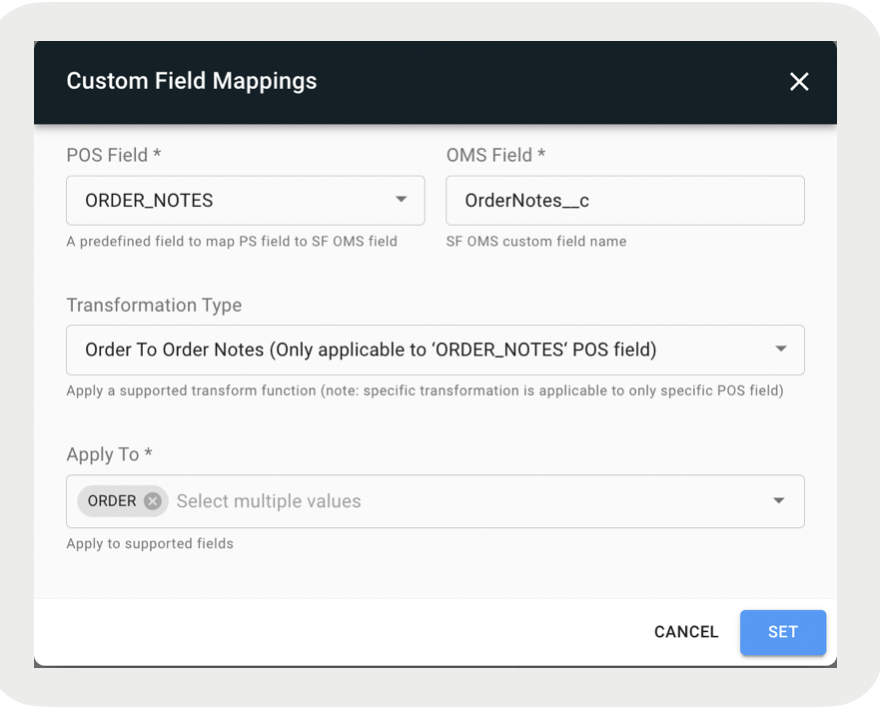
In the screenshot, the POS app field (ORDER_NOTES) is mapped to the SF OMS field (OrderNotes__c). It is applied to "ORDER" and the transformation type is "Order to Order Notes". With this configuration, we're using code logic (transformation type) to read and grab the order notes we're trying to find in the Order object (apply to).
order.notesList[0].noteText
To further explain, in the code example above, the transformation type of "Order to Order Notes" is being used to read the field value of noteText from the order.noteList[0] object. After we have the information we need, we process it and post it to SF OMS.

- - A configuration property that is a predefined Point of Sale field to map to. E.g., ORDER_NOTES.
- - A configuration property that is an SF OMS custom field name. E.g., OrderNotes__c.
- - A configuration property that is a list of SF object names for which this mapping should be applied. E.g., ORDER. The difference between Order and Product is just a way, for example, to read the order notes from either the Order object or Product object. It is specific to the POS field that is being selected.
- - A configuration property that applies a supported transform function. E.g, Order To Order Notes. This is the logic that will find the specific field value of an array object in a JSON string. It is specific to the POS field that is being selected.
- - A character that marks the beginning or end of a unit in a string of data. E.g., comma (,), semicolon (;).
- - The format of the date to be posted in SF OMS. E.g., MM-dd-yyyy.
To Add a Custom Field Mapping:
- Click at the bottom of the panel.
- Fill out the fields.
- Click SET.
- (Optional) Select the pencil icon to the right to edit a field mapping.
- (Optional) Select the trash bin icon to the right to delete a field mapping.
POS Fields
| POS Field | Applied To | Transform Function |
|---|---|---|
| ASSOC_ID | ORDER | NONE |
| ORDER_NO_RECEIPT_RETURNS | ORDER | NONE |
| ORDER_DETAIL_STORE_ID | PRODUCT | NONE |
| ORDER_NOTES | ORDER | ORDER_TO_ORDER_NOTES |
| ORDER_QUOTE_ID | ORDER | NONE |
| ORDER_STORE_ID | ORDER, LOCATION | NONE |
| ORDER_TARIFF | ORDER | NONE |
| ORDER_TAX_EXEMPT | ORDER | ORDER_TO_TAX_EXEMPT |
| ORDER_UPDATE_DATE | ORDER, FULFILLMENT_ORDER | EPOCH_TO_DATE |
| ORIGINAL_ORDER_ID | ORDER | NONE |
| PRODUCT_CARD_ALIAS | ORDER | PRODUCT_CARD_ALIAS |
| PAYMENT_CARD_LAST_FOUR | ORDER | PAYMENT_TO_CARD_LAST_FOUR |
| PRODUCT_ASSOC_ATTR | PRODUCT | PRODUCT_TO_ASSOC_ATTR |
| PRODUCT_CUSTOMSKU | PRODUCT | List to JSON string |
| PRODUCT_NOTES | PRODUCT | PRODUCT_TO_PRODUCT_NOTES |
| PRODUCT_PICKUP_STOREID | PRODUCT |
PRODUCT_PICKUP_ TO_TARGET_STORE_ID |
| PRODUCT_FULFILLMENTLOC_STOREID | PRODUCT | NONE |
| PRODUCT_FULFILLMENT_TYPE | PRODUCT | NONE |
| PRODUCT_FULFILLMENT_SUBTYPE | PRODUCT | NONE |
| PRODUCT_PRICE_ADJUSTMENT_PROMONAME | PRODUCT_PRICE_ADJUSTMENT | NONE |
| PRODUCT_PRICE_ADJUSTMENT_REASON | PRODUCT_PRICE_ADJUSTMENT_REASON | List to JSON string |
| PRODUCT_TARGET_STORE_ID | PRODUCT | NONE |
| PRODUCT_TAX_CODE | PRODUCT_TAX | NONE |
| PRODUCT_TAX_JURISDICTION | PRODUCT_TAX | NONE |
| PRODUCT_TAX_REGISTRATION_NO | PRODUCT_TAX | NONE |
| STORE_FULFILLMENT_ORDER_ID | ORDER | NONE |
| STORE_REGISTER_ID | ORDER | NONE |
| TARIFF_RATE | ORDER | NONE |
Digital Wallet Types
Map online payment options, such as ApplePay, PayPal, and Google Pay, to the Retail CLoud POS app. This field(s) is not mandatory however, it is critical for BORIS flows to map online payment options to the POS. Configure the same payment types in the Commerce system and Point of Sale CMS. These are found in your Salesforce account under Type in the Order Payment Summary.
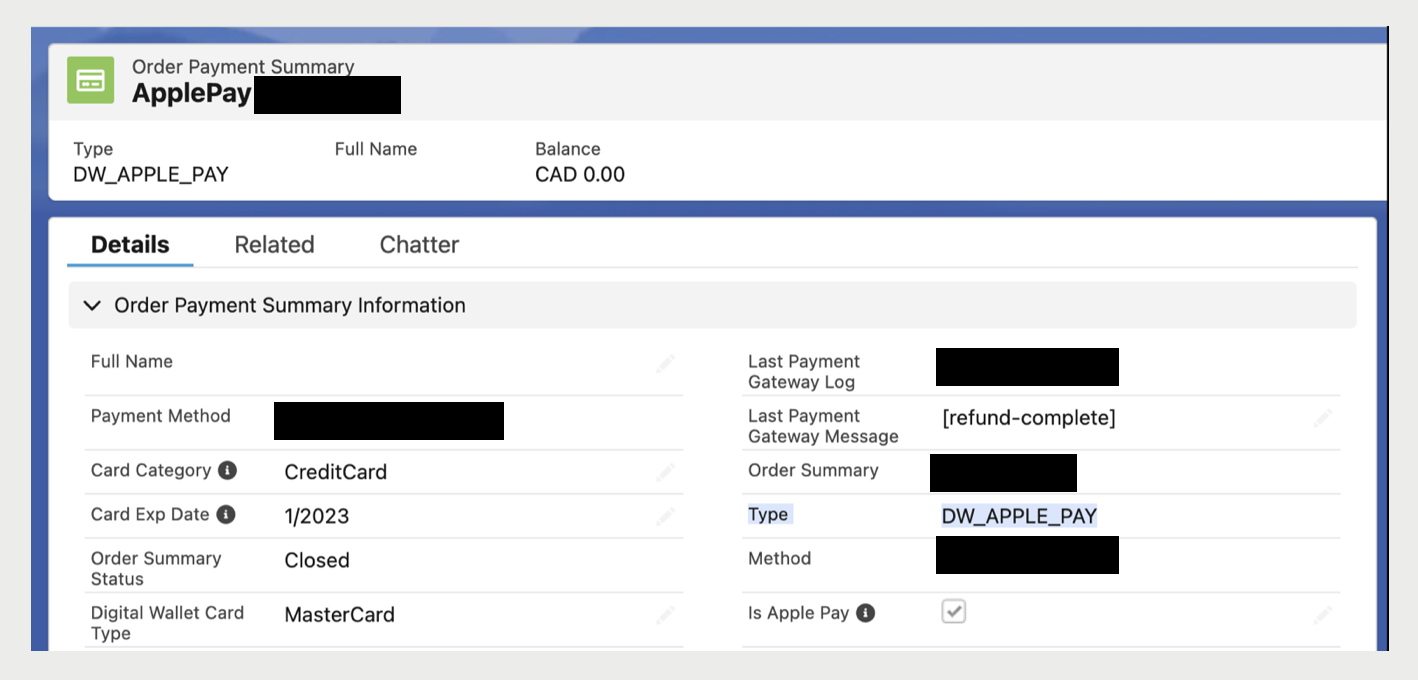
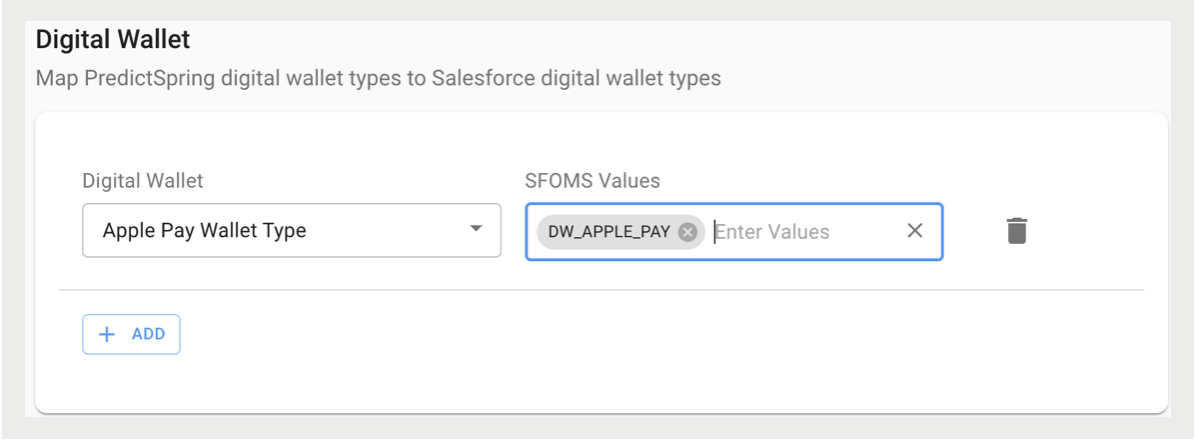
For details on the support capability for BORIS returns to credit card payments, refer to Buy Online, Return In-Store (BORIS) Payment Refunds via Credit Card.
Additional Payment Types
In terms of functionality, Additional Payment Types is similar to Digital Wallet. If you allow, for example, Affirm during checkout, then it needs to be configured so that Retail Cloud's additional payment type values can be mapped to the SF OMS additional payment type values. The values to be entered, if applicable, can be found in your Salesforce account.
Delivery Methods
View delivery methods in your Salesforce Point of Sale account in the Order Delivery Method summary.
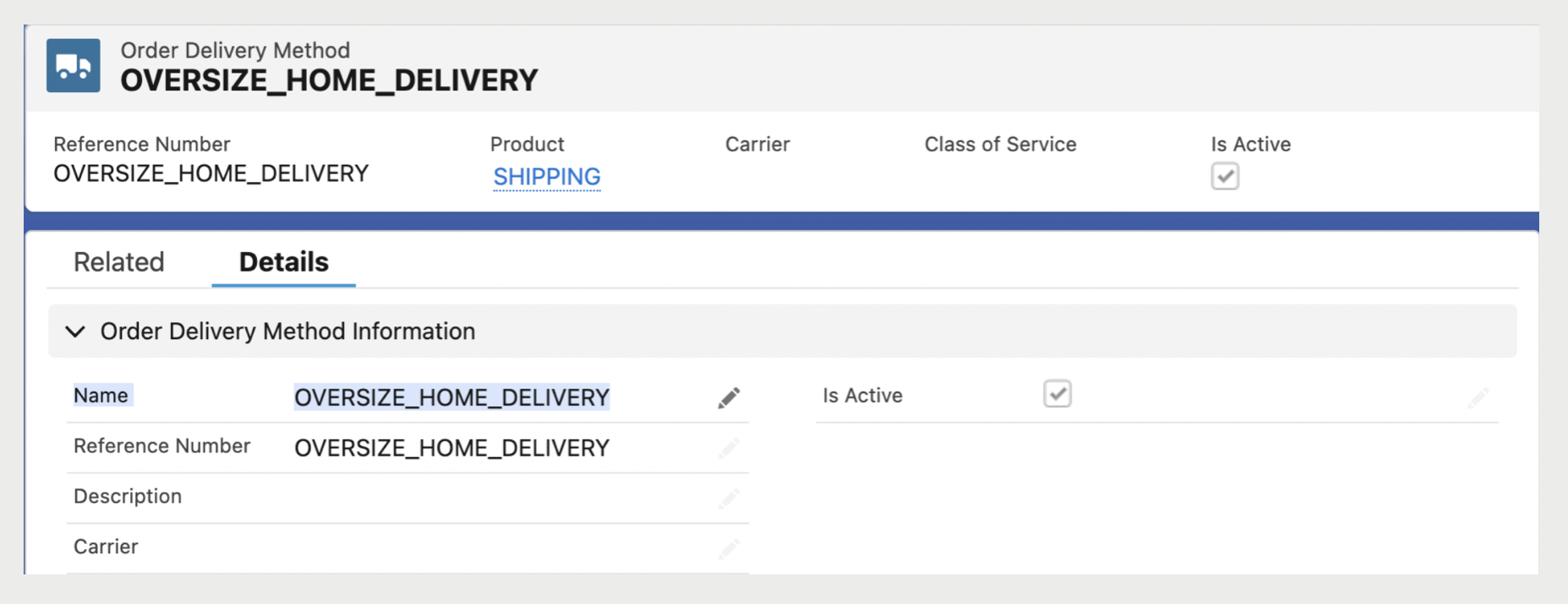
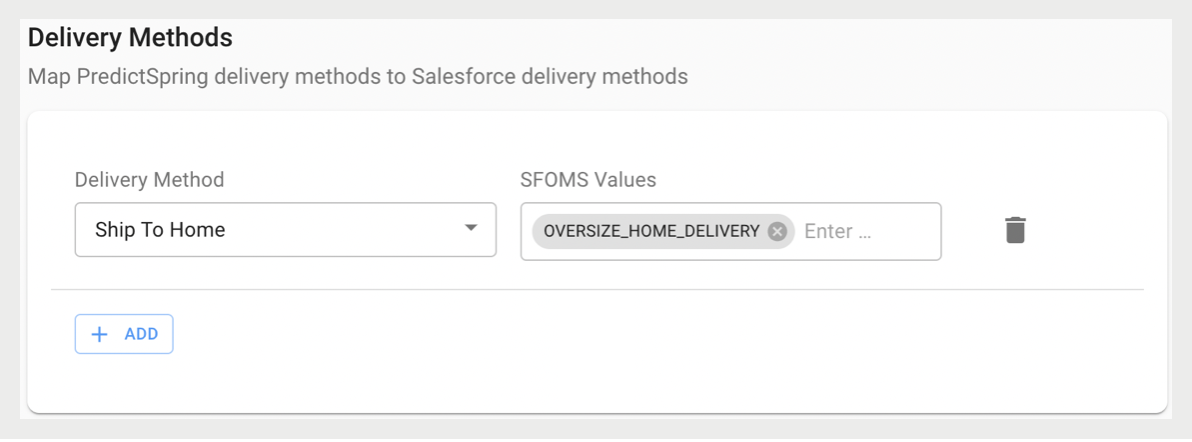
There are different order fulfillment types (for example, online, in-store) at the item-level as well as fulfillment subtypes (for example, BOPIS, try at store, pick up later). Point of Sale created the field to map a brand's various delivery methods. Point of Sale uses logic to map out the delivery methods in their subsequent fulfillment and fulfillment subtypes. In the above screenshot, since a delivery method was entered under in the CMS, with Point of Sale's logic, the fulfillment type would be online with a fulfillment sub type as default.