
Integrate the Salesforce Order Management System (OMS) connector with the Point of Sale platform.
After reading this article, read SF OMS CMS Configuration to learn the configuration portion.
Prerequisites:
- Refer to POS Access List - URLs and IP Addresses for a list of URLs and IP addresses to be allow listed. This is to enable necessary communication.
- The Person Accounts feature must be turned on in your Salesforce environment. Point of Sale's API connectors leverage queries for "Person Account" account types. It won't function if not turned on.
Salesforce OMS Integration Methodology
There are a couple of ways Point of Sale can integrate with the Salesforce OMS.
-
Shared Responsibility Model - Integrates with the SF OMS via REST APIs with a shared responsibility model where all API integration is owned by Point of Sale. The SF OMS process flows are controlled by the merchant and their SI. This allows brands to customize their flows as per business needs.
-
Customized Package - Creates a custom SF OMS package with a set of pre-defined process flow from Point of Sale. Point of Sale works with the merchant's SI to customize as per merchant needs.
After reviewing the pros and cons of both options, Point of Sale decided to integrate using the shared responsibility model with a clear demarcation between the API client (Point of Sale) and the owner (merchant/SI).
Troubleshoot State and Country/Territory Picklist Errors
When the State and Country/Territory Picklists feature is enabled in your Salesforce Order
Management org, Salesforce validates the country and state values on incoming order
addresses. The connector sends the country and state values (for example, the code
FR) into the standard country and state name fields. With the picklists
enabled, Salesforce accepts a value in those fields only when it matches a country or state
Integration Value. If the country, state, or territory that Point of Sale sends doesn't
match the Integration Value configured for that field, Salesforce logs this error
internally:
"There's a problem with this country, even though it may appear correct. Please select a country/territory from the list of valid countries."
To resolve this issue in your Salesforce org, use one of the following options. No Point of Sale or CMS configuration is involved.
Option 1: Align the picklist Integration Values (Recommended)
Change each country and state Integration Value so that it matches the value the connector posts.
- Click the gear icon, and then select Setup.
- In Quick Find, enter State and Country/Territory Picklists, and then select it.
- Click Configure States, Countries, and Territories.
- In the Countries/Territories list, locate the country, and then click Edit in the Action column.
- On the Country/Territory Details page, set the Integration Value to the value the
connector posts (for example, change
FrancetoFR). Confirm that Active is selected.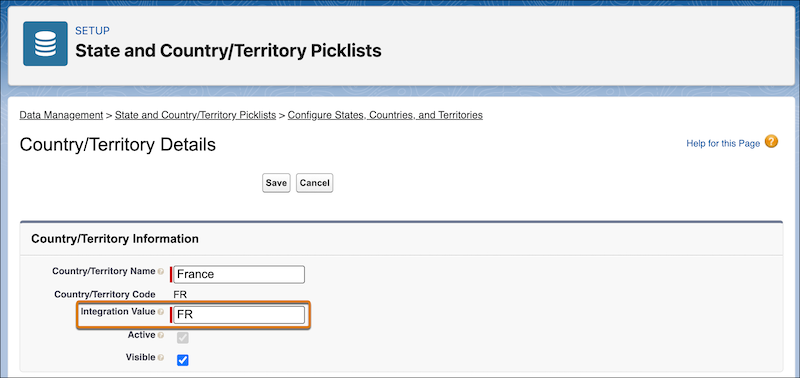
- Click Save.
- To align states, open the country and edit each state under States, setting its Integration Value the same way.
- Repeat these steps for every country and state that your stores transact in.
Option 2: Transform the value with Apex
Add an Apex class in the Order Management org that transforms the incoming country and state values to valid picklist values before the order record is saved. For more information, see Apex Code Overview in Salesforce Help.
POS Use Cases
Understand the use cases for the Point of Sale (POS) that uses the Salesforce OMS adapter.
POS Flows
- Sale Transactions
- In-Store Order
- Endless Aisle Order
- Mixed Cart Order
- POS In-Store Returns
- POS Exchanges
Omnichannel Flows
- BORIS - Buy Online Return In Store
- BOPIS - Buy Online Pickup In Store
- BOPIS
- What happens if the customer does not pick up? When a BOPIS order is created, it goes into the packing stage in fulfillment. If the item isn't picked up. then the order can be canceled. SF OMS is then notified of the cancellation.
-
What happens if the item is not available? Similar to the example above, the order can be canceled and SF OMS is notified.
- Ship to Store
- Inventory handling via ASN
- Inventory receiving in store
- BOPIS
- BOFIS - Buy Online Fulfill In Store
-
What happens if the store cannot fulfill the order? Similar to BOPIS, SF OMS is notified that the store cannot fulfill the order.
-
Reference Architecture
Understand the reference architecture for the integration of Point of Sale (POS) with Salesforce Order Management System (OMS).
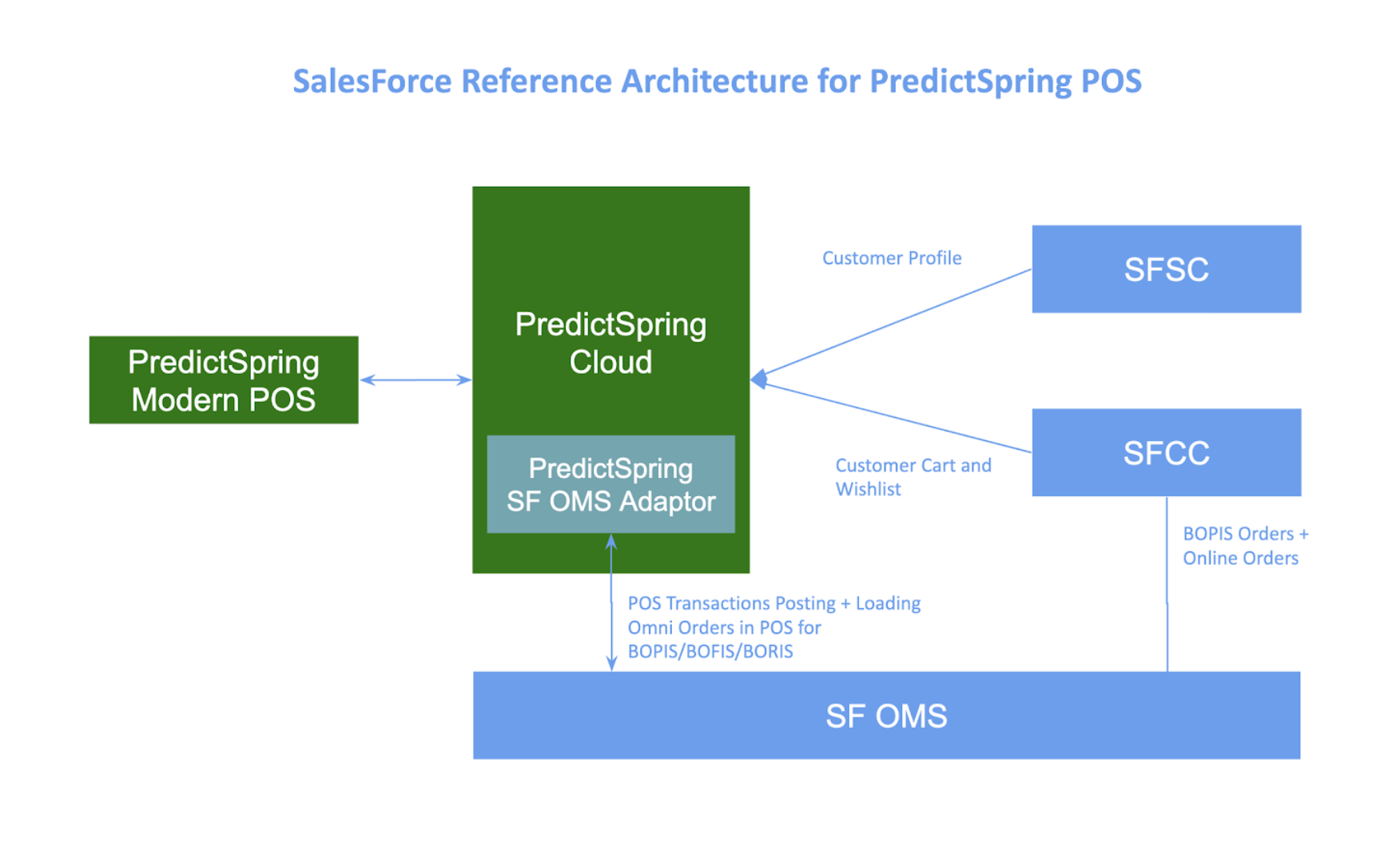
Salesforce OMS Integration Details
Use Salesforce OMS APIs and event listeners to connect POS posting flows with Point of Sale OMS objects. With a comprehensive order history, the integration supports advanced cancellation, order search, returns, and refunds, ensuring a complete customer 360 view.
Salesforce OMS APIs
Authorization
OAUTH Access Token based authorization is used for API calls.
Reference: REST API Developer Guide
Posting Transactions via SF Object APIs
SOBJECTS /services/data/<apiVersion>/sobjects/<Object>
a. <Object> can be Order, Account, OrderItem, Pricebook2, PricebookEntry, Product2, OrderDeliveryGroup, OrderPaymentSummary, OrderDeliveryGroupSummary, OrderItemSummary, FulfillmentOrder, FulfillmentOrderLineItem, Location, CardPaymentMethod, OrderDeliveryMethod, SalesChannel, PaymentGroup, PaymentAuthorization, OrderItemTaxLineItem, OrderAdjustmentGroup, OrderItemAdjustmentLineItem, Payment, PaymentMethod, Shipment, DigitalWallet, PaymentGateway
| SObject | Description |
|---|---|
| OrderSummary | This represents the current properties and state of an order, including fulfillment information. It is associated with one order that represents the original order. The order summary's values are the sums of the values in the original order and any subsequent orders representing changes such as returns or cancellations. |
| Order | An original order or a change to an order, such as a return or cancellation. It is associated with one order summary, which represents the current state of an order. The values on the order records don’t usually change. In Order Management, you usually interact with order summaries instead of orders. |
| Account | When using Person Accounts, an account of the Person Account record type represents an individual shopper. When not using Person Accounts, a standard account and contact together represent an individual shopper. A business account shopper always has a standard account and contact. |
| PricebookEntry |
The price of a product in a price book. Salesforce Order Management doesn't use this object, but because order products require them, it creates dummy price book-entry records. When you create products to represent delivery methods, you must also add dummy price book-entry records. Note: If the Optional Price Books feature is turned on, then Order Management doesn’t create price book-entry records, and you don’t have to add them to delivery method products. |
| OrderDeliveryGroup | This defines a group of order products, belonging to one order, to be fulfilled using the same delivery method and delivered to the same recipient. In Order Management, you usually interact with order delivery group summaries instead of order delivery groups. |
| OrderDeliveryGroupSummary | This defines a group of order product summaries, belonging to one order summary, to be fulfilled using the same delivery method and delivered to the same recipient. An order delivery group summary is used to create one or more fulfillment orders. |
| FulfillmentOrder | A fulfillment request or shipper's instruction that can be sent to a fulfillment location. This represents a group of products and delivery charges on a single order that have the same fulfillment location, delivery method, and recipient. They can be included in one shipment or split into multiple shipments. A fulfillment order is associated with one order summary. For BOFIS flows, the status can be updated using standard SFOMS PATCH endpoints or custom Platform Events depending on your SFOMSConfig settings. |
| Location | A location that fulfills orders, such as a warehouse or retail store. |
| CardPaymentMethod | A credit card or debit card. |
| OrderDeliveryMethod | The Order Management uses an order delivery method record together with a product record to represent a delivery method. The product record is added to an order to represent a charge for that delivery method. |
| SalesChannel | A source of orders, such as a web storefront, physical store, marketplace, or mobile app. If you use Salesforce B2C Commerce, we recommend creating a sales channel record for each site in your B2C Commerce implementation. |
| PaymentGroup | A group of payment transactions processed for an order. |
| PaymentAuthorization | A single payment authorization. |
| OrderAdjustmentGroup | This defines a related set of price adjustments to order products on one order. In Order Management, you usually interact with order adjustment group summaries instead of order adjustment groups. |
| OrderAdjustmentGroupSummary | This defines a related set of price adjustments on order product summaries belonging to one order summary. The integration with Salesforce B2C Commerce assigns an order adjustment group summary for each storefront promotion to the adjustments that belong to that promotion. |
| Payment | A single payment capture or sale. |
| PaymentMethod | A payment method, such as a credit card, cash, or digital wallet. |
| DigitalWallet | A digital payment method. |
| Shipment | A single package that is associated with one fulfillment order. |
| PaymentGateway | A connection to an external payment gateway. |
| Product2 | A product that a merchant sells or has sold. A product can also represent delivery charges for one or more order delivery methods. |
Reference: Order Management Objects
Cancel Order
/services/data/<apiVersion>/commerce/order-management/order-summaries/%s/actions/submit-cancel
| HTTP Method | POST |
|---|---|
| URL | /commerce/order-management/order-summaries/orderSummaryId/actions/submit-cancel |
| Request |
|
| Response |
|
| Reference | Salesforce Order Management Developer Guide - Order Summaries, Submit Cancel |
Return Order Items
/services/data/<apiVersion>/commerce/order-management/order-summaries/%s/actions/submit-return
| HTTP Method | POST |
|---|---|
| URL | /commerce/order-management/order-summaries/orderSummaryId/actions/submit-return |
| Request |
|
| Response |
|
| Reference | Salesforce Order Management Developer Guide - Order Summaries, Submit Return |
Cancel Order Item
/services/data/<apiVersion>/commerce/fulfillment/fulfillment-orders/%s/actions/cancel-item
| HTTP Method | POST |
|---|---|
| URL | /commerce/fulfillment/fulfillment-orders/fulfillmentOrderId/actions/cancel-item |
| Request |
|
| Response |
|
| Reference | Salesforce Order Management Developer Guide - Fulfillment Orders, Cancel Item |
Create Credit Memo
/commerce/order-management/order-summaries/orderSummaryId/actions/create-credit-memo
| HTTP Method | POST |
|---|---|
| URL | /commerce/order-management/order-summaries/orderSummaryId/actions/create-credit-memo |
| Request |
|
| Response |
|
| Reference | Salesforce Order Management Developer Guide - Order Summaries, Ensure Refunds Async |
Create Credit Memo
/commerce/order-management/order-summaries/orderSummaryId/async-actions/ensure-refunds-async
| HTTP Method | POST |
|---|---|
| URL | /commerce/order-management/order-summaries/orderSummaryId/async-actions/ensure-refunds-async |
| Request |
|
| Response |
|
| Reference | Salesforce Order Management Developer Guide - Order Summaries, Ensure Refunds Async |
Update Order Details (Change Order Summary)
Use this API to submit changes to an existing order summary, such as edits to order item summary details, through Salesforce Order Management. This API supports API version 66.0 and later.
Before you use this API, complete these prerequisites.
- Make sure that Salesforce OMS is the system of record. After you post an order to Salesforce OMS, submit updates through OMS actions on the order summary. Don't edit the base order records directly.
- Enable the
OrgPermissions.changeOrderSummaryorg permission in your Salesforce OMS org. This permission gives you access to the Change Order Summary API. - Add a change reason code, such as
POS Edit Order, to the Reason field on the Order Product Summary Change object (OrderItemSummaryChange). Your change requests need a valid reason.
/services/data/v66.0/commerce/order-management/order-summaries/%s/actions/submit-change
| HTTP Method | POST |
|---|---|
| URL | /services/data/v66.0/commerce/order-management/order-summaries/orderSummaryId/actions/submit-change |
Salesforce OMS Event Listener
BOPIS / BOFIS - For Omni orders that are to be picked or fulfilled from stores, Point of Sale leverages the Salesforce Fulfilment Order Subscription Channel.
/event/FOStatusChangedEvent
Streaming API (CometD) is used for long polling and real-time streaming.
Reference: Developer Documentation
Custom Platform Events for BOFIS - For Buy Online Fulfill In Store (BOFIS) orders that need custom status update handling, you can use custom Platform Events to receive updates from the POS system.
Fulfillment_Status_Change__e
This custom Platform Event enables POS to send fulfillment status changes for BOFIS orders, particularly for SHIPPED status updates. When configured, the POS system posts events to this endpoint to trigger status updates in Salesforce OMS.
Example endpoint: /services/data/v52.0/sobjects/Fulfillment_Status_Change__e
Custom Field: Quantity_Fulfilled__c - For tracking fulfilled quantities on
individual fulfillment order line items during BOFIS flows, add the custom field
Quantity_Fulfilled__c to the FulfillmentOrderLineItem object. This field
tracks the quantity fulfilled for each line item when POS sends PATCH requests to update
fulfillment status.
For a list of events that Point of Sale can stream, refer to Point of Sale Data Exports.
Salesforce OMS to Point of Sale OMS Object Mapping
This diagram explains the object mapping. For a detailed field-level mapping, see POS Fields in Configure the Salesforce (SF) Order Management System (OMS) in
CMS.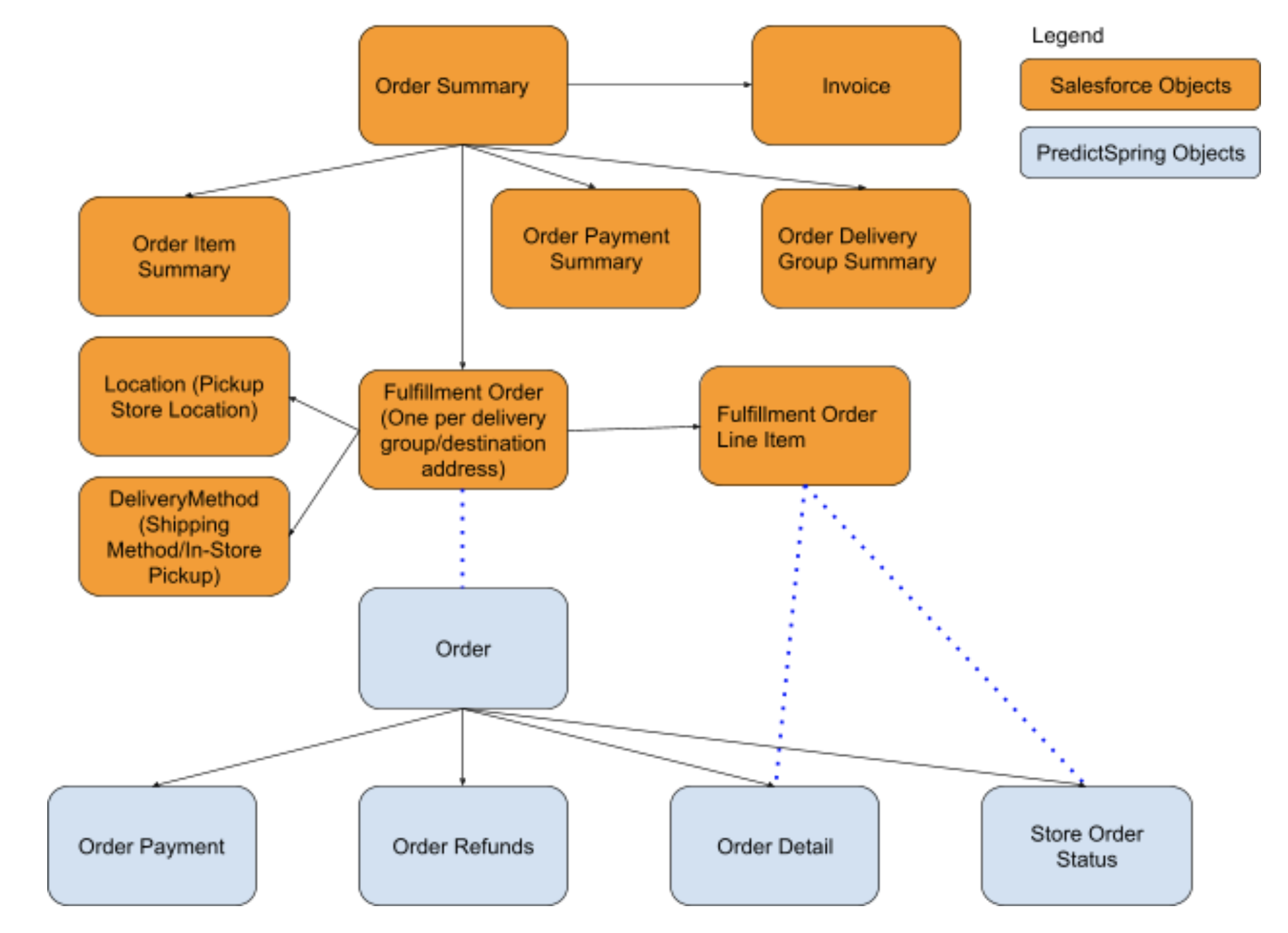
| OMS Object | Point of Sale Object |
|---|---|
| Fulfillment Order | Order |
| Fulfillment Order Line Item | Order Detail. For BOFIS flows that require tracking fulfilled quantities, add the custom field Quantity_Fulfilled__c to this object. |
| Fulfillment Order Item Adjustment | Order Item Price Adjustment |
| Fulfillment Order Item Tax | Order Detail Tax |
| Invoice | Order Payment Details |
| Payment Line Invoice | Order Payment Details |
| Refund Line Payment | Order Refund Payment Details |
| Refund | Order Refund Payment Details |
POS Posting Flows
Understand POS Posting Flows including the flow diagram for creating order objects, SObject details, and special data mapping. Visualize the process of creating order objects within SF OMS. Verify accurate and efficient transfer of data, reduce errors, and improve overall data quality.
After completing a sale on the app, the Point of Sale platform synchronously pushes the order
information to the Salesforce OMS system using a composite graph API. As a fallback to primary
posting in case of any errors, orders are pushed using an order export job process which can
be scheduled via CMS.
Flow Diagram for Creating Order Objects in SF OMS
This uses a Composite Graph API.
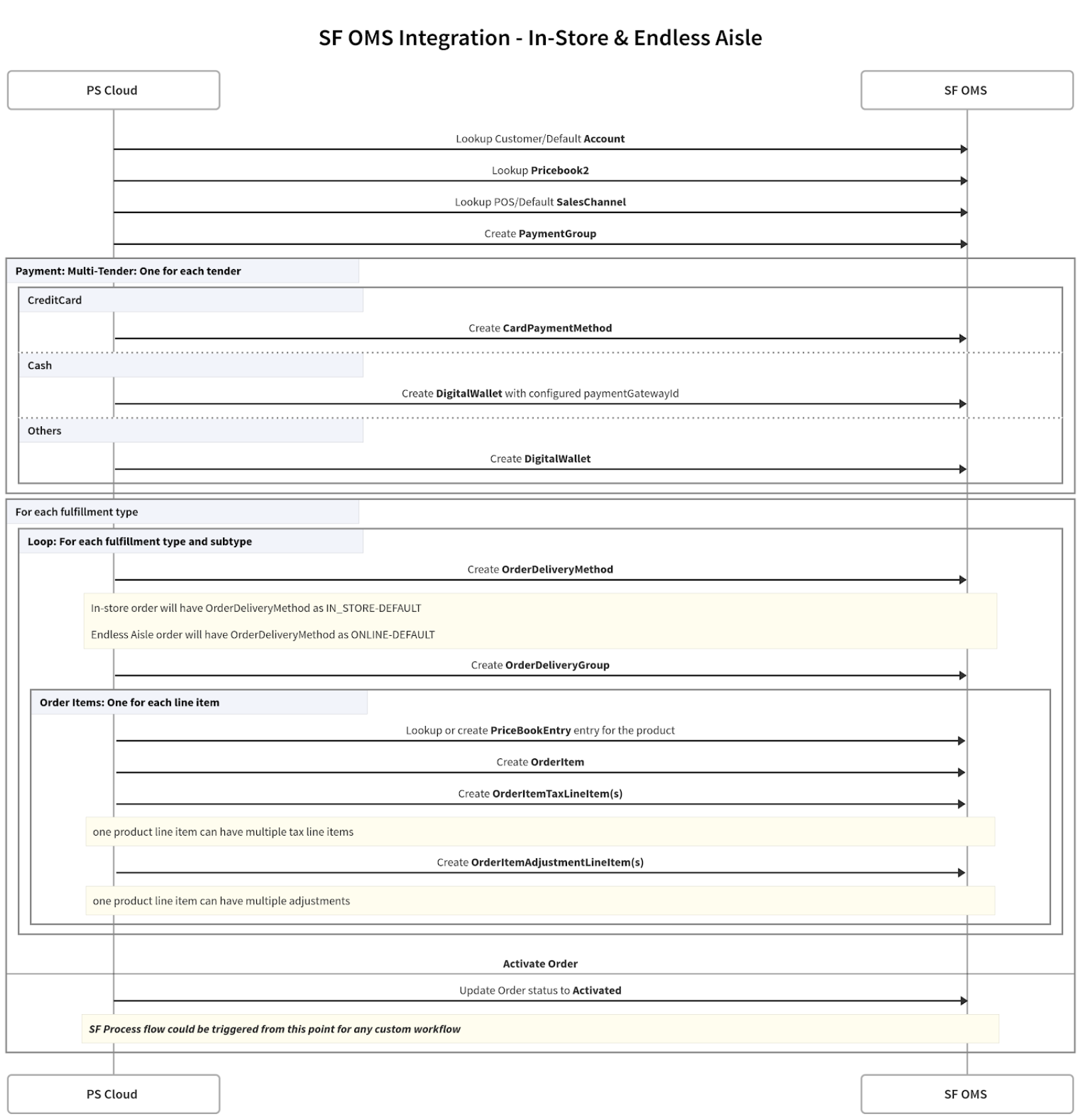
SObject Details
The following Salesforce objects are used duringthe order creation process.
Account
Point of Sale looks up an account by the customer email and if it isn't found, it falls back to the default account. If a default account isn't found, Point of Sale creates one during runtime.
Get Account Details By Customer Email:
| HTTP Method | GET |
|---|---|
| URL | /services/data/v49.0/query/?q= |
| Request |
|
| Response | {"totalSize":1,"done":true,"records":[{"attributes":{"type":"Account","url":"/services/data/v49.0/sobjects/Account/00-105000005tmJFAAY"},"Id":"00105000005tmJFAAY"}]} |
Get Default Account Details:
| HTTP Method | GET |
|---|---|
| URL | /services/data/v49.0/query/?q= |
| Request | SELECT+Id+FROM+Account+WHERE+Name+%3D+%27SHOPNOW20140910-en_US-US%27 |
| Response |
|
Create Default Account:
| HTTP Method | POST |
|---|---|
| URL | /services/data/v49.0/sobjects/Account |
| Request | {“Name”:”SHOPNOW20140910-en_US-US”} |
| Response |
|
Pricebook2
Point of Sale looks up the price book by the merchant ID, locale, and region (MerchantID-Locale-Region). If it isn't found, Point of Sale creates one during run time.
Get Pricebook Details:
| HTTP Method | GET |
|---|---|
| URL | /services/data/v49.0/query/?q= |
| Request |
|
| Response |
|
Create Pricebook Account:
| HTTP Method | POST |
|---|---|
| URL | /services/data/v49.0/sobjects/Pricebook2 |
| Request |
|
| Response |
|
SalesChannel
Point of Sale looks up the sales channel with the name “POS”. If it isn't found, the system falls back to the default sales channel named MerchantId-Locale-Region-POS. If a default sales channel isn't found, Point of Sale creates it during run time.
Get:
| HTTP Method | GET |
|---|---|
| URL | /services/data/v49.0/query/?q= |
| Request | SELECT+Id+FROM+SalesChannel+WHERE+SalesChannel+%3D+%27POS%27 |
| Response |
|
Create:
| HTTP Method | POST |
|---|---|
| URL | /services/data/v49.0/sobjects/SalesChannel |
| Request | {“SalesChannelName”:”SHOPNOW20140910-en_US-US-POS”} |
| Response |
|
OrderDeliveryMethod
DeliveryMethodName is derived as FulfillmentType-FulfillmentSubType. See the "OrderDeliveryMethod by order type" section below for details.
Get:
| HTTP Method | GET |
|---|---|
| URL | /services/data/v49.0/query/?q= |
| Request |
|
| Response |
|
Create:
| HTTP Method | POST |
|---|---|
| URL | /services/data/v49.0/sobjects/OrderDeliveryMethod |
| Request | {“Name”:”IN_STORE-DEFAULT”} |
| Response |
|
OrderDeliveryGroup
Create:
| HTTP Method | POST |
|---|---|
| URL | /services/data/v49.0/sobjects/OrderDeliveryGroup |
| Request | {"SourceObjectId":"80105000000283dAAA"} |
| Response |
|
PaymentGroup
Create:
| HTTP Method | POST |
|---|---|
| URL | /services/data/v49.0/sobjects/PaymentGroup |
| Request | {"SourceObjectId":"80105000000283dAAA"} |
| Response |
{ "id" : "01s050000004p3HAAA", "success" : true, "errors" : [ ] } |
CardPaymentMethod
CardPaymentMethod and Payment are created with the processing mode as “External” as the payment is completed in the POS.
Note: As part of the 8.10.1 app build, PaymentGatewayID was added to the CardPaymentMethod object to support payment capture in OM.
Create:
| HTTP Method | POST |
|---|---|
| URL | /services/data/v49.0/sobjects/CardPaymentMethod |
| Request |
|
| Response | {"id":"03O0500000005CbEAI","success":true,"errors":[]} |
DigitalWallet
CardPaymentMethod and Payment are created with processing mode as “External” as the payment is completed in the external system.
| HTTP Method | POST |
|---|---|
| URL | /services/data/v49.0/sobjects/DigitalWallet |
| Request |
|
| Response | {"id":"1DW05000000028qGAA","success":true,"errors":[]} |
Payment
Payment status is “Processed” as the payment is processed at the POS Register.
| HTTP Method | POST |
|---|---|
| URL | /services/data/v49.0/sobjects/Payment |
| Request |
|
| Response | {"id":"0aQ0500000003SwEAI","success":true,"errors":[]} |
PriceBookEntry
| HTTP Method | POST |
|---|---|
| URL | /services/data/v49.0/sobjects/PricebookEntry |
| Request |
|
| Response | {"id":"01u05000001meKDAAY","success":true,"errors":[]} |
OrderItem - Create
When processing in-store orders via SF OMS Connector, there may be inconsistencies in the LineNumber value, which uniquely identifies items within an order. This is due to differences in the way LineNumbers are generated in SF OMS, using an indexing system rather than the OrderItemId.
During the return order posting process, two distinct methods can be employed:
-
SF OMS Connector: Utilizes externalOrderItemId for return processing and preserves the original LineNumber (LineNumber: 1 -> LineNumber: 1)
-
Point of Sale Order SPI: Point of Sale handles complete return orders and SF OMS updates the LineNumber according to the OrderItemId (LineNumber: 1 -> LineNumber: 2)
Point of Sale does not support dual-mode order postings, for example, SF OMS and SPI. It is recommended to either go with a full SPI or full SF OMS approach.
| HTTP Method | POST |
|---|---|
| URL | /services/data/v49.0/sobjects/OrderItem |
| Request |
|
| Response |
|
12. OrderItemTaxLineItem
| HTTP Method | POST |
|---|---|
| URL | /services/data/v49.0/sobjects/OrderItemTaxLineItem |
| Request |
|
| Response | {"id":"0au050000004HpLAAU","success":true,"errors":[]} |
OrderItemAdjustmentLineItem
| HTTP Method | POST |
|---|---|
| URL | /services/data/v49.0/sobjects/OrderItemAdjustmentLineItem |
| Request |
|
| Response | {"id":"3qZ050000004CVJEA2","success":true,"errors":[]} |
OrderDeliverMethod By Order Type
This information is configurable in the CMS:
| Order Type | OrderDeliveryMethod |
| In-Store Sales (Take With) | OrderDeliveryMethod for in-store sales orders is IN_STORE-DEFAULT |
| In-Store Sales (Pickup Later) | If a merchant supports pickup later (for example, picking up a bigger item using my pick-up truck later next week), OrderDeliveryMethod for in-store sales order is IN_STORE-PICKUP_LATER. |
| Endless Aisle Order | For endless aisle orders, the OrderDeliveryMethod is ONLINE-DEFAULT |
Special Data Mapping
| Field | Specification |
|---|---|
| Payment.PaymentGatewayId | For cash payments, if a merchant needs specific payment gateway name to be used, it can be configured in PS OMS Configuration (OMSConfig.OmsCashPaymentGatewayName) |

BOPIS / BOFIS
The BOPIS (Buy Online, Pickup In Store) and BOFIS (Buy Online, Fulfill In Store) integration enables efficient order fulfillment and cancellation processes. By fetching fulfillment orders and pushing pick, pack, and shipped events into Salesforce Order Management System (OMS), businesses gain real-time visibility into their inventory and order status. Advanced cancellation features and scheduled jobs further streamline operations. Understand the key distinctions between BOPIS and BOFIS to optimize your fulfillment strategy.
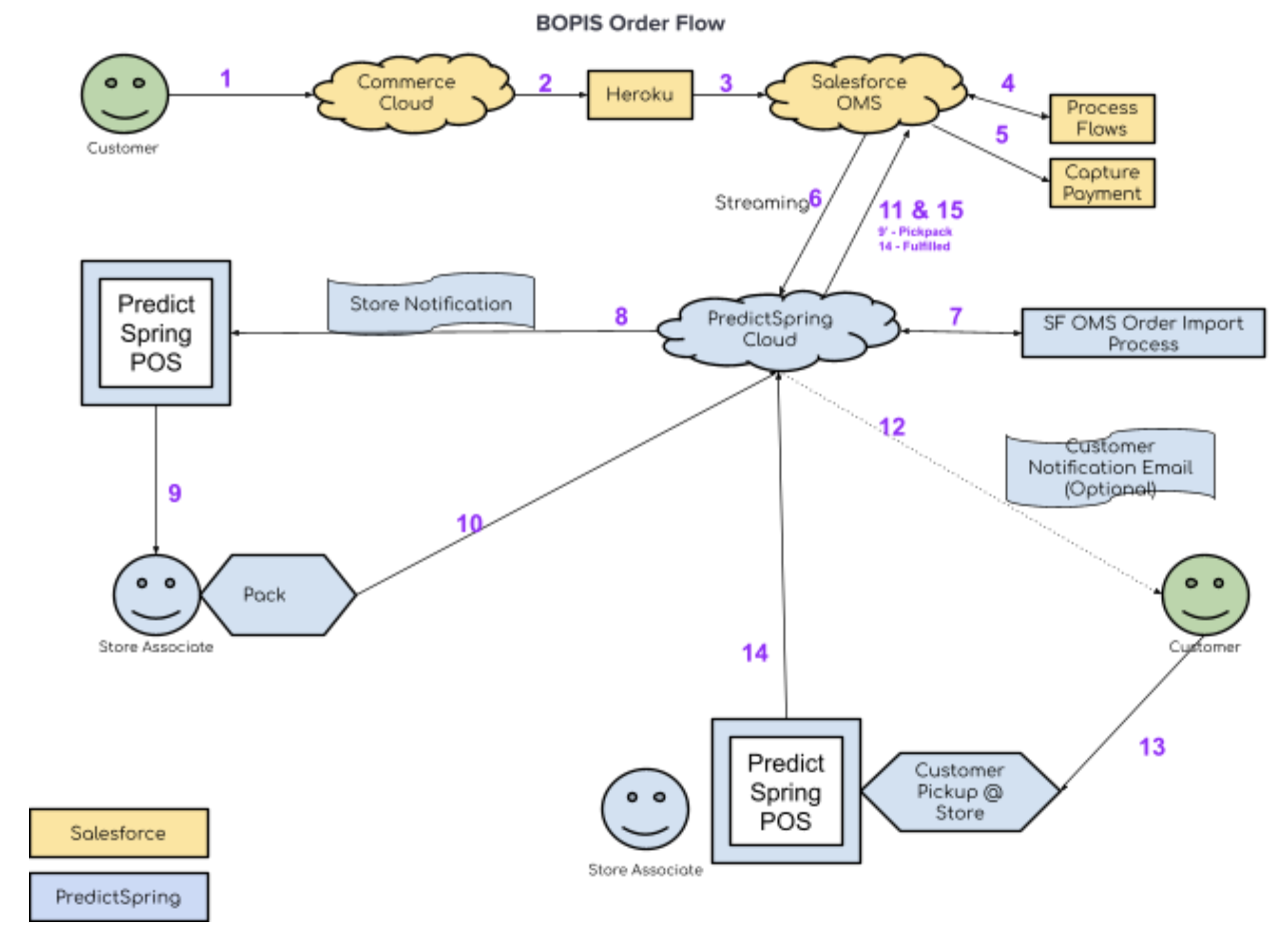
- The customer places a BOPIS order through Salesforce Commerce.
- Salesforce Heroku Job is triggered.
- Heroku job exports customer orders to SF OMS.
- Salesforce Process flow creates order fulfillment objects in SF OMS.
- Payment captured in SF OMS.
- Salesforce triggered streaming API notification to Point of Sale.
- Point of Sale imports order details into the Point of Sale platform.
- Point of Sale sends notifications to the store regarding new BOPIS order
- Store associate picks & packs the order.
- POS notifies that order is packed and ready for customer pickup.
- Update SF OMS Fulfillment Order object with a status of Pickpack.
- SFMC sends the email.
- The customer picks up the order at the store.
- POS notified Point of Sale about the pickup.
- Point of Sale updates SF OMS about the order being picked up by the customer.
Fetch fulfillment orders
Point of Sale subscribed to FOStatusChangedEvent of SF OMS. This triggers an order import process as soon as the fulfillment order is in an appropriate state.
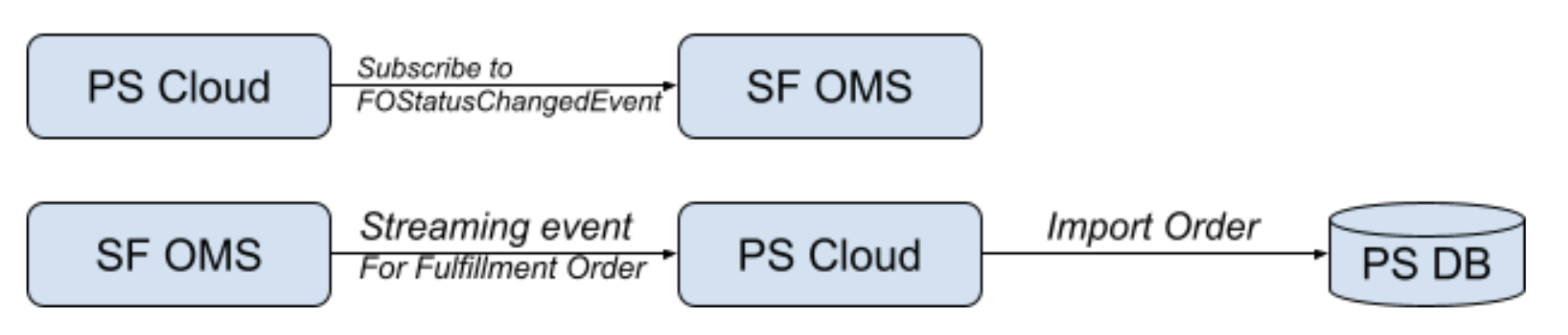
There are a set of configurable conditions that are available to control when a fulfillment order can be imported into Point of Sale.
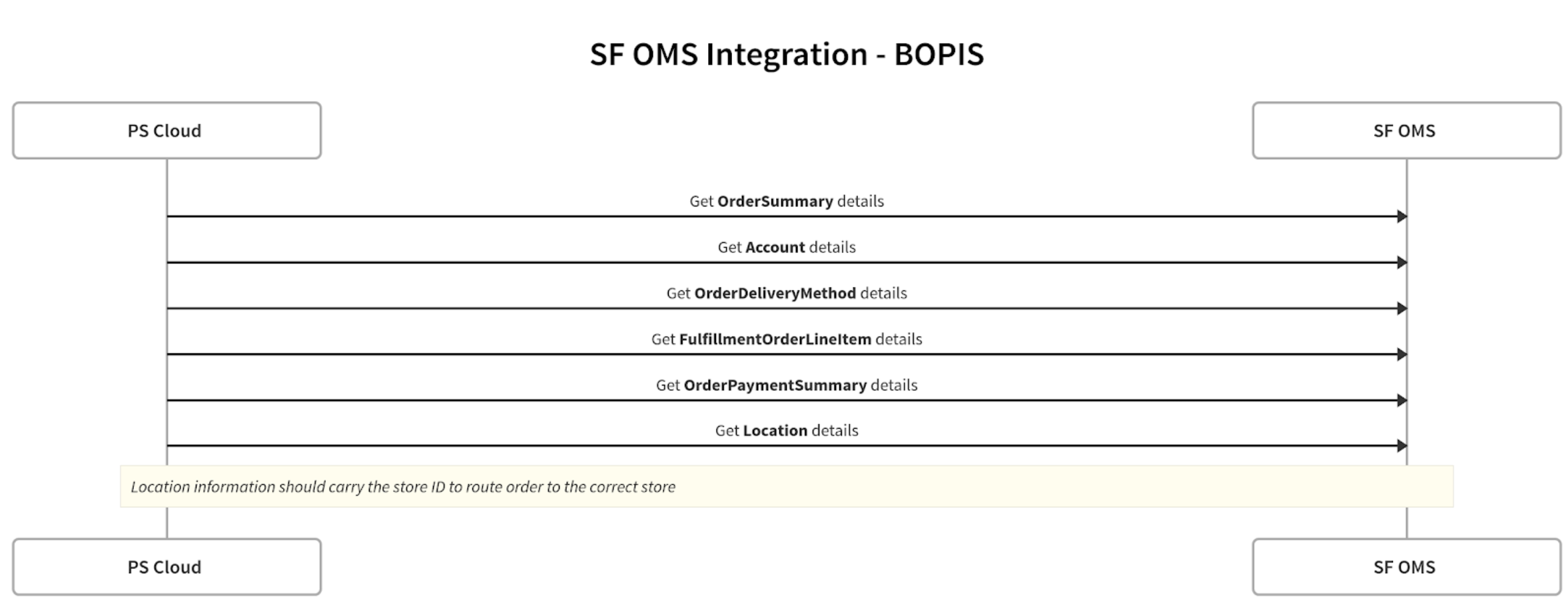
Here is the flow that shows the objects that are pulled in for a BOPIS order:
Pick / Pack / Shipped Events Push Into SF OMS
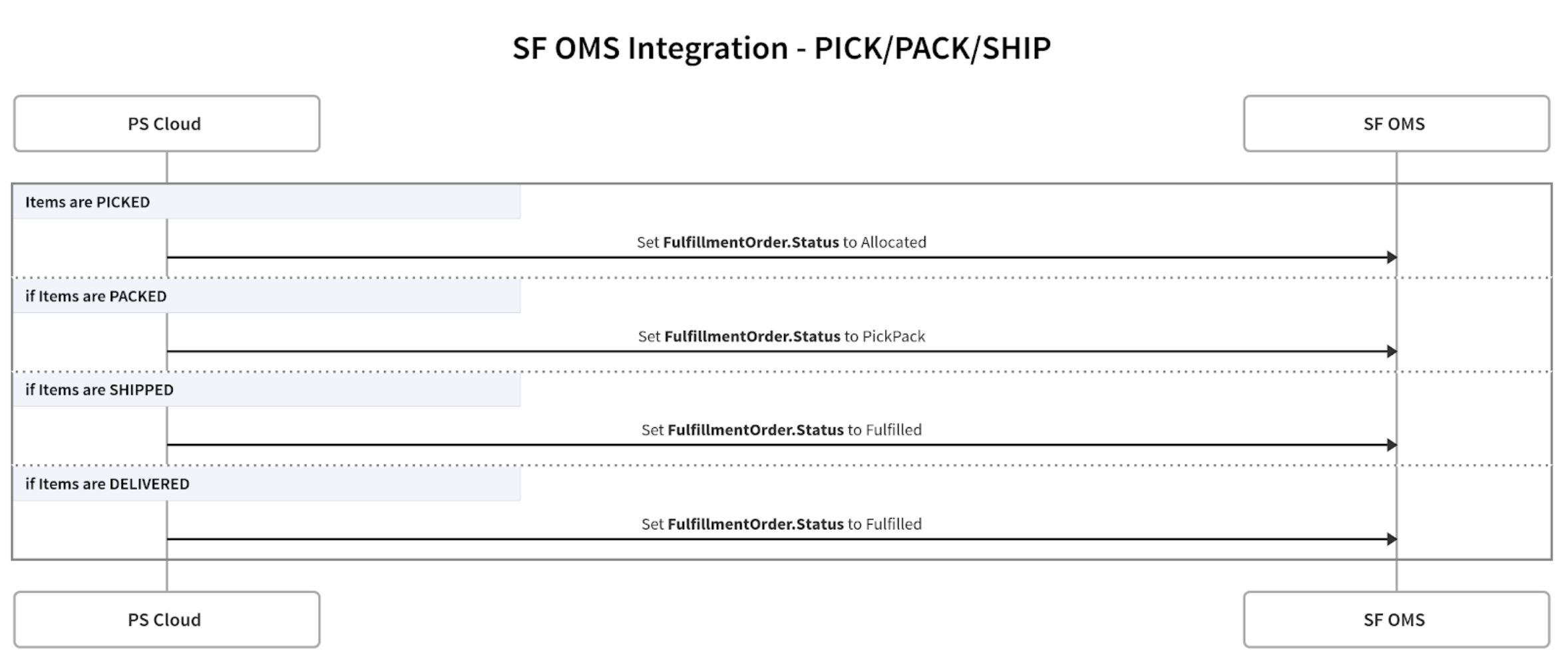
API to update the fulfillment order status:
| HTTP Method | PATCH |
|---|---|
| URL | /services/data/v49.0/sobjects/FulfillmentOrder/<Fulfillment
Id> |
| Request | {"Status": "<StatusValue>"} |
| Response | HTTP Code 204 |
Cancel Events Push Into OMS
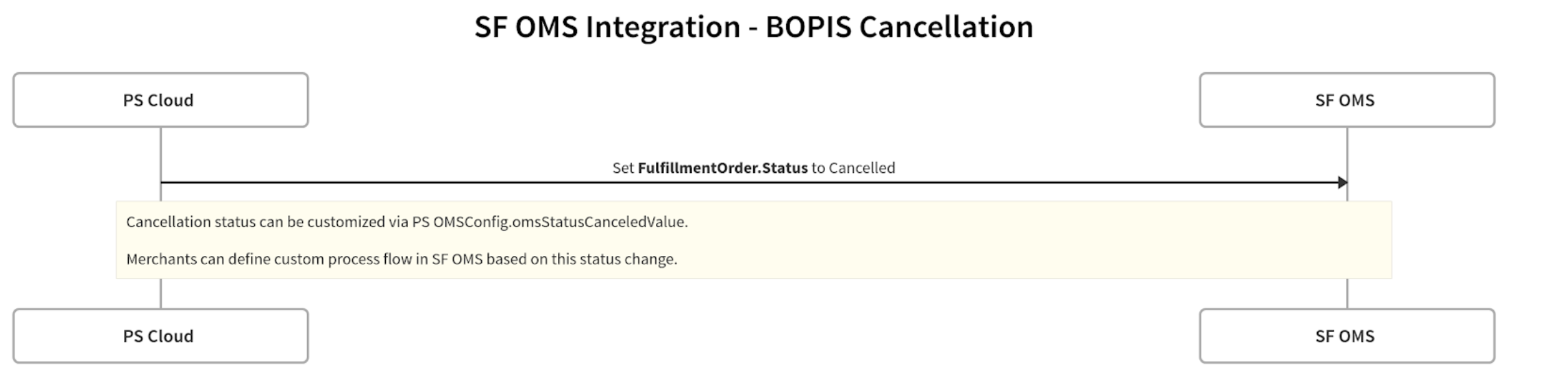
API to update the fulfillment order status:
| HTTP Method | PATCH |
|---|---|
| URL | /services/data/v49.0/sobjects/FulfillmentOrder/<Fulfillment
Id> |
| Request | {"Status": "<StatusValue>"} |
| Response | HTTP Code 204 |
Advanced Cancellation:
There can be line item cancellation and also order-level cancellation. The Cancel API is used along with the Cancel Event to support line item level cancellations.
| HTTP Method | PATCH |
|---|---|
| URL | /commerce/fulfillment/fulfillment-orders/fulfillmentOrderId/actions/cancel-item |
| Request |
|
| Response | HTTP Code 200 |
BORIS
Search orders, process returns and cancellations, and manage refunds within your system. Connecting BORIS streamlines order management, providing a centralized platform for handling the entire order lifecycle. This integration enhances efficiency and accuracy in fulfilling customer requests related to their orders. With BORIS, you can optimize order-related processes.
Order Search
- Search the order using SOQL REST API.
- Example query: SELECT id FROM Order WHERE Name LIKE 'Amanda Freeman%’.
| HTTP Method | GET |
|---|---|
| URL | /services/data/v49.0/query/ |
| Request |
|
| Response |
|
Tip: For details on the support capability for BORIS returns to credit card payments, please refer to this article.
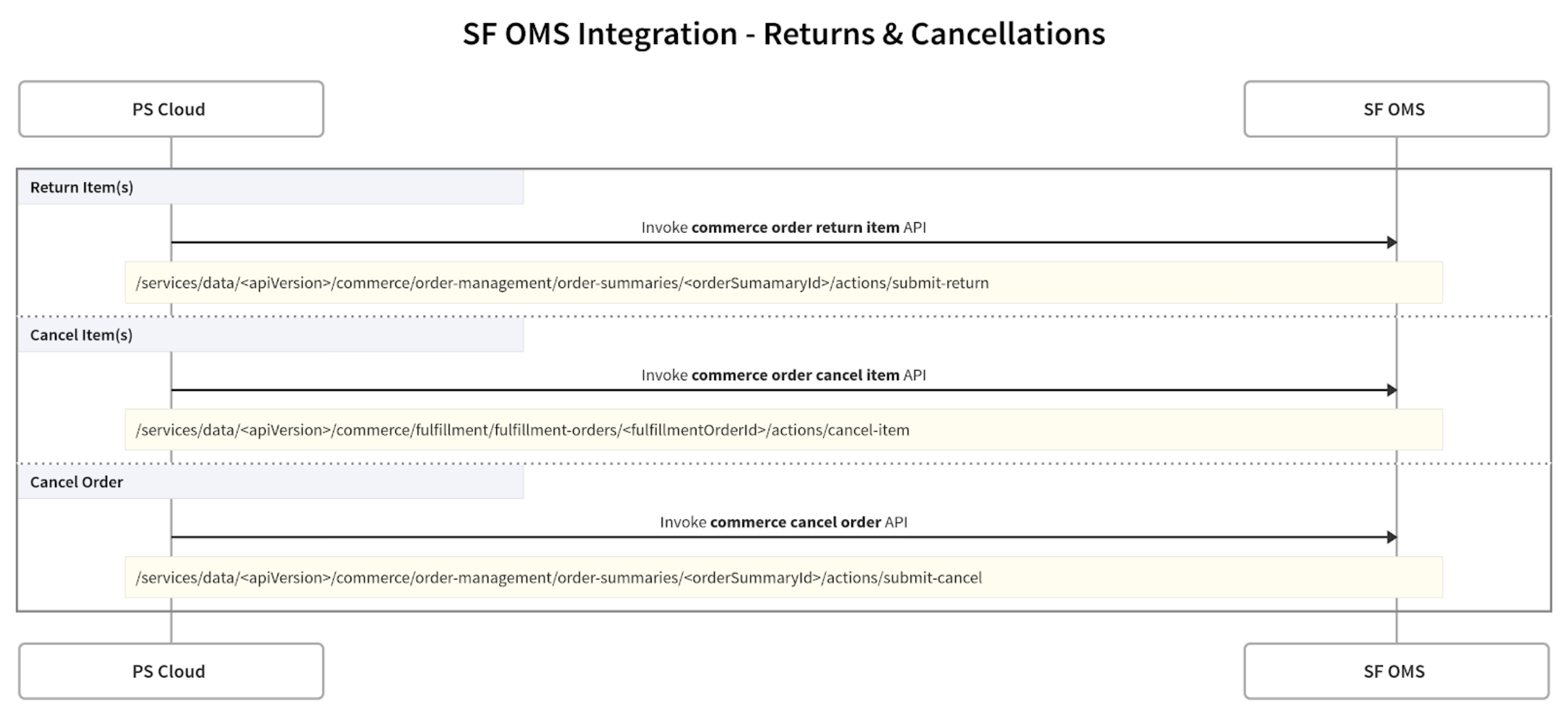

Customer 360 - Order History
Learn about order search in Customer 360.
Order Search
| HTTP Method | GET |
|---|---|
| URL | /services/data/v49.0/query/ |
| Request | ?q=SELECT%20Name%20FROM%20Order%20WHERE%20Name%20LIKE%20%27T-estingca%25%27%0A |
| Response |
|
- Search the order using SOQL REST API.
- Example query: SELECT id FROM Order WHERE Name LIKE 'Amanda Freeman%’.
- Supported search fields: OrderNumber, FirstName, LastName, BillingEmailAddress, BillToContactId.
- Response fields: emailId, OrderID, Total, orderDate, count, OrderstatusText.
PS OMS Configuration - Declarative Model
These elements are configurable using PS OMS Configuration for Salesforce:
| Field | Description | Example |
|---|---|---|
| Service | Service Provider. For salesforce, it should be “LIGHTNING” | LIGHTNING |
| UrlBase |
Salesforce org base URL. For example, https://ps--uat.my.salesforce.com/ This should end with “my.salesforce.com” |
https://ps--uat.my.salesforce.com/ |
| Username | Username to connect to Salesforce instance | psintegration@predictspring.com |
| Password | Password to connect to Salesforce instance | hgj6576AhgA^=@8 |
| ApiVersion |
Provides ability to configure the SF OMS API version. For example, v49.0 This value is used in URL construction. This has to match to the exact API version as defined by SF API. For example: /services/data/v49.0/query/ |
v49.0 |
| QueryApiVersion | Provides ability to configure the SF OMS Query API version.Ideally ApiVersion and QueryApiVersion should be the same. In rare cases, if needed, this version could be different from ApiVersion. | v49.0 |
| OMSCustomField |
Defines custom field mapping from Salesforce objects to Point of Sale object. The primary use case is to identify the store that should be fulfilling a BOPIS order. A field mapping for ORDER_STORE_ID must be present to support BOPIS flow. For Salesforce OMS Integration, supported posField is ORDER_STORE_ID only - This is where the BOPIS order will be fulfilled from.Only SF object it applies to is LOCATION - This is the SF object that holds the store ID information. omsFieldName: This varies by merchant. In this example, warehouseID__c custom field holds the store ID from which the item will be fulfilled. This store ID value should match storeID in Stores Feed. |
[ { "omsFieldName": "warehouseID__c", "posField": "ORDER_STORE_ID", "applyTo": [ "LOCATION" ] } ] |
| FilterQuery |
Custom filter applied to identify the fulfillment orders to be imported. For example, to import fulfillment orders that have delivery method name of ‘Store Pickup’, filter query is defined as below DeliveryMethod.Name = 'Store Pickup CAD' |
DeliveryMethod.Name = 'Store Pickup CAD' |
| OMSStatusCanceledValue | Status value used when an order is cancelled. By default, Point of Sale sets this to Cancelled. Merchants may use a custom process flow, which expects a different value before marking the order as cancelled. In those cases, the expected value could be configured here - for example ‘Processing Cancel’ | Processing Cancel |
| OMSCashPaymentGatewayName | If merchants need a specific payment gateway to use for cash payment so that there could be a custom workflow which skips payment authorization steps, this can be used. For example, set this to CashPOS. If this field isn't set, then DigitalWallet.paymentGatewayId isn't set in case of cash payment. | CashPOS |
| OMSStatusesToProcess | Array of OMS Status Values that should be processed during Streaming event processing from Salesforce. This allows us to ignore other status fields that are not of interest. If we want to process only the fulfillment orders in “Invoice Paid” status, configure this as ["Invoice Paid"] | ["Invoice Paid"] |