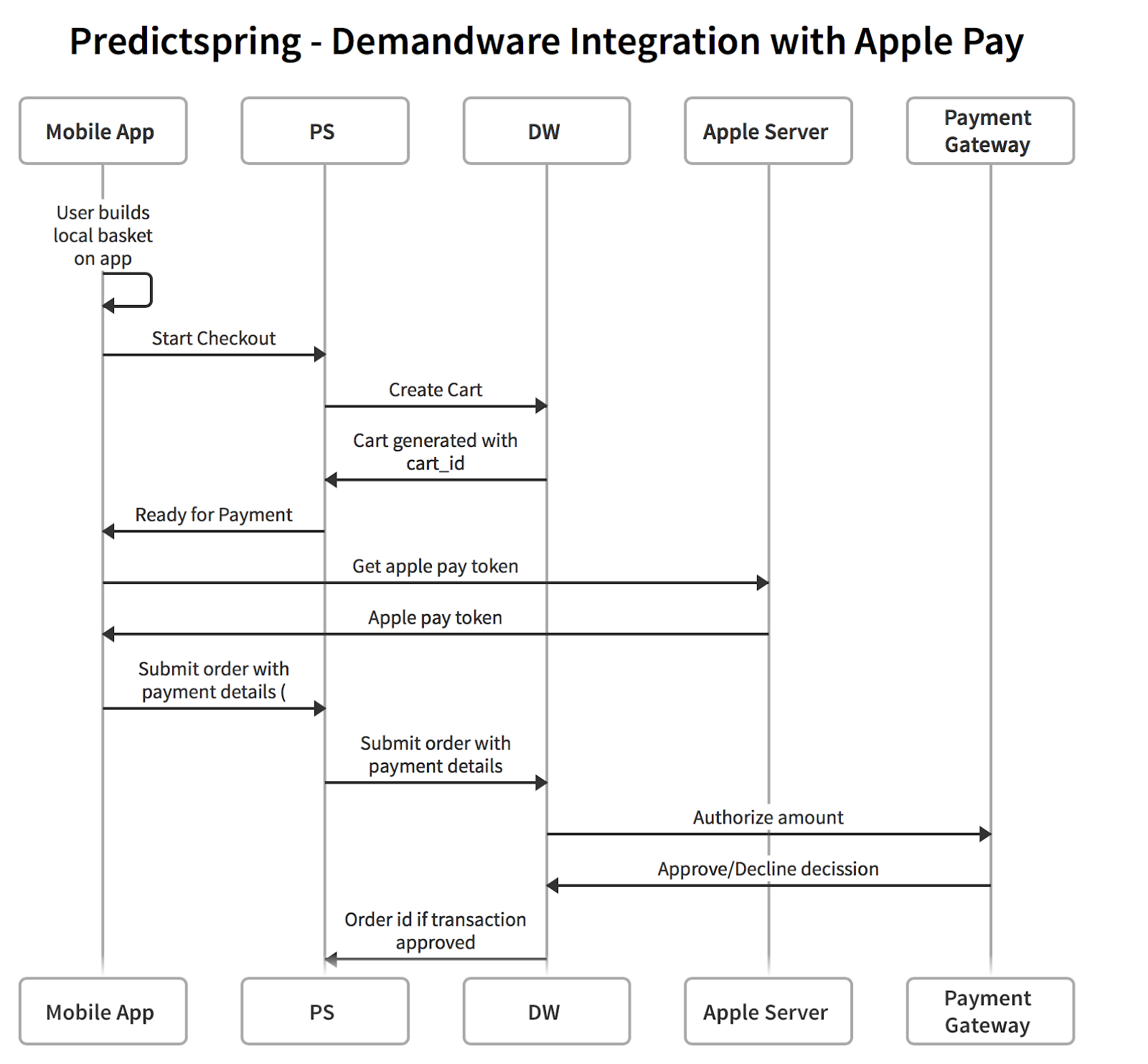
Point of Sale offers native integration with leading e-commerce platforms, such as Demandware and Magento, to unify data and streamline operations.
Connecting your e-commerce system allows you to synchronize product catalogs, customer data, and order information. By integrating these systems, you gain a comprehensive view of your retail business and improve customer experiences. This integration also helps automate processes and optimize inventory management.
Navigating Integration Complexities with Major ERP Platforms
Regarding the ease of integration with major ERP platforms like Microsoft, Oracle, and SAP, there is no clear leader among these large entities concerning integration design patterns. The integration complexity largely depends on the use of an Enterprise Service Bus (ESB). With an ESB, the ease of integration hinges on how well the ESB can interface with these ERP platforms.
In scenarios without an ESB, assuming there is a team well-versed in the integration layer, the difficulty of integrating with major ERP systems like Microsoft D365, Oracle ERP Cloud, and SAP S/4HANA could be considered comparable, despite the inherent complexities of each ERP system.
However, a significant consideration is the level of customization within these ERP platforms. As the customization increases, the challenge of developing and maintaining integrations also escalates.
Integration Modules
This diagram depicts a high-level integration approach taken by Point of Sale with its partner
systems. 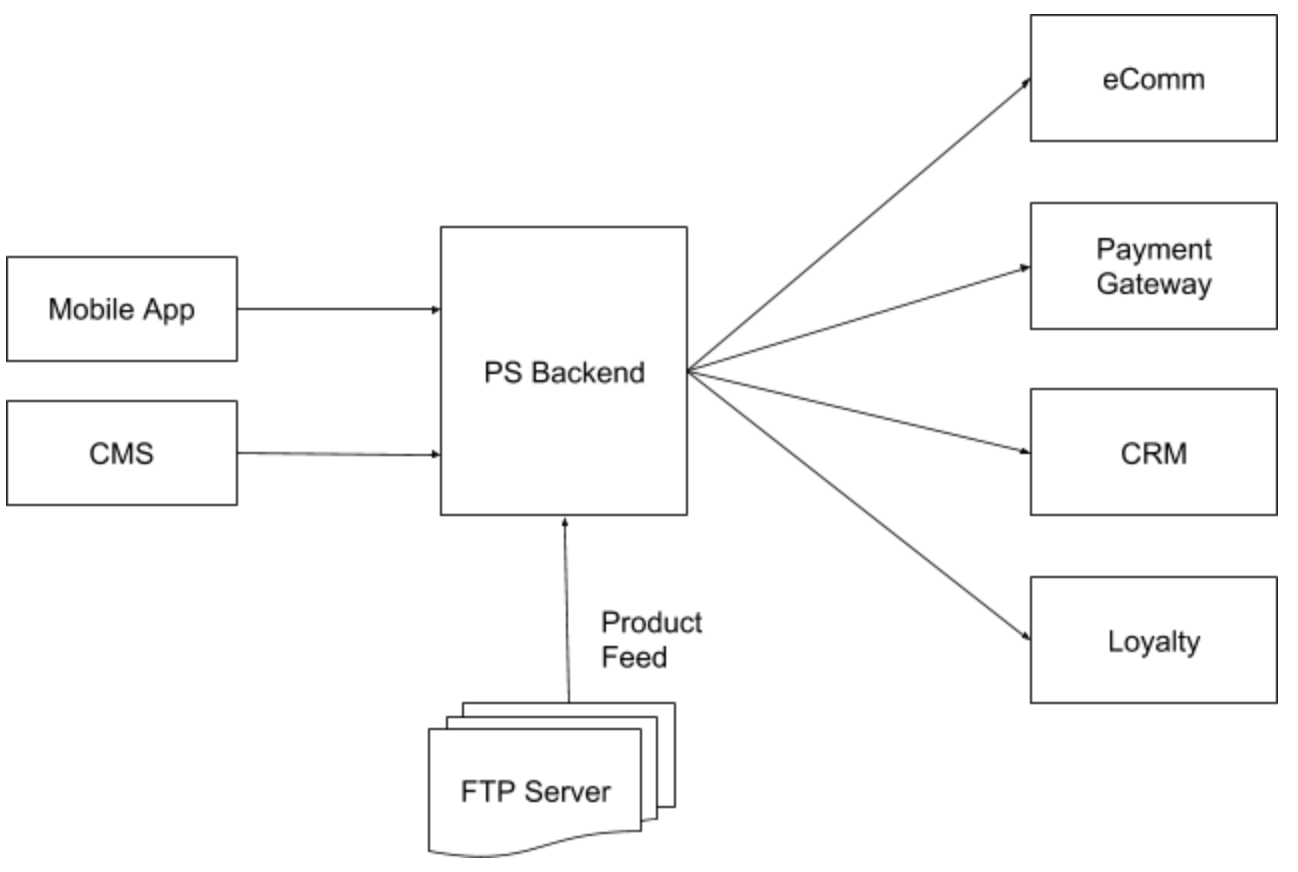
POS app and CMS send requests to the Point of Sale backend which in turn makes the necessary calls to various systems owned by a merchant and builds the response for the POS app/CMS. Merchants drop product catalog feed files on a secure FTP site, which is then ingested by the Point of Sale cloud.
- Ecomm - Cart and checkout operations
- Payment Gateway - For payment authorization
- CRM - Retrieve customer account details i.e. login, profile cards, profile addresses
- Loyalty - Retrieve customer loyalty details i.e. points, rewards
Besides these high-level blocks, the Point of Sale platform also integrates with other services like gift card authorization, address verification, and more.
Credit Card - Checkout Flow
This section depicts a typical interaction between the POS app, Point of Sale backend, and merchant system when an end user wants to place an order using a credit card.
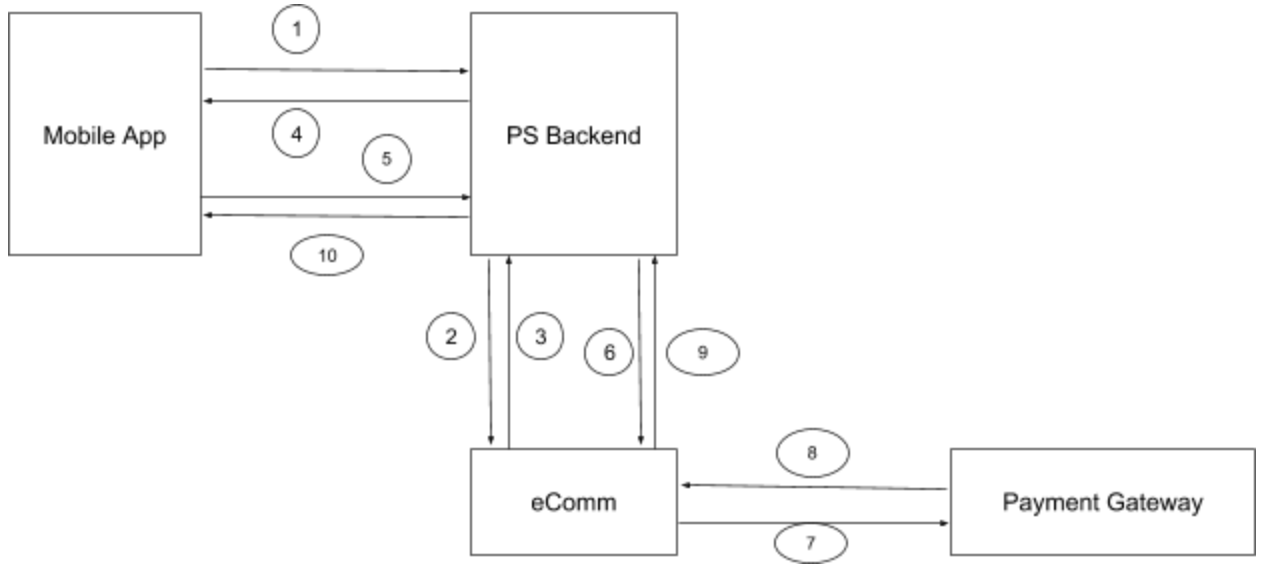
- A user adds items to the cart in the POS app and initiates the checkout process with the Point of Sale backend.
- Point of Sale backend builds the cart in the eComm system.
- eComm responds back with a cart identifier and cart total.
- Point of Sale backend relays the back cart identifier and cart total back to the POS app.
- Customers then proceed to credit card-based checkout providing payment data and address details. The POS app calls backend with all details of the order.
- Point of Sale backend calls eComm order submission APIs with payment details.
- eComm system sends user credit card data to a merchant-configured payment gateway.
- The payment gateway approves or declines the transaction and responds back to eComm (steps 7 and 8 can also be done through Point of Sale backend directly).
- If approved, the order is created in the eComm system.
- Point of Sale backend communicates order confirmation back to the POS app.
Apple Pay - Checkout Flow
The following section depicts a typical interaction between the POS app, Point of Sale backend, and merchant system when an end user wants to place an order using Apple Pay.
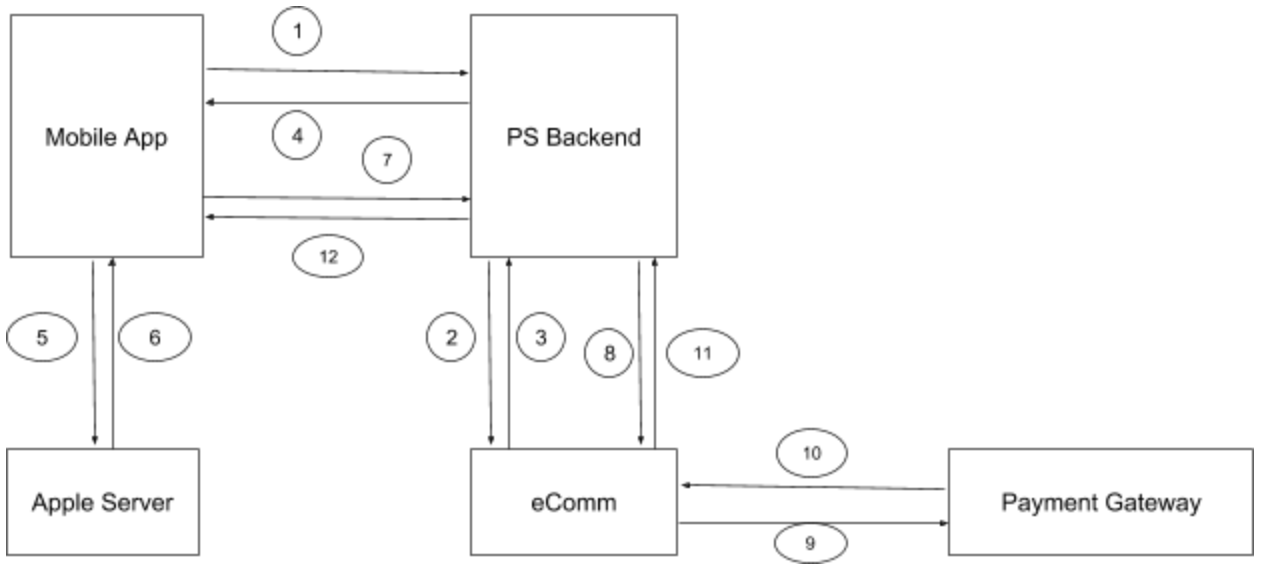
- The user adds items to the POS app cart and initiates the checkout process with the Point of Sale backend.
- Point of Sale backend builds the cart in eComm.
- eComm responds back with a cart identifier and cart total.
- Point of Sale backend relays back cart identifier and cart total back to the POS app.
- The user selects Apple Pay to complete the transaction.
- The POS app contacts Apple Servers to retrieve Apple Pay tokens.
- Apple Servers respond back to the app with the token.
- The POS app calls backend with all details of the order and Apple Pay token as payment method.
- eComm sends Apple pay tokens to the payment gateway.
- The payment gateway approves or declines the transaction and responds back to eComm.
- If approved, eComm creates the order and returns the order ID to Point of Sale backend. If failure occurs, an exception is returned.
- Point of Sale backend communicates eComm confirmation back to the POS app.