
Configure payment gateways in Point of Sale CMS to securely process customer payments. By connecting preferred payment providers, you streamline transactions and enhance the customer checkout experience. Accept a variety of payment methods, reduce friction, and improve overall sales efficiency.
- Modern POS App build: Depends on the Payment Gateway used by the merchant
- Platform Support: iPhone & iPad
- Offline Support: No
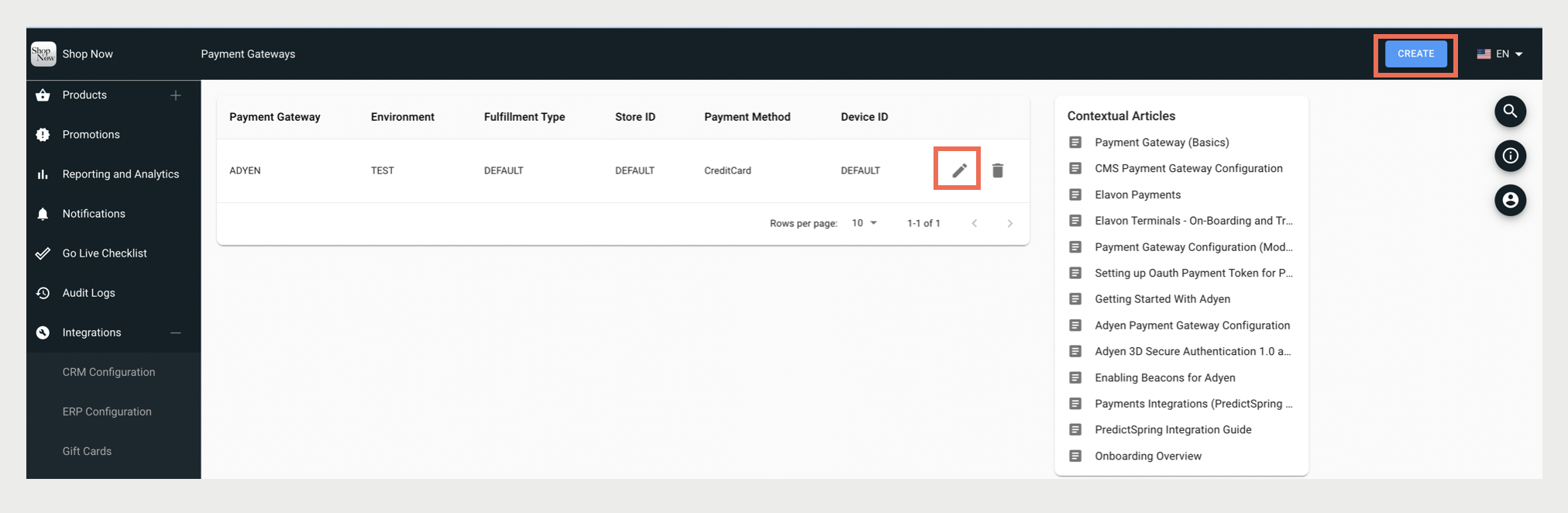
- In the CMS, go to .
- Click CREATE to create a new configuration.
- Select a Payment Gateway from the dropdown or click the Edit icon to edit an existing one.
-
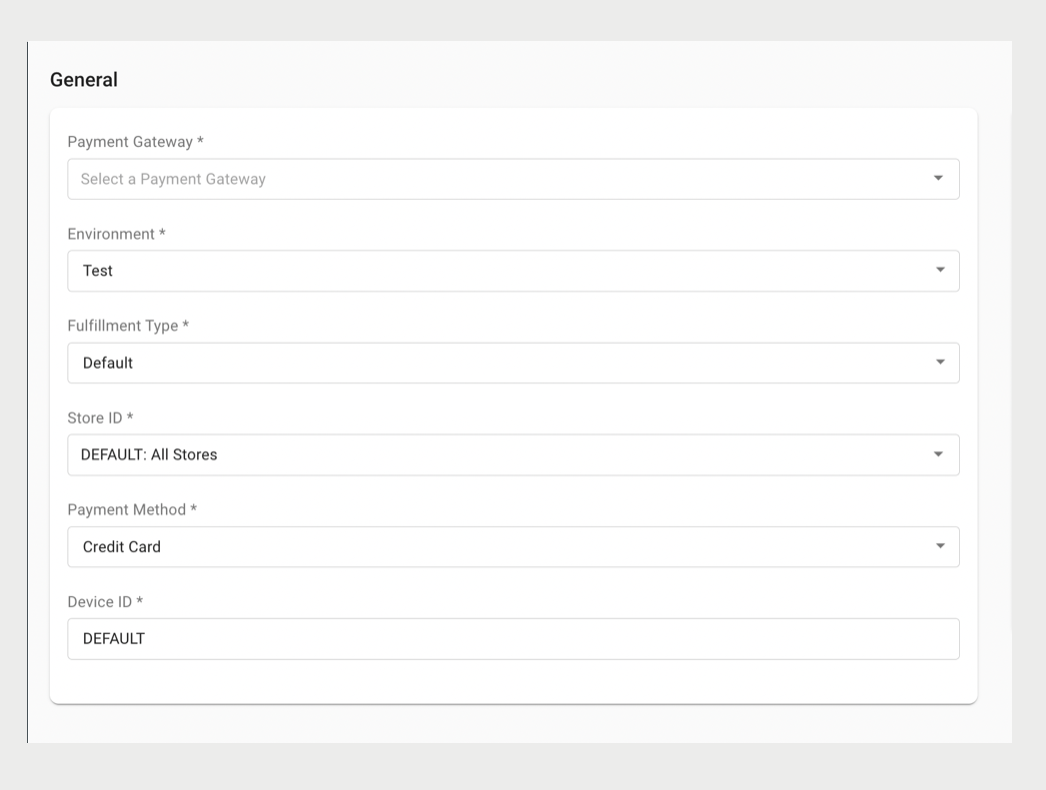
Complete all of the required fields and click SAVE.
Payment Gateway Fields
| Payment Gateway Fields | Adyen | Elavon | PayPal Here | Fiserv | HiPay | UTA | Verifone PSDK |
|---|---|---|---|---|---|---|---|
| Payment Gateway | Required | Required | Required | Required | Required | Required | Required |
| Environment | Required | Required | Required | Required | Required | Required | Required |
| Fulfillment Type | Required | Required | Required | Required | Required | Required | X |
| Store ID | Required | Required | Required | Required | Required | Required | X |
| Payment Method | Required | Required | Required | Required | Required | Required | X |
| Device ID | Required | Required | Required | Required | Required | Required | X |
| Default Device ID | X | Required | X | X | X | X | X |
| URL Base | Required | Required | Required | X | Required | Required | X |
| Secondary URL Base | X | X | X | X | X | X | X |
| Merchant Gateway ID | Required | X | X | X | X | Required | X |
| Merchant Key | Required | X | Required | X | Required | Required | X |
| Merchant Secret | X | X | Required | X | X | Required | X |
| Merchant Token | X | X | Required | X | X | X | X |
| Merchant Organization ID | X | Required | X | X | X | X | X |
| Services | Required | Optional | X | X | X | X | X |
| Terminal Certificate Name Suffix | Required | X | X | X | X | X | X |
| Terminal Gateway ID | Required | Required | X | X | X | X | X |
| Terminal Username | Optional | X | X | X | Required | X | X |
| Terminal Password | Optional | X | X | X | Required | X | X |
| Terminal Key Identifier | Optional | X | X | X | X | X | X |
| Terminal Key Encryption Version | Optional | X | X | X | X | X | X |
| Terminal Key Passphrase | Optional | X | X | X | X | X | X |
| Terminal Beacon ID | Optional | X | X | X | X | X | X |
| Terminal Request Timeout Interval In Seconds | Optional | Optional | X | Optional | X | X | X |
| Payment Status Check API Timeout In Seconds | Optional | Optional | X | X | X | X | X |
| Transaction Verification Days | Optional | X | X | X | X | X | X |
| Skip Fraud Check | Optional | X | X | X | X | X | X |
| Has Cart Summary On Payment Terminal | Optional | X | X | X | X | X | Optional |
| Manual Credit Card Entry | Optional | Optional | X | X | X | X | Optional |
| Manual Payment Capture | Optional | X | X | X | X | X | Optional |
| Adyen Company Account Name | Optional | X | X | X | X | X | Optional |
| Adyen Store Code | Optional | X | X | X | X | X | X |
| Adyen Terminal Management URL Prefix | Optional | X | X | X | X | X | X |
| Pay By Link Base URL | Optional | X | X | X | Required | X | Optional |
| Pay By Link URL Expiration In Hours | Optional | X | X | X | X | X | Optional |
| Callback URL | Should Exist | X | Should Exist | X | Should Exist | X | Should Exist |
X - Not Applicable
Common Fields
Environment: Test / Live based on if this is for a test account or live account.
Fulfillment Type: Choose DEFAULT if you wish to create this config for a POS app to perform transactions.
Store ID: Choose DEFAULT if you wish to have the same config across all stores. Otherwise, choose a particular store from the store drop-down to apply these settings to a particular store.

If you've yet to set up an Adyen and Point of Sale account, please ensure your StoreIDs are the same for both accounts.
If your Point of Sale account is already live but have yet to set up Adyen, please ensure your Adyen's StoreID is the same as your Point of Sale's StoreID.
If your Adyen account is already live but have yet to set up Point of Sale, please ensure your Point of Sale's StoreID is the same as Adyen's StoreID.
Payment Method: Choose CHECK if the configured payment gateway is for check flow. Otherwise, Credit Card for all other cases.
Device ID: Choose DEFAULT if you wish to have the same config across all the store devices. Enter a particular device ID to apply these settings to a particular device.
Payment Gateway Types
The Point of Sale platform integrates with many of the most commonly used payment gateways. The following tables list the supported payment gateway types with their related configuration articles.
| Supported Payment Gateway Types | Related Articles |
| Adyen | |
| Elavon | |
| Paypal Here | |
| Fiserv | TBD |
| HiPay | |
| UTA | TBD |