
Integrate your Point of Sale brand with NetSuite, streamlining data and workflows across platforms. Configuring both NetSuite and your content management system (CMS) ensures a seamless connection. This integration helps to maintain consistent branding and product information, and enables efficient order and inventory management. With connected systems, you reduce manual data entry and improve overall operational efficiency.
This article outlines the process to set up a Point of Sale brand to integrate with NetSuite. It is assumed that the brand already has the necessary sandbox and production accounts available.
The setup consists of configuration on the NetSuite side (through the NetSuite web console) as explained in this article, followed by configuration on the Point of Sale side (through the CMS). Refer to NetSuite CMS Configuration for the CMS configuration portion.
NetSuite POS Architecture
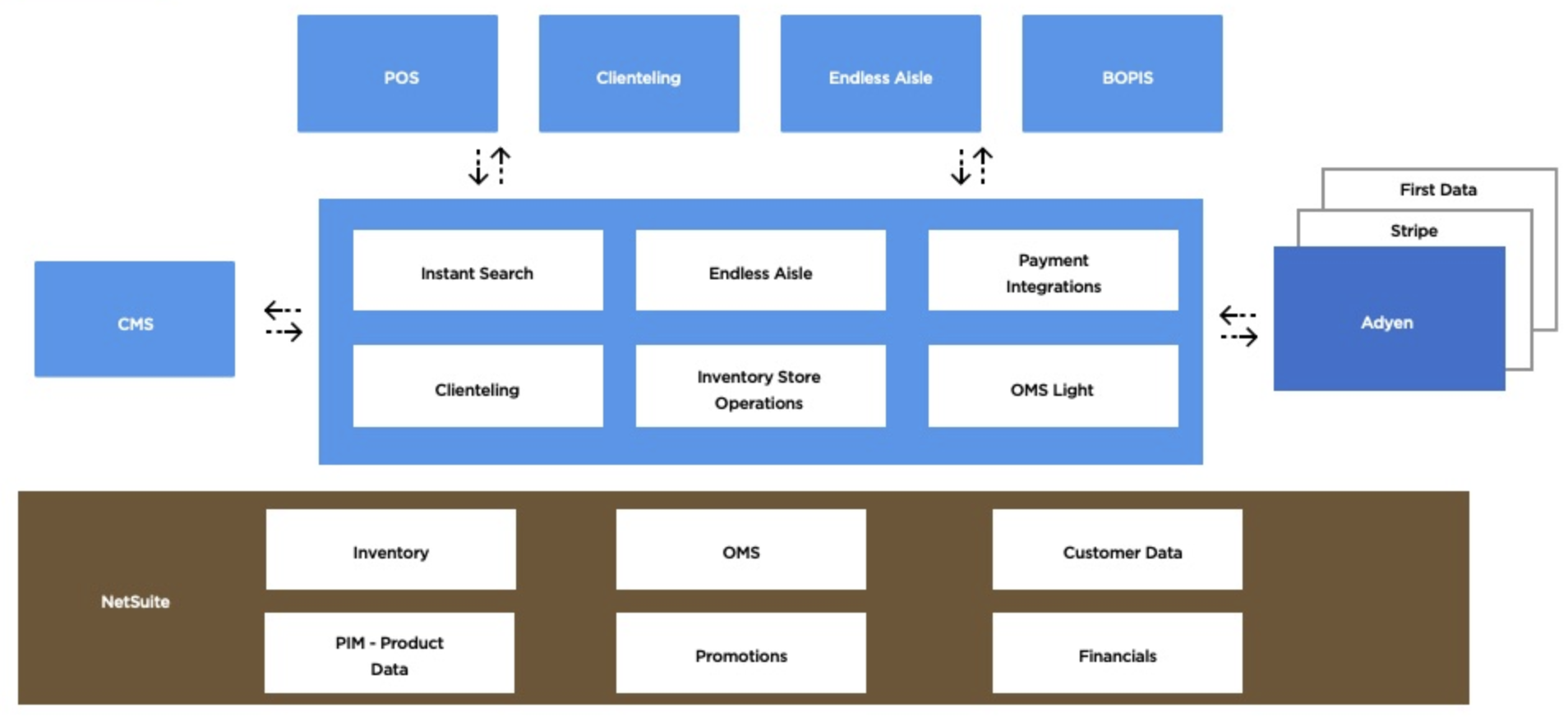
Configure NetSuite Setup
Complete the NetSuite-side configuration including account setup, authentication, roles, and custom fields required for Point of Sale integration.
Configure Account Settings
- Log in to the NetSuite UI as an Administrator.
- Navigate to .
- Make a note of the Account ID shown on the Company Information UI.
- Navigate to .
- Click on the SuiteCloud tab.
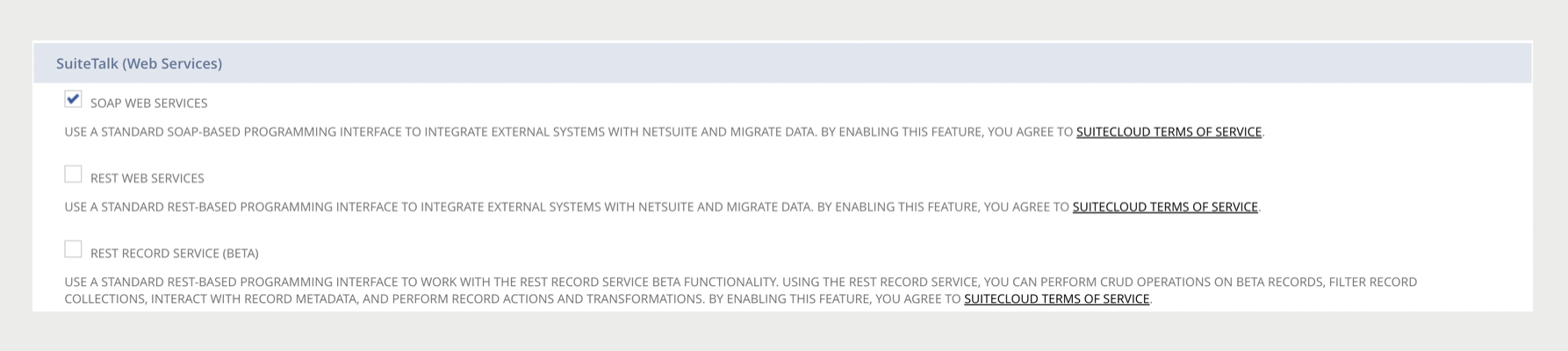
- Scroll to SuiteTalk (Web Services).
-
Enable SOAP WEB SERVICES.
This will allow the use of the SOAP (Simple Object Access Protocol)-based method for integration.
- Navigate to .
- Create a new integration by clicking on the New button.
-
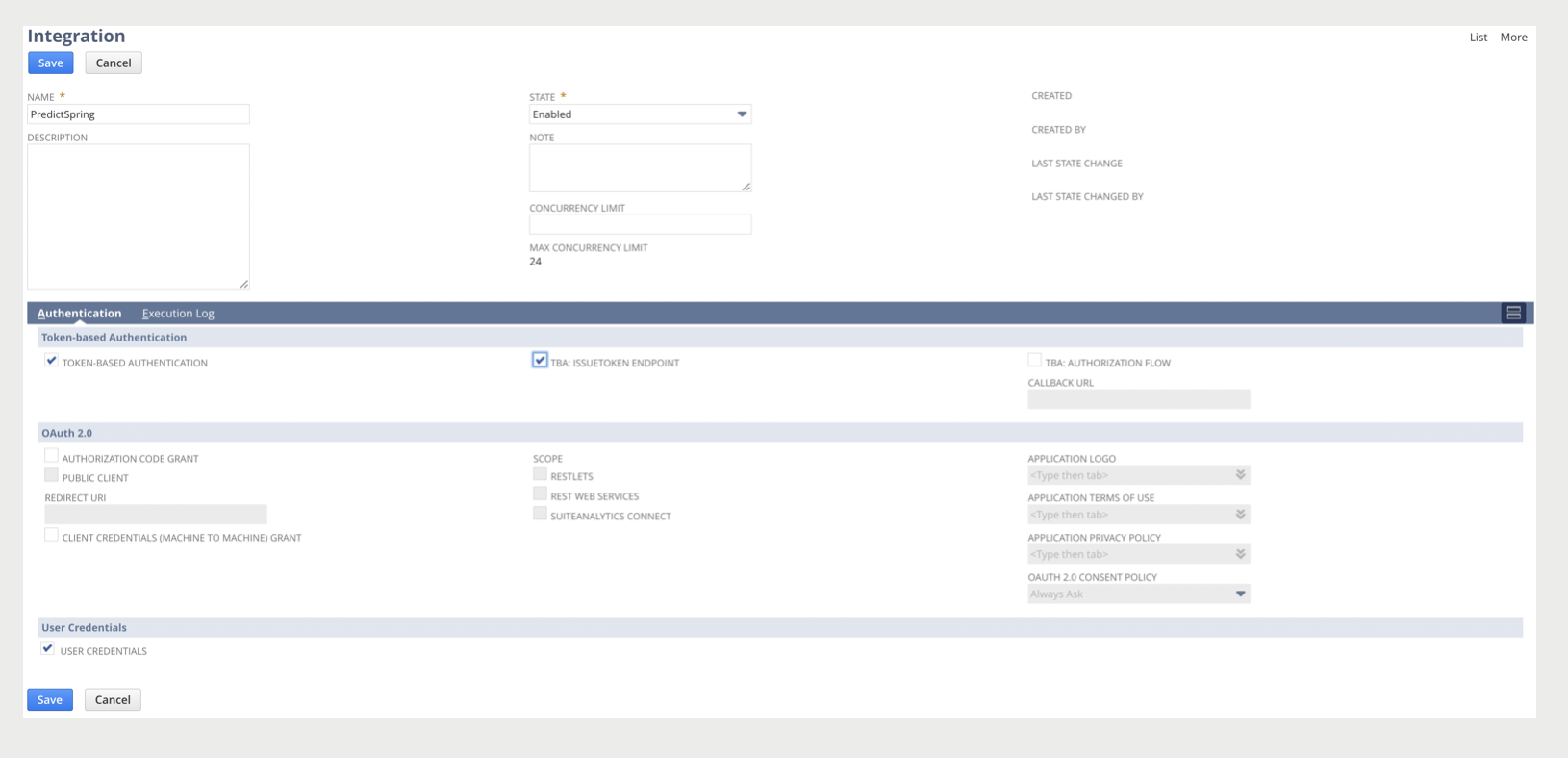
Fill out the required fields including Name and State.
By default, the State is Enabled.
-
Under Authentication, enable the following options:
- TOKEN-BASED AUTHENTICATION - A security technique that authenticates the users who attempt to log in.
- TBA: ISSUETOKEN ENDPOINT - A programmatic method for creating the tokens, which will reduce compromising a user's credentials.
- USER CREDENTIALS - An additional method for authentication.
-
Click Save.

Create Web Services Role
Create a new role for web service access with appropriate permissions.
- Navigate to .
- Click on the New Role button.
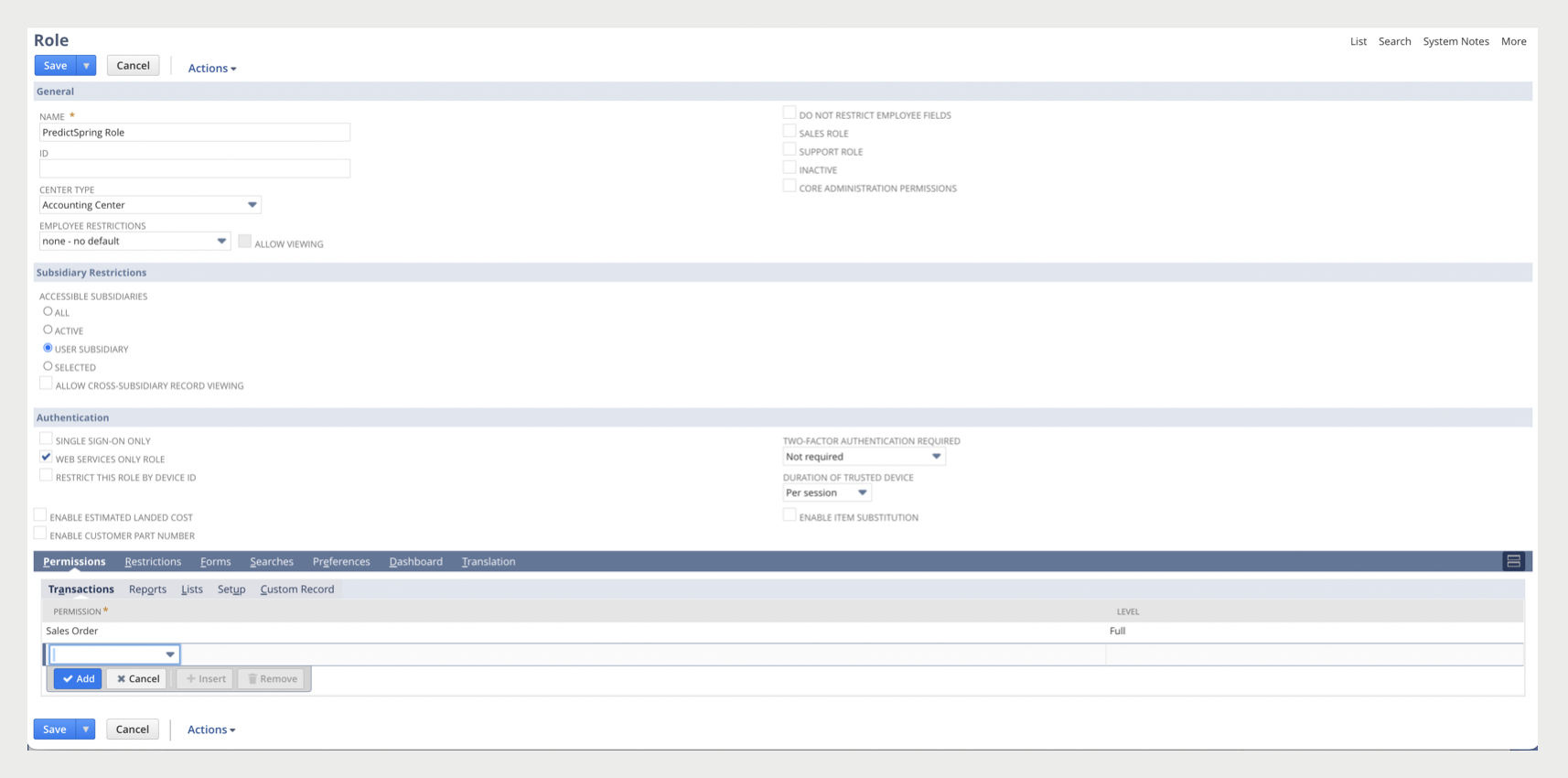
- Fill out the required fields including Name.
-
Under Subsidiary Restrictions, enable USER SUBSIDIARY.
This will restrict the role's access to the user's subsidiary only.
-
Under Authentication, enable WEB SERVICES ONLY ROLE.
This will prohibit the user from accessing NetSuite through the user interface, enhancing the security of the integrations.
-
Under Permissions, add relevant permissions with their levels. See
Configure Role Permissions
- Click Save.
Configure Role Permissions
The recommended permissions for the web services role are:
-
Transactions:
Permission Level Adjust Inventory Full Cash Sale Full Cash Sale Refund Full Check Full Credit Card Full Credit Card Refund Full Credit Memo Full Credit Returns Full Customer Deposit Full Customer Payment Full Customer Refund Full Find Transaction Full Invoice Full Item Receipt Full Make Journal Entry Full Receive Order Full Receive Returns Full Refund Returns Full Return Auth. Approval Full Return Authorization Full Sales Order Full Quote Full View Payment Events Full -
Lists:
Permission Level Custom Record Entries Full Customer Profile Full Customers Full Documents and Files Full Email Template Full Items Full Perform Search Full Promotion Full Publish Search Full Website (External) publisher Full Locations Full Payment Methods Full Product Lines Full Record Custom Field Full Shipping Items Full Subsidiaries Full Tax Records Full -
Setup:
Permission Level Access Token Management Full Accounting Lists Full Integration Application Full Log in using Access Tokens Full Manage Accounting Periods Full SOAP Web Services Full User Access Tokens Full
Create Web Services User
Create a new user that will have the web services role created above.
- Navigate to .
- Click on the New User button.
-
Under Access, enable GIVE ACCESS.
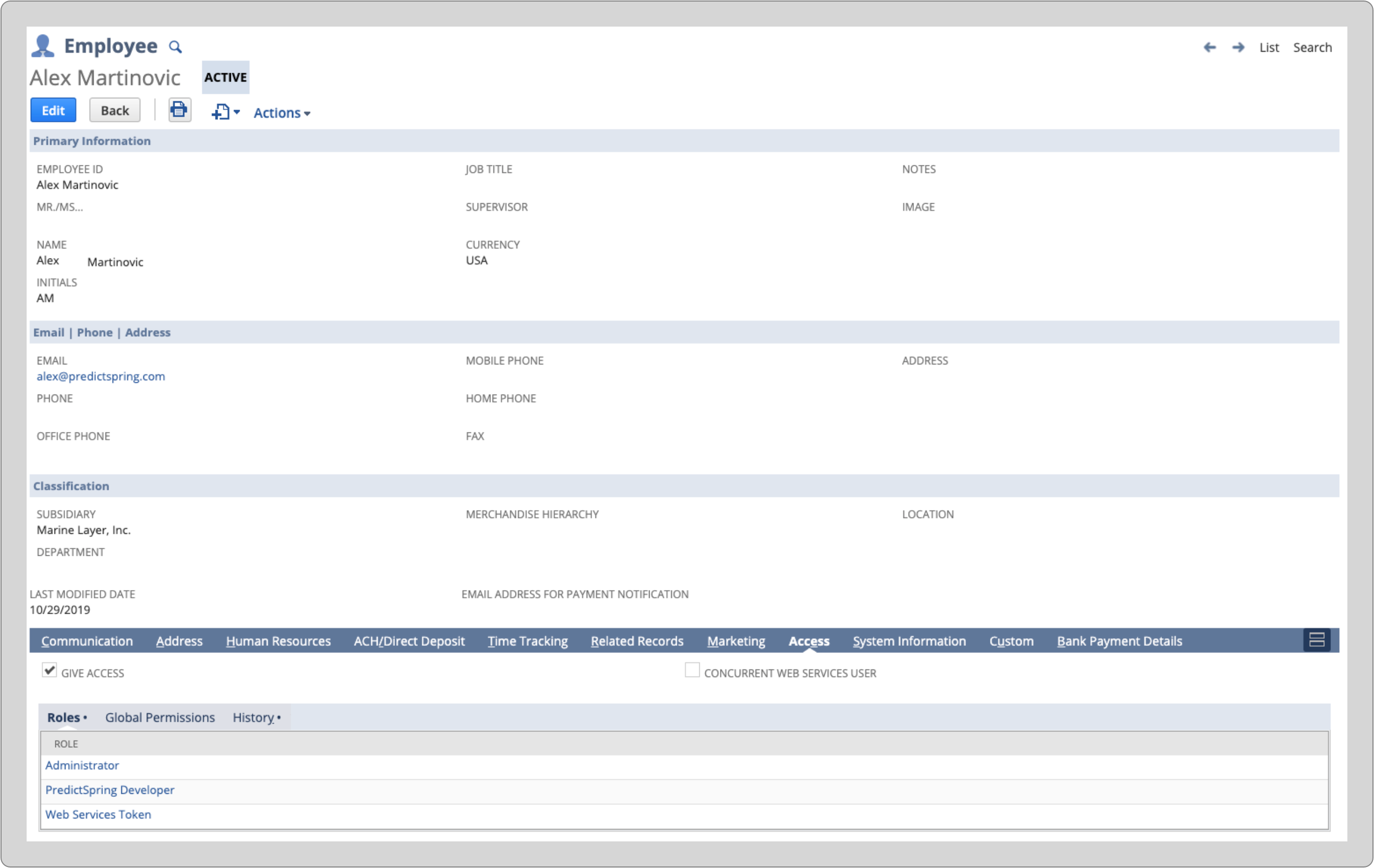
- On the tab, assign the web services role created above to the new user.
Create Access Tokens
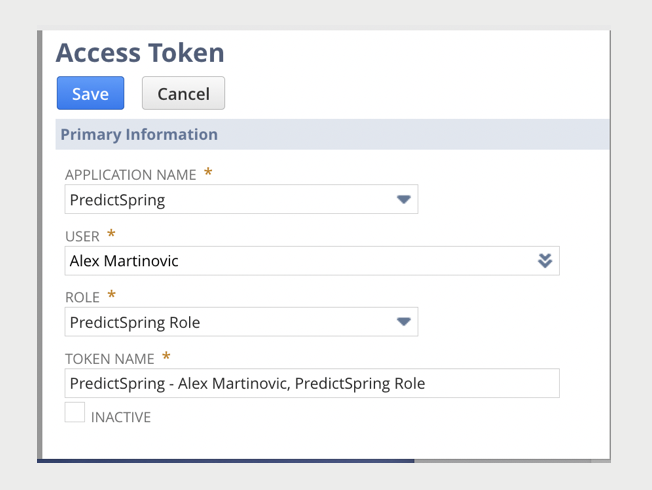
Create a web services access token for the web services user.
- Navigate to .
- Under Application Name, select your integration which you've named in the previous steps.
- Under User, select the user you've created.
- Under Role, select the role you've created.
- Under Token Name, enter a name for your tokens that will be generated.
-
Click Save.
Configure Custom Fields
Create custom fields required for data synchronization between Point of Sale and NetSuite.
Create Entity Fields
- Navigate to .
-
Create the following entity fields:
Attribute ID Type Description _remaining_balance_credit Currency Customer store credit (optional) _discount_group List/Record Customer group for promotion (optional) _email_acquisition List/Record Email acquisition type - GIVEN, REFUSED, UNAVAILABLE (optional) _phone_type List/Record Customer phone type - LANDLINE, CELL (optional)  Note NetSuite will automatically prepend
custentityto the beginning of the ID.
Create Transaction Body Fields
- Navigate to .
-
Create the following transaction body fields:
Attribute ID Type Description _tax_amount Decimal Number Order-level tax amount as calculated by Point of Sale _discount_amount Decimal Number Order-level discount as calculated by Point of Sale _external_customer_id Free-Form Text References to a customer ID existing in an external system, if required for clienteling _pos_order_id Free-Form Text POS order ID _pos_transaction_id Free-Form Text POS transaction ID _customer_credit Currency Customer credit amount applied to order (optional) _layaway Check Box Marks order as layaway order (optional) _ship_method List/Record Shipping method internal ID (optional) _cc_last_4_digits Integer Number Last four digits of the credit card, if available (optional)
Tip: For details on the support capability for BORIS returns to credit card payments, refer to this Buy Online, Return In-Store (BORIS) Payment Refunds via Credit Card.
_finance_account_number Free-Form Text Financing account number (optional) _finance_auth_number Free-Form Text Financing authorization code (optional) _finance_message Free-Form Text Financing instruction text (optional) _finance_order_number Free-Form Text Financing order number (optional) _finance_primary_buyer Free-Form Text Financing primary buyer (optional) _finance_total_amount Currency Total amount financed (optional) _finance_payment_type_code List/Record Financing payment type code internal ID (optional) _finance_buyer_id Integer Number Financing buyer ID (optional) _finance_last_four_ssn Free-Form Text Financing last four digits of social security number (optional) _finance_message_code List/Record Financing message code (optional) _finance_order_type List/Record Financing order type (optional) _finance_state_id List/Record Financing ID state issued (optional) _finance_buyer_verified Free-Form Text Financing buyer is verified (optional) _tax_exempt_card_number Free-Form Text Masked tax exempt card number (optional) _tax_exempt_code Free-Form Text Tax exempt code (optional) _tax_exempt_customer_name Free-Form Text Tax exempt customer name (optional) _tax_exempt_name Free-Form Text Tax exemption name (optional) _tax_exempt_notes Free-Form Text Tax exempt notes (optional) _tax_exempt_rate Decimal Number Tax exempt percentage rate (optional) _is_exchange_order Check Box Indicates that the order is part of an exchange _promotion_code Free-Form Text A comma-separated list of merchant promotion codes applied to the order _logged_in_associate_id Free-Form Text Internal ID of associate logged into POS at order time _store_credit Decimal Number Store credit used by customer for order _total_credit_used Decimal Number Total credit used by customer for order _total_assembled Decimal Number Total assembled quantity _total_boxed Decimal Number Total boxed quantity _delivery_date Date Selected delivery date for delivery orders _coupon_code Free-Form Text A comma-separated list of merchant coupon codes applied to the order _order_discount_reason_codes Free-Form Text A comma-separated list of PS reason codes for discounts applied to order _quote_id Free-Form Text Point of Sale quote ID Note NetSuite will automatically prependcustbodyto the beginning of the ID.
Create Transaction Line Fields
- Navigate to .
-
Create the following transaction line fields:
Attribute ID Type Description _item_discount_amount Decimal Number Item level discount as calculated by Point of Sale _item_pos_order_item_id Free-Form Text Order item ID as determined by Point of Sale _item_upc Free-Form Text Item UPC code _delivery_type List/Record Order item delivery type (if supported, set up as a select form field within NetSuite) _delivery_date Date For line level fulfillment, the delivery date for the line _pickup_date Date For line level fulfillment, the pickup date for the line _available_date Date For line level fulfillment, the available date for the line _item_notes Free-Form Text Notes applied to the line _line_unique_key Free-Form Text Applies a unique key to be associated with the line _item_discount_reason_codes Free-Form Text A comma-separated list of PS reason codes for discounts applied to the line Note NetSuite will automatically prependcustcolto the beginning of the ID.
Create NetSuite Customers (if necessary)
If using an external system for clienteling, create one or more Customers in NetSuite for use by Point of Sale when creating transactions within NetSuite.
Collect Parameters for Point of Sale
Once the above setup is complete, the following parameters will need to be provided to Point of Sale in order to allow Point of Sale servers to invoke web services on NetSuite.
-
Collect the following Authentication Parameters:
Parameter Location in NetSuite Account ID SuiteTalk URL Consumer Key Integration Consumer Secret Integration Token ID Access Token Token Secret Access Token -
Collect the following Object References:
Reference Location in NetSuite Payment Method Names/Internal IDs Subsidiary Internal ID* Location Internal IDs* Department Internal IDs* Class Internal IDs* Customer Internal IDs** * These references are only required depending on required fields in the transaction records that need to be created within NetSuite.
** These references are only required if the customer accounts are referenced from an external system as NetSuite requires a customer entity to be set in transactions based on a NetSuite customer.
NetSuite Transaction Postings
Understand the NetSuite records created by POS for different order flows and transaction types.
Overview
The following is a summary of NetSuite records created by POS in NetSuite for different order flows. POS orders can be searched within NetSuite by POS Order ID and/or POS transaction ID.
Quotes (Estimates)
- Quotes (estimate records in NetSuite) can be generated from the POS Suspended Carts page when a cart is saved. Only active quotes will be shown on the Suspended Carts page as the app filters out any expired quotes.
- Quotes in POS have a reference to the NetSuite quote via the quote ID.
- Quotes can be resumed in POS, which will generate a cart from the quote. The cart can be updated as needed. When the order is submitted, the NetSuite quote is updated with any additional changes, and a sales order or invoice is initialized from the quote in NetSuite and then persisted.
Sale Transactions
For standard sale transactions, the following records are created:
- Sales Order, Invoice, or Cash Sale (depending on chosen transaction type in CMS)
- Customer Payment(s) - multiple records if a multi tender order
Return Transactions
For return transactions, the following records are created:
- Return Authorization
- Item Receipt
- Credit Memo
- Customer Refund(s) - multiple records if a multi tender return
Exchange Transactions
Exchange transactions create records for both the original order and the new order components.
Exchange - Even
Original Order:
- Sales Order, Invoice, or Cash Sale (depending on chosen transaction type in CMS)
- Customer Payment(s) - multiple records if a multi tender order
- Return Authorization - for item(s) being returned
- Item Receipt - for item(s) being returned
- Credit Memo - for item(s) being returned
- Customer Refund(s) - multiple records if a multi tender return - for item(s) being returned
New Order:
- Sales Order, Invoice, or Cash Sale (depending on chosen transaction type in CMS) - for item(s) being purchased in exchange
- Customer Payment(s) - multiple records if a multi tender order - for item(s) being purchased in exchange
Exchange - Customer Gets Refund
Original Order:
- Sales Order, Invoice, or Cash Sale (depending on chosen transaction type in CMS)
- Customer Payment(s) - multiple records if a multi tender order
- Return Authorization - for item(s) being returned
- Item Receipt - for item(s) being returned
- Credit Memo - for item(s) being returned
- Customer Refund(s) - multiple records if a multi tender return - for item(s) being returned
New Order:
- Sales Order, Invoice or Cash Sale (depending on chosen transaction type in CMS) - for item(s) being purchased in exchange
- Customer Payment(s) - multiple records if a multi tender order - for item(s) being purchased in exchange
Exchange - Customer Pays Additional
Original Order:
- Sales Order, Invoice, or Cash Sale (depending on chosen transaction type in CMS)
- Customer Payment(s) - multiple records if a multi tender order
- Return Authorization - for item(s) being returned
- Item Receipt - for item(s) being returned
- Credit Memo - for item(s) being returned
- Customer Refund(s) - multiple records if a multi tender return - for item(s) being returned
New Order:
- Sales Order, Invoice, or Cash Sale (depending on chosen transaction type in CMS) - for item(s) being purchased in exchange
- Customer Payment(s) - multiple records if a multi tender order - for item(s) being purchased in exchange
No Receipt Return
For returns without a receipt, the following records are created:
- Return Authorization
- Item Receipt
- Credit Memo
- Customer Refund(s) - multiple records if a multi tender return
No Receipt Exchange
No Receipt Return:
- Return Authorization - for item(s) being returned
- Item Receipt - for item(s) being returned
- Credit Memo - for item(s) being returned
- Customer Refund(s) - multiple records if a multi tender return - for item(s) being returned
New Order:
- Sales Order, Invoice, or Cash Sale (depending on chosen transaction type in CMS) - for item(s) being purchased in exchange
- Customer Payment(s) - multiple records if a multi tender order - for item(s) being purchased in exchange