
Enable order management by integrating your NetSuite ERP with Point of Sale CMS. Begin with an initial configuration on your NetSuite account. Then, complete the setup in the CMS.
- Sandbox and Production accounts for both NetSuite and CMS environments
As this integration with Netsuite relies heavily on NetSuite internal IDs, it is recommended that the integration is configured by a Point of Sale Customer Success Manager (CSM) or the merchant's NetSuite consultant as much of this information will be available in NetSuite.
To learn how to integrate NetSuite OMS, refer to the NetSuite Integration Guide.
Configure ERP in CMS
- In the Point of Sale CMS, navigate to .
-
Fill out the fields . Fields denoted with * are required fields.
ERP CMS Fields
Field Description General Settings ERP Service Name* Your ERP integration service
Example: NetSuite, Custom, etc.
Use Tax Rates Exported From Netsuite For NetSuite ERP, if enabled, tax rates will be retrieved from NetSuite Use line item shipping If selected, shipping details are applied at the line-item level rather than the order level Enable Master of Record If enabled, OMS will be the Master of Record for all orders when retrieving order details Has Department Per Location Enabled indicates that department (i.e., cost center) references will be retrieved from the store level ERP configuration Has Fulfillment Based Transaction Type Enabled indicates invoices for cash & carry orders, and the sale orders of endless aisle will be generated Disable Default Search Enabled indicates that search will not be executed at page load. Search will be executed only when search terms are entered by user Always Use Custom Price Enabled indicates to use NetSuite's custom Price Level for maintaining initial pricing of products. By default, Point of Sale sends "1" as the InternalID for the "Base Price" Price Level to NetSuite. Enabling this toggle changes it to "-1," preserving the initial product pricing.
Note: If this setting is enabled, a tax engine must be configured. Otherwise, turn this flag off, and orders can be posted without a tax integration record.
Credentials Fields Account ID* ERP account ID; can be found in your NetSuite account and is shown on the Company Information UI Consumer Key* ERP API access credentials consumer key; can be found in your NetSuite account when setting up a new integration
Note: Max length supported is 128 characters
Consumer Secret* ERP API access credentials consumer secret; can be found in your NetSuite account when setting up a new integration Token ID* ERP API access credentials token ID; can be found in your NetSuite account when creating a web services access token for the web services user Token Secret* ERP API access credentials token secret; can be found in your NetSuite account when creating a web services access token for the web services user Checkout Settings Endpoint URL* Merchant NetSuite base URL; can be found in your NetSuite account by going to Setup > Company > Company Information, Company URLs tab, Suitetalk (SOAP and REST web services)
Example: https://293_AB1.suitetal-k.api.netsuite.com
Customer Store Credit Custom Field NetSuite custom field to the store customer credit; can be found in your NetSuite account
Example: custentity_qas_re-mainingbalancecr
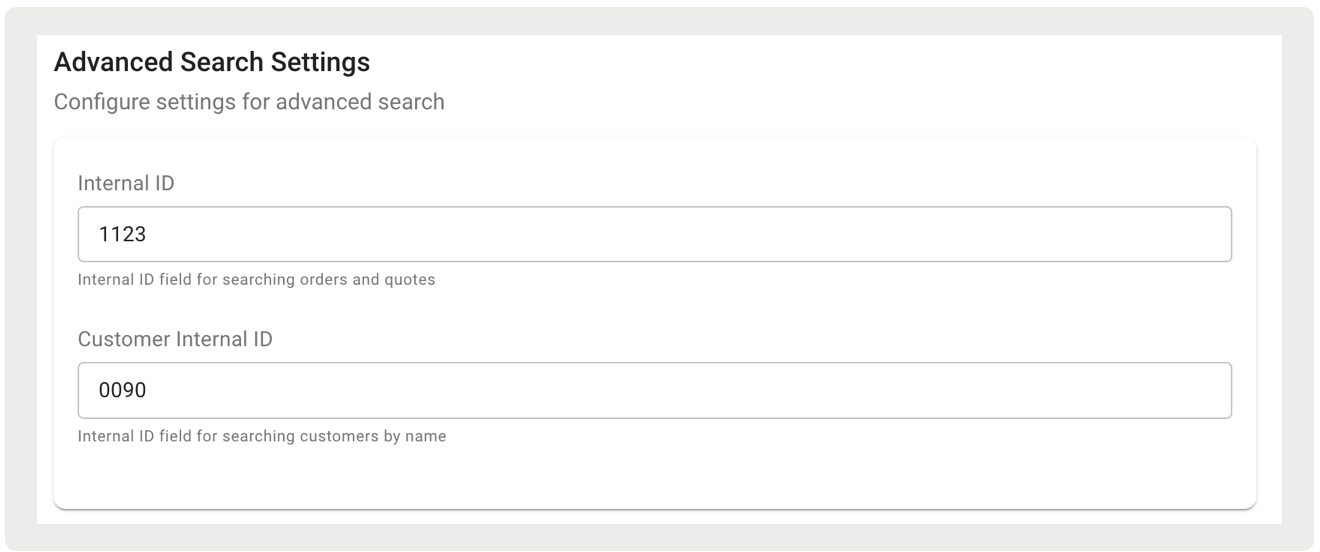
Customer Group Custom Field Specifies the name of the custom field in the customer record that stores the customer group ID for merchants that support customer groups. Create Finance Deposits If this flag is enabled, a customer deposit will be created for finance tenders, Edit Customer Credit If this flag is enabled, editing will be allowed to a customer store credit amount which is held in a custom field in the customer record. Advanced Search Settings Internal ID Internal ID field for searching orders and quotes. For more details, please refer to Advanced Search Settings. Customer Internal ID Internal ID field for searching customers by name. For more details, please refer to Advanced Search Settings. Reference IDs Class ERP Class internal ID; can be found in your NetSuite account by going to Setup > Company > Classes Department ERP Department internal ID; can be found in your NetSuite account by going to Setup > Company > Department Gift Certificate Item ERP Gift Certificate Item internal ID; can be found in your NetSuite account Guest Customer ERP Guest Customer Internal ID for guest orders; can be found in your NetSuite account by going to Lists > Relationships > Customers POS Transaction ID - External Ref ID To find and retrieve an order from NetSuite in Point of Sale, we use a custom field with the necessary Internal ID for the search call Guest Account Ref ID Internal account ID that will be sent when guest orders are submitted Not on file ERP Not-On-File item internal ID; can be found in your NetSuite account Not on file SKU ERP Not-On-File item SKU; can be found in your NetSuite account Store ERP Used to link external Store ID fields with Point of Sale Store ID fields during searches for external quotes. Select the "Target Field" that is mapped to the NetSuite Store ID within the Store Feed (e.g., CustomeString0) Product ERP Point of Sale product field containing ERP Product internal IDs Product Type Mapping Point of Sale product field containing ERP Product type mappings Return custom form ERP Return Transaction Custom Form internal ID; can be found in your NetSuite account Subsidiary ERP Subsidiary internal ID; can be found in your NetSuite account by going to Setup > Company > Subsidiaries. For NetSuite calls (Search and Create Customer) passing the subsidiary ID, if populated at the store level, the store-level ID will be sent. Otherwise, the merchant-level ID from the ERP configuration settings in the CMS will be used. Transaction custom form ERP Transaction Custom Form internal ID; can be found in your NetSuite account Deposit Credit Item Ref ID Item internal ID reference Credit Card Types Credit Card Type List of supported credit card types
Example: Visa, Mastercard, American Express, Discover, JCBank, etc.
Tip: For details on the support capability for BORIS returns to credit card payments, please refer to this article.
Credit Card Reference ID ERP payment card internal ID Tender Types Type Supported tender types
Example: Cash, CreditCard, GiftCard, PLCC, Check, etc.
Payment Method ID ERP tender payment method internal ID; can be found in your NetSuite account General Ledger Account ID ERP tender account internal ID for the tender type; can be found in your NetSuite account Custom Fields POS Field List of supported POS fields from which data can be pulled into the ERP custom fields (e.g., Available Date, Customer ID, ERP Select, etc.)
For descriptions of each supported field in CMS, please refer to "POS Fields" below.
ERP Field ERP custom field name; can be found in your NetSuite account
Example: custqas_extern-alcustomerid
Applies To List of ERP entity types to which custom fields are applied to
Example: Order, Order Item, Return, etc.
Error Settings Number of Retries Maximum number of retries to attempt an ERP API request Retry timeout in seconds ERP API retry timeout in seconds ERP email list List of email addresses to be notified in the event of failed ERP API requests POS Fields
POS Field Description Available Date Date item/service is available Last 4 Digits of Credit Card Last 4 digits of credit card Credit Card Expiration Date Credit card expiry date Custom Boolean Default Custom true/false field Coupon Code Applied discount code Contact Phone Number Phone number for delivery-related inquiries (e.g., when an order is delivered) Customer Group Customer category/segment Customer ID Unique customer identifier Delivery Date Scheduled delivery date Discount Amount Total discount on order ERP Select ERP-related option Financing Account Number Financing account number Financing Amount Financed Total financed amount Financing ID Expiration Financing ID expiry date Financing ID State State issuing financing ID Financing Instruction Special financing instructions Financing Last 4 SSN Last 4 digits of SSN Financing Order ID Financing order identifier Financing Payment Type Code Financing payment type Financing Primary Account Holder Primary financing account holder Financing Verified Buyer Verified financing buyer Is Exchange Order Indicates an exchange order Item Discount Discount on an item Item Discount Reason Codes Codes for item discount reasons Item Notes Notes about the item Item UPC Item's Universal Product Code Layaway Indicates layaway purchase Line Unique Key Unique line item identifier Line Item Sale Associate ID Sales associate ID for item Location Store/warehouse location Logged In Associate ID Logged-in associate ID Order Discount Reason Codes Codes for order discount reasons Order ID Order identifier Replacement Order Indicates replacement order Payment Device Device for payment processing Payment Device ID Payment device identifier Pickup Date Scheduled pickup date Promotion Code Applied promotional code Route Stop Delivery route stop number
Note: For app builds 10.2.1 or greater, when Point of Sale retrieves an order from NetSuite if this field in the order has a value, the system will prevent any edits to the deliverable items.
Ship Method ID Shipping method identifier Store Credit Applied store credit amount Serial Number Item's serial number Tax Amount Total tax amount Tax Exempt Card Number Tax-exempt card number Tax Exempt Code Tax exemption reason code Tax Exempt Customer Name Tax-exempt customer name Tax Exempt Name Tax exemption name Tax Exempt Notes Notes on tax exemption Tax Exempt Rate Tax exemption rate Tender Refund Amount Refunded tender amount Total Assembled Total assembled items Total Boxed Total boxed items Total Credit Used Total credit used Transaction ID Transaction identifier Truck Number Delivery truck number
Note: For app builds 10.2.1 or greater, when Point of Sale retrieves an order from NetSuite if this field in the order has a value, the system will prevent any edits to the deliverable items.
- Save your changes.
Advanced Search Settings
Configuring the advanced search settings can help prevent timeouts during searches when retrieving quotes, orders, and customer data. To access these settings, enter the relevant saved search ID from your NetSuite account. Without a specific saved search ID, the system defaults to basic search functionality.
Important: To enable this feature, the "Disable Default Search" flag must be turned off under General Settings.
- For quotes and orders, you must create a saved search sorted by the LastModified Date. This search should support sales orders, estimates, and invoices.
-
For customer searches, create a saved search sorted by FirstName and LastName to facilitate more efficient retrieval.
Configure Master of Record for Quotes
Configure external ERP as the Master of Record for quotes.
- In CMS, go to .
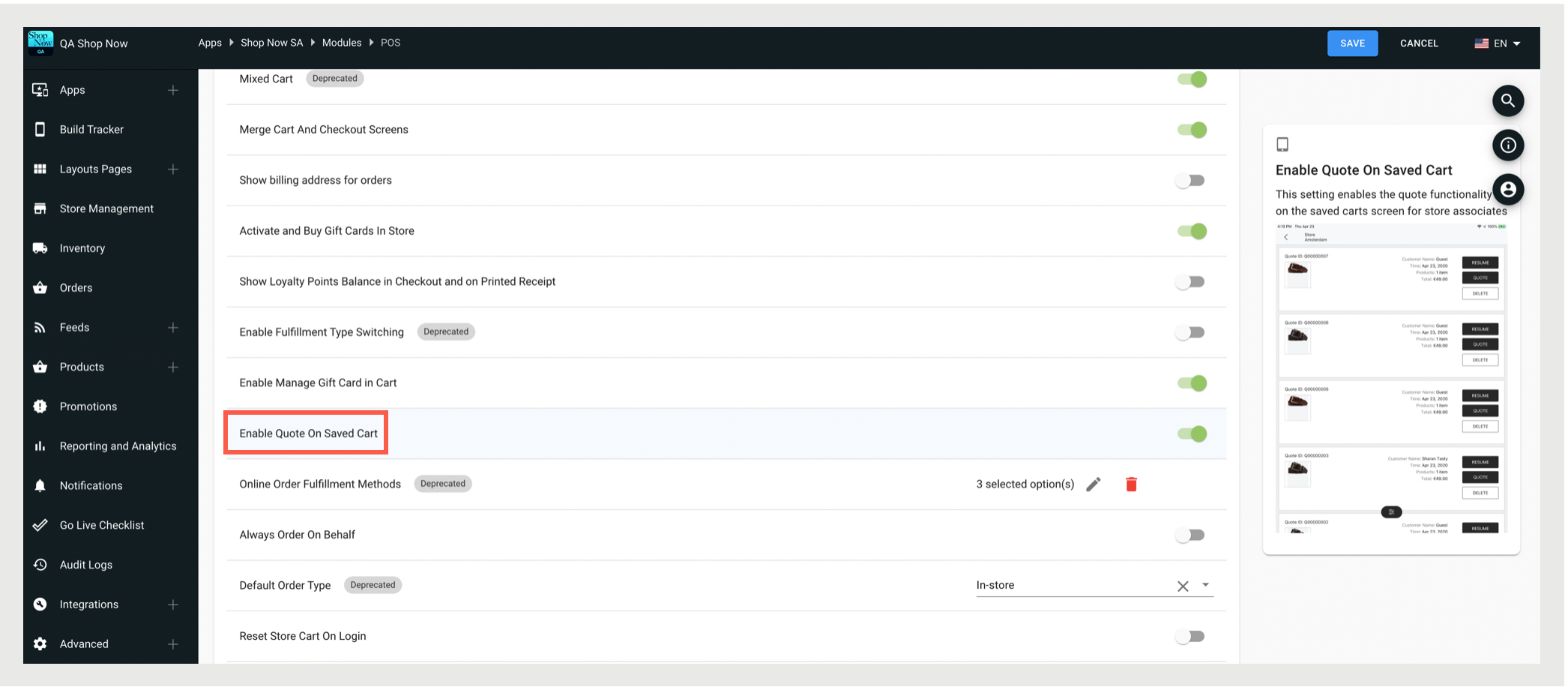
- Then enable Quote Master of Record is external ERP system and save.
- Go back to CMS and go to .
- Edit your selected app config and go to
- Enable Quote on Saved Cart.
Configure Shipping Methods
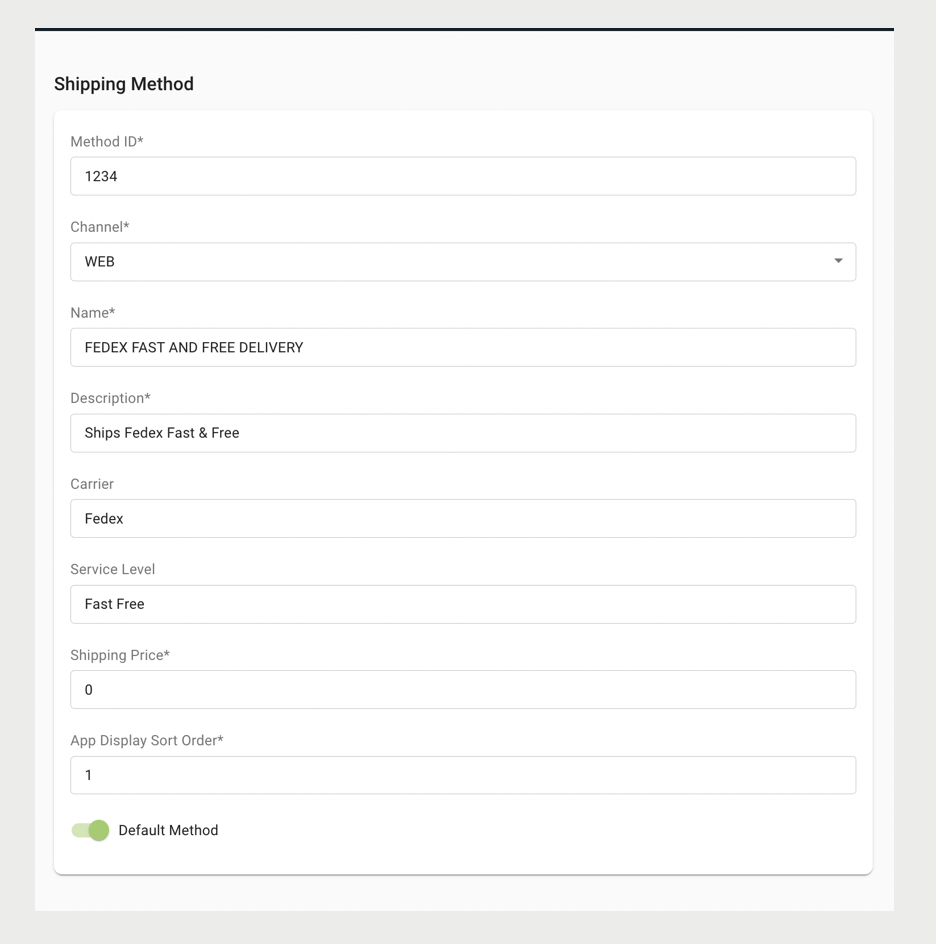
Configure shipping methods to display on the POS app and successfully post to NetSuite.
Tip: You'll need to check your NetSuite environment to determine the available shipping methods.
- In CMS, go to .
- Configure the fields by referring to this article.
Configure Stores
Configure your stores in CMS to successfully post to NetSuite.
- In CMS, navigate to Store Management > Stores.
-
For each store, enter these details. Fields denoted with an asterisk (*) are required
fields.
Store Fields & Descriptions
Field Name Description ERP Configuration Customer ID Merrchant NetSuite Guest Customer internal ID for store guest orders Location ID* Merchant NetSuite store ID, value should match CustomString0 Secondary Location ID Store showroom reference ID of ERP configuration that is used for clearance items Department ID Merchant NetSuite Department internal ID Class ID Merchant NetSuite Class internal ID Tax Item ID Merchant NetSuite Tax Item internal ID; used if POS sends tax amounts to NetSuite Other Attributes CustomString0 Merchant NetSuite store ID, value should match Location ID. This value is automatically populated through Store Field Mappings. Please note, when uploading the Store Feed, regular text values are not permitted and will not be imported. Ensure that the relevant columns (store ERP, store type, etc.) are formatted in JSON. Refer to the attached file(s) for an example feed.
Configure Associates
In addition to setting up NetSuite ERP in the CMS, you must also configure store associates. Store associate records must include the corresponding NetSuite ID, as this is a required field for order posting. In NetSuite, these are referred to as "Employees". Additionally, ensure that the "Sales Rep" option is checked on the NetSuite side.
- In CMS, navigate to .
- Edit a store associate.
- Go to .
- Enter the NetSuite employee ID, which can be found in the NetSuite portal.
Configure Server Settings
Configure your server settings to set up webhook integration points for orders and returns.
- In CMS, navigate to .
-
Configure these fields:
Server Settings Fields & Descriptions
Real-Time Order Export Endpoint
Webhook to invoke when a new order is placed. See example below:
{"integrationType":"HTTP_POST_JSON","url":"http://stage-v2.psconnector.com/service/v1/oms/orders","contentType":"application/json","headers":[{"name":"PredictSpring-Secret","value":"abuh2YYBGV3kXK8157ZNBLUioGKc4d/ sRvjZMhWKjaCb87t0ldFLUlADMKs+t7NPj/Nczm1y2vF+1EAlWplw=="}]} Real-Time Returns Export Endpoint
Webhook to invoke when an order is returned. See example below:
{"integrationType":"HTTP_POST_JSON","url":"http://stage-v2.psconnector.com/service/v1/oms/orders/update","contentType":"application/json","headers":[{"name":"PredictSpring-Secret","value":"abuh22YYBGV3kXK8157ZNBLUioGKc4d/ sRvjZMhWKjaCb87t0ldFLUlADMKs+t7NPj/Nczm1y2vF+1EAlWplw=="}]} Real-Time Order Update Endpoint
Webhook to invoke when an order is updated. See example below:
{"integrationType":"HTTP_POST_JSON","url":"http://stage-connector-v2.us-west-2.elasticbeanstalk.com/service/v1/oms/orders/update","contentType":"application/json","headers":[{"name":"PredictSpring-Secret","value":"abuh22YYBGV3kXK8157ZNBLUioGKc4d/ sRvjZMhWKjaCb87t0ldFLUlADMKs+t7NPj/Nczm1y2vF+1EAlWplw=="}]}

Known Issues and Restrictions
In cases where an address retrieved from the CRM is empty or incomplete, Point of Sale is unable to validate it, potentially resulting in orders being posted to NetSuite without a shipping address. It is highly recommended that merchants have their associates verify the address whenever they place an order from a customer profile. Additionally, it is recommended that the merchant maintain clean and accurate data in the CRM that aligns with Point of Sale's address fields and formatting.