
Integrate Afterpay with Salesforce Commerce to offer customers a flexible payment option. By integrating Afterpay, retailers can provide a buy now, pay later option. This payment flexibility can lead to increased sales and customer satisfaction. Review the architecture and integration steps to enable Afterpay within Point of Sale.
Architecture
Point of Sale integrates with these Afterpay APIs:
- Get Configuration: This helps in determining whether the cart is eligible for Afterpay based on the order total.
- Create Checkout: Gets the Afterpay token by sharing the cart details with Afterpay.
- Capture Full Payment: This is required for immediate payment flow Immediate Payment Flow.
- Auth: This is required for Deferred Payment Flow.
Sequence Diagram
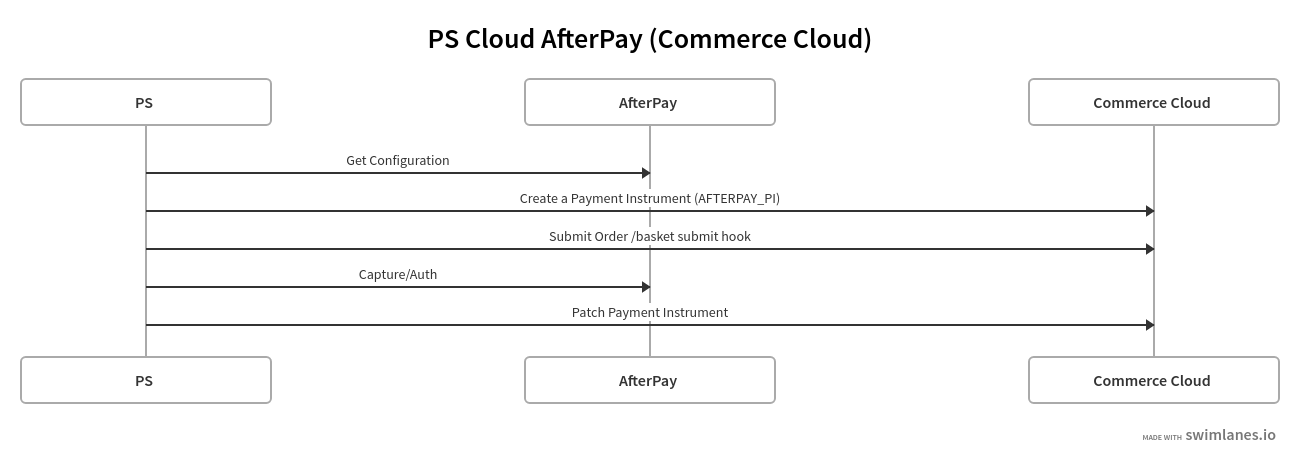
- Get the configuration from Afterpay which provides the min and max order total eligible for Afterpay. If the cart total falls in the range present user an option to pay with Afterpay.
- If the customer decides to pay with Afterpay make a create checkout call to Afterpay based on the customer cart. Get the Afterpay token.
- Send the Afterpay Token to App so that it can redirect the customer to the Afterpay application.
- Once the app gets a callback from Afterpay it makes a confirm Order call to Point of Sale and Point of Sale will create an Afterpay Payment Instrument in Salesforce Commerce using the POST Payment /baskets/{basket_id}/payment_instruments OCAPI.
- Submit the Order using the OCAPI : /orders This will create the order from the basket. This hook will have customizations to not make place orders and mark orders ready for export. It will be in a created state.
- Once the Order is created successfully Point of Sale will make either the Capture or Auth call to Afterpay.
- Based on the Afterpay Capture/Auth API call, send the response back to the Salesforce Commerce using PATCH /orders/{order_no}/payment_instruments/{payment_instrument_id} OCAPI. If the transaction is approved - place the order, populate the custom attributes required for Afterpay, and mark the order ready for export. In case the Afterpay transaction was not approved but declined, the order will be marked as failed using the same OCAPI hook PATCH /orders/{order_no}/payment_instruments/{payment_instrument_id}.
Customer Questionnaire
- Does the above flow match your website behavior?
- Afterpay Credentials:
- Merchant ID and Secret Key.
- Which Afterpay flow is used? Immediate vs Deferred?
- Salesforce Commerce details:
- Afterpay Payment Instrument ID.
- Afterpay custom attributes needed on the Order.