---
schema_version: "1"
id: 7641c406c8a20885d338992fce2fae3795a922ad315a65dd4512983dc402cbaf
title: Enable Manual Capture for Payments
collection: admin
version: current
locale: en-us
portal_url: https://docs.salesforce.com/admin/current/en-us/commerce/264-0-0/payments_enable_manual_capture.md
canonical_url: https://help.salesforce.com/s/articleView?id=commerce.payments_enable_manual_capture.htm&release=264.0.0&type=5
source_site: help.salesforce.com
content_type: documentation
content_hash: 7e2a1879fa08917689b53a4a09150f4fb1974028a19c81cfddf17e414ffd0615
description: Use manual capture for payment processing for greater control, flexibility, and security in managing their payment transactions. Manual capture is available for Commerce and Pay Now stores.
products:
  - Salesforce Payments
  - Commerce
release: "264"
---
# Enable Manual Capture for Payments

Use manual capture for payment processing for greater control, flexibility, and security in managing their payment transactions. Manual capture is available for Commerce and Pay Now stores.

### Required Editions

<table class="slds-table slds-table_bordered slds-max-medium-table_stacked slds-m-bottom_small edition"><colgroup><col></colgroup><tbody><tr class=""><td class="slds-cell-wrap" style="vertical-align:top;"><a href="https://help.salesforce.com/s/articleView?id=commerce.payments_editions.htm&amp;language=en_US" target="_blank">View supported editions</a>.</td></tr></tbody></table>

<table class="slds-table slds-table_bordered slds-max-medium-table_stacked slds-m-bottom_small permission">
        <colgroup>
          <col style="width:50%">
          <col style="width:50%">
        </colgroup>
        <thead class="slds-text-title_caps ">
          <tr class="">
            <th scope="colgroup" class="slds-cell-wrap" colspan="2" style="text-align:center;vertical-align:top;" id="d3754e57">User Permissions Needed</th>
          </tr>
        </thead>
        <tbody>
          <tr class="">
            <td data-label="User Permissions Needed" class="slds-cell-wrap" style="vertical-align:top;" headers="d3754e57 ">To enable manual capture</td>

            <td class="slds-cell-wrap" style="vertical-align:top;" headers="d3754e57 ">Customize application</td>

          </tr>
        </tbody>
      </table>

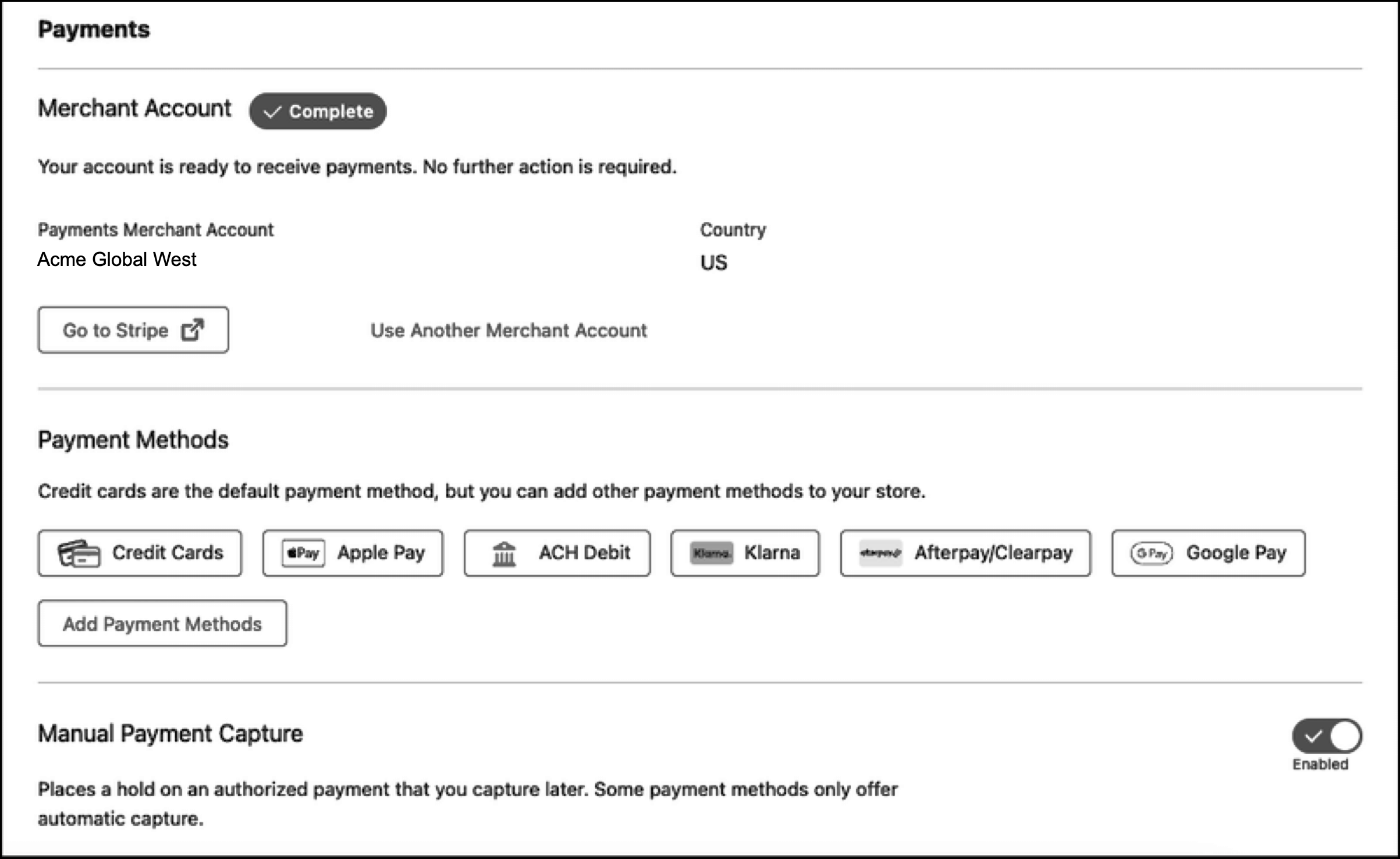
1. For a new Pay Now store or a Commerce store using managed checkout, enable manual capture in the Payments section of your store's managed checkout configuration.
    
    ![Managed checkout manual capture setting](https://sf-zdocs-cdn-prod.zoominsoftware.com/tdta-commerce-payments-264-0-0-production-enus/c04ba30f-6dde-4ea7-949b-4f77b22b9fcb/payments/images/payments_managed_manual_capture.png)
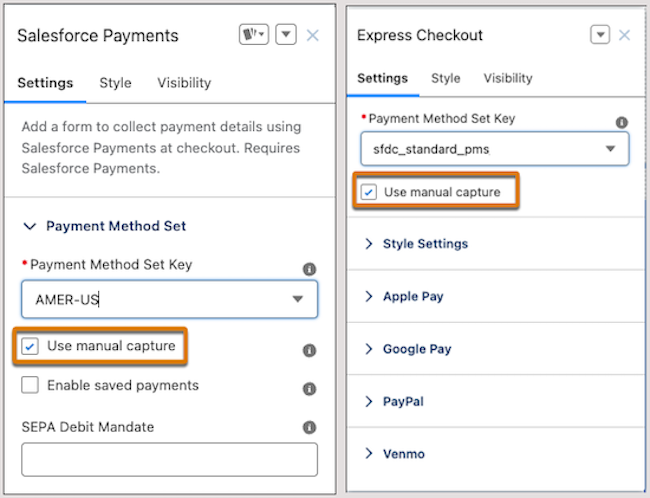
2. For a Commerce store using custom checkout, enable manual capture from Experience Builder. On the Checkout or Pay page, enable the setting on the Salesforce Payments or Express Checkout component.
    
    ![Manual capture in Experience Builder](https://sf-zdocs-cdn-prod.zoominsoftware.com/tdta-commerce-payments-264-0-0-production-enus/c04ba30f-6dde-4ea7-949b-4f77b22b9fcb/payments/images/payments_builder_comps_manual_capture.png)