---
schema_version: "1"
id: eb2101b1c955e1a088476a54d02155d43918e6eb5061d2fa6c70a77680fcd2a6
title: Enable Salesforce Payments for Commerce and Pay Now
collection: admin
version: current
locale: en-us
portal_url: https://docs.salesforce.com/admin/current/en-us/commerce/264-0-0/payments_enable_in_setup.md
canonical_url: https://help.salesforce.com/s/articleView?id=commerce.payments_enable_in_setup.htm&release=264.0.0&type=5
source_site: help.salesforce.com
content_type: documentation
content_hash: e775aaaa02904fdcf5f09c342f9f625d3f05299eabdc50135fbb6195471228dd
description: Instead of using a third-party provider, use Salesforce Payments, the native service you can use to accept payments during checkout. With Salesforce Payments, you can offer customers a variety of payment options. Payments is available for B2B, D2C, and Pay Now stores. After you enable Payments, you can't disable it.
products:
- Salesforce Payments
- Commerce
release: "264"
---
# Enable Salesforce Payments for Commerce and Pay Now
Instead of using a third-party provider, use Salesforce Payments, the native service you can use to accept payments during checkout. With Salesforce Payments, you can offer customers a variety of payment options. Payments is available for B2B, D2C, and Pay Now stores. After you enable Payments, you can't disable it.
### Required Editions

Tip If you’re setting up a D2C store for the first time, bypass this process and instead let the Commerce Setup Assistant enable and configure Payments for your org. For more information, see [Video: Choose Your Checkout Solution](https://help.salesforce.com/s/articleView?id=commerce.comm_checkout_container.htm&type=5&language=en_US) and [Set Up a Commerce Store](https://help.salesforce.com/s/articleView?id=commerce.comm_quick_start.htm&type=5&language=en_US).
Before you can enable Payments manually, first enable Digital Experiences and set up a dedicated Experience Cloud site for Payments.
1. From Setup, in the Quick Find box, enter Payments.
2. In the left navigation, select **Payments**.
3. Verify that Digital Experiences is enabled and that the Experience site is active.
When the prerequisite tasks are complete, the Enable button becomes active, and the Pay Now section is available.
4. Click **Enable**.
After you enable Payments, you can’t disable it.
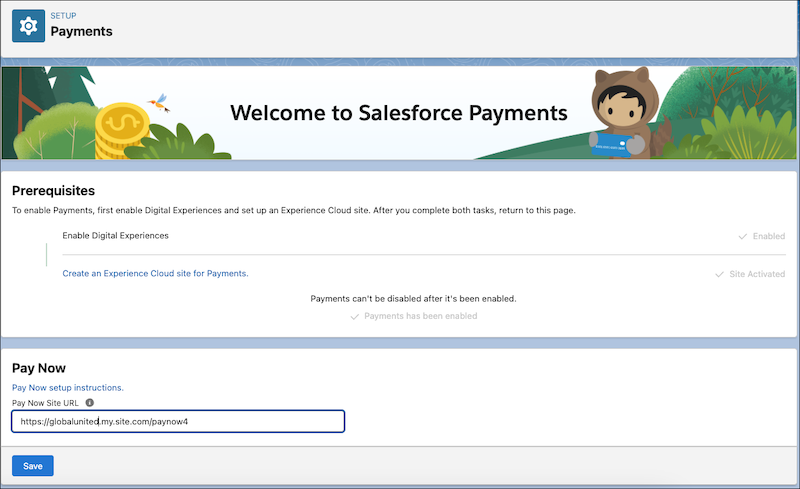
Here’s what the Payments Setup page looks like when Payments is enabled. In the App Launcher, verify that the Payments app is available.
#### See Also
- [Salesforce Payments Setup](https://help.salesforce.com/s/articleView?id=commerce.payments_setup_intro.htm&type=5&language=en_US)
- [Set Up a Channel for Payment Data](https://help.salesforce.com/s/articleView?id=commerce.payments_data_channel_setup.htm&type=5&language=en_US)
- [Prepare Your Org for Commerce](https://help.salesforce.com/s/articleView?id=commerce.comm_quick_start.htm&language=en_US)
- [Salesforce Pay Now](https://help.salesforce.com/s/articleView?id=commerce.pay_now_intro_prereqs.htm&type=5&language=en_US)