---
schema_version: "1"
id: e5e4a48f4b8a1eddc4fd8bdcc859370113e2eebeb99f250c8bdfc4259d147658
title: Add Payment Source Information to the Payment Details Page
collection: admin
version: current
locale: en-us
portal_url: https://docs.salesforce.com/admin/current/en-us/commerce/264-0-0/payments_add_source_to_pdp.md
canonical_url: https://help.salesforce.com/s/articleView?id=commerce.payments_add_source_to_pdp.htm&release=264.0.0&type=5
source_site: help.salesforce.com
content_type: documentation
content_hash: ef0373f3373c10c7a7b02e0d9ebdbbe5e55bd84275d6ab01bc54e873432c7097
description: As of Spring ’25, you can view the origin of a payment on the payment intent record. If you’ve been using Payments before the Spring ’25 release, you can add the Source section to the record page to capture the information.
products:
- Salesforce Payments
- Commerce
release: "264"
---
# Add Payment Source Information to the Payment Details Page
As of Spring ’25, you can view the origin of a payment on the payment intent record. If you’ve been using Payments before the Spring ’25 release, you can add the Source section to the record page to capture the information.
### Required Editions
1. At the top of the page, click  and select **Setup**.
2. Select **Object Manager**.
3. In the Quick Find box, enter and select Payment Intent.
4. Select **Page Layouts** | **Payment Intent Layout**.
The page layout opens.
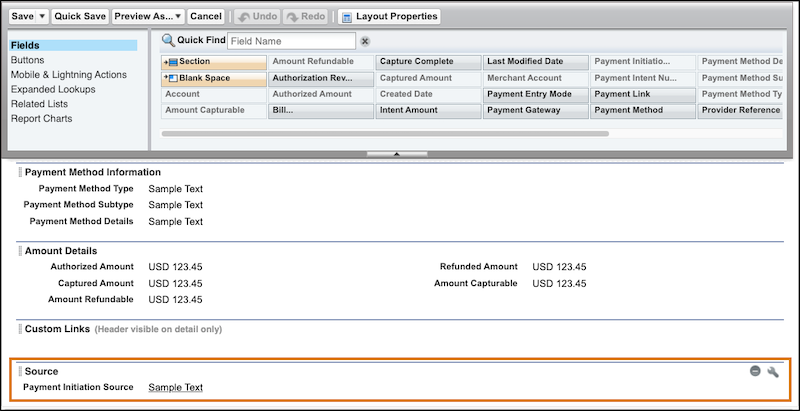
5. On the palette at the top of the page, select **Fields**, and drag the Section element onto the Payment Intent Detail part of the page.
6. Click  to view the Section Properties page.
7. Enter Source as the section name, and select the column layout.
8. In the palette, drag the Payment Initiation Source field to the Source section.
9. Save your changes.
10. Refresh the app to see the Source section on the Details tab of each payment intent record.
#### See Also
- [Page Layouts](https://help.salesforce.com/s/articleView?id=platform.customize_layout.htm&language=en_US)