If you have a Pay Now store created before Winter ’24, upgrade the payment page components to improve the layouts, ensure express checkout options, and to enable one-click checkout.
Required Editions
-
At the top of the page, click
 and select Setup.
- In the Quick Find box, find and select All Sites.
- For the site you want to upgrade, click Workspaces and select Administration.
- Click Login & Registration, and under Universal Registration, allow self-registration and passwordless login via the Universal Registration API.
- Save your changes, and exit Setup.
- Go to the store home page, and from the Store dropdown menu, select the Pay Now store that you want to upgrade.
-
Select Website Design, and click Experience
Builder.
- From the Pages menu, select Checkout
- On the Checkout page, remove the Pay Now Checkout (deprecated) component, and replace it with Pay Now: With Products.
- From the Pages menu, select Pay.
- On the Pay page, remove the Pay Now (deprecated) component, and replace it with Pay Now: Predefined Amount.
- Exit Experience Builder.
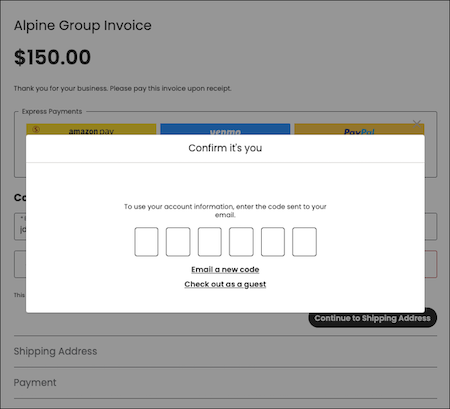
When a customer clicks a payment link, they see a refreshed page layout. If it’s their first transaction, the shopper has the option to save their information and become a registered user.
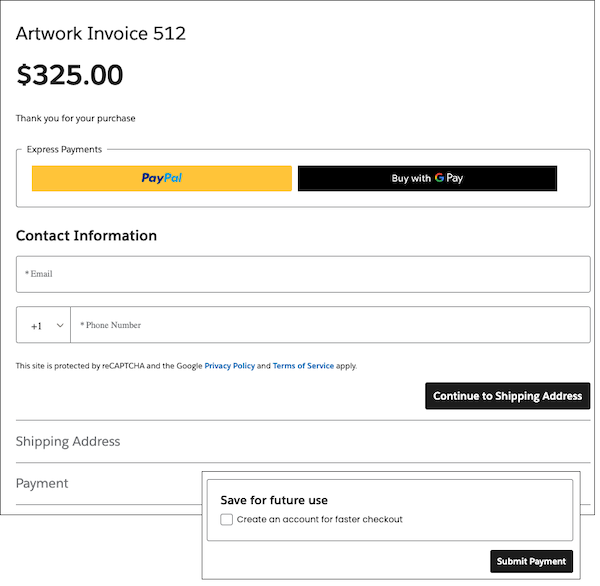
Registered customers can check out faster at their next visit with one-click checkout.